
 Git ColaLinux
vs
GitHub DesktopWindows
Git ColaLinux
vs
GitHub DesktopWindows
Git Cola como alternativa Linux ao GitHub Desktop
Atualizado em
Nossa avaliação
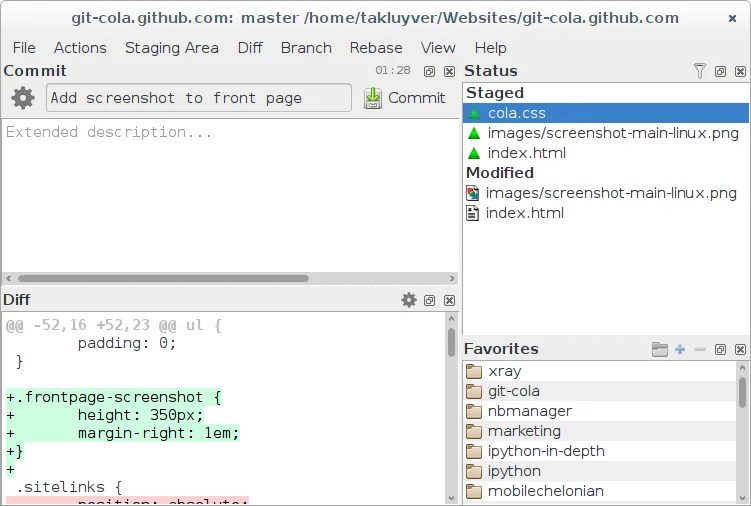
Git Cola can replace GitHub Desktop for users who are comfortable with a more traditional Git GUI and want a lightweight, highly configurable client. It covers cloning, branching, committing, pushing/pulling, viewing history, resolving conflicts, and even integrates with GitHub issues via the command line. It is best suited for developers who prefer a desktop tool that stays close to Git’s native workflow and for those who don’t need the built‑in GitHub‑specific features of GitHub Desktop.
- Licença
- GPL-2.0
- Preço
- Grátis
- Versão mais recente
- 4.19.0 (12 de julho de 2026)
- Avaliação
- —
O que funciona igual
- Both allow cloning repositories from GitHub and managing branches (create, switch, delete).
- Both provide a graphical commit history and diff view for reviewing changes.
- Both support staging/unstaging changes, committing, and pushing/pulling to remotes.
- Both can resolve merge conflicts through a visual merge tool.
- Both integrate with GitHub issues and pull requests via external tools or command line.
O que muda
- Git Cola lacks a built‑in GitHub issue and PR browser; users must use external tools or the command line.
- Git Cola does not offer a native “GitHub Desktop” style sync panel; all actions are accessed through menus or shortcuts.
- Git Cola’s UI is more traditional and may feel less modern than GitHub Desktop’s polished design.
- Git Cola does not bundle a GitHub authentication flow; users need to set up SSH or HTTPS credentials manually.
- Git Cola’s configuration is file‑based and can be more complex for beginners.
Abrindo seus arquivos do GitHub Desktop
GitHub Desktop stores its settings in a proprietary JSON format inside the user’s home directory; Git Cola does not read or write these files. Exporting a repository from GitHub Desktop simply means cloning the repo, which Git Cola can handle without issue. Importing a GitHub Desktop project is not supported directly, but cloning the same repo in Git Cola achieves the same result.
Trocando o GitHub Desktop pelo Git Cola, passo a passo
- Open GitHub Desktop and note the repository URLs you use.
- Launch Git Cola and choose File → Clone Repository.
- Paste the GitHub URL and select a local folder.
- Use Git Cola’s Branch menu to create or switch branches.
- Commit changes via the staging pane and push to the remote.
- If you use GitHub issues, open them in your browser or use the command line.
Principais recursos do Git Cola
- Gráfico visual de commits e navegação de histórico
- Ferramenta integrada de diff e merge
- Gerenciamento de branch, tag e stash
- Suporte a comandos Git personalizados
- Árvore de arquivos e lista de mudanças pesquisáveis
- Desfazer/refazer para ações de staging
- Atalhos e temas configuráveis
- Exportar patches e aplicá‑los
Como instalar o Git Cola no Linux
flatpak install flathub com.github.git_cola.git-colasudo apt install git-colasudo apt install git-colasudo dnf install git-colasudo zypper install git-colaPerguntas frequentes
Does Git Cola support SSH authentication for GitHub?
Yes, Git Cola uses the system’s Git configuration, so any SSH keys set up for GitHub work automatically.
Can I use Git Cola to create pull requests?
Not directly; you’ll need to open GitHub in a browser or use the GitHub CLI to create PRs after pushing branches.
Is Git Cola suitable for beginners?
It is more feature‑rich and configurable than GitHub Desktop, so beginners may find it a bit overwhelming, but it offers a powerful workflow for users who want more control.
Outras 4 alternativas ao GitHub Desktop
 GitKrakenGitKraken é um cliente Git multiplataforma com rastreamento de issues integrado e edição de código.FlatpakGitKraken vs GitHub DesktopLazygitUma interface de terminal rápida e amigável para Git que simplifica fluxos de trabalho complexos sem sair da…Código abertoGrátisLazygit vs GitHub Desktop
 gitgGitg é uma interface gráfica leve para Git que visualiza o histórico de commits e gerencia repositórios.Código abertoGrátisFlatpakgitg vs GitHub Desktop
 GitKrakenGitKraken é um cliente Git multiplataforma com histórico visual, editor integrado e quadro de tarefas.FlatpakGitKraken vs GitHub Desktop