
 PiTiViLinux
vs
PiTiViLinux
vs
 Pinnacle StudioWindows
PiTiVi como alternativa Linux ao Pinnacle Studio
Atualizado em
Nossa avaliação
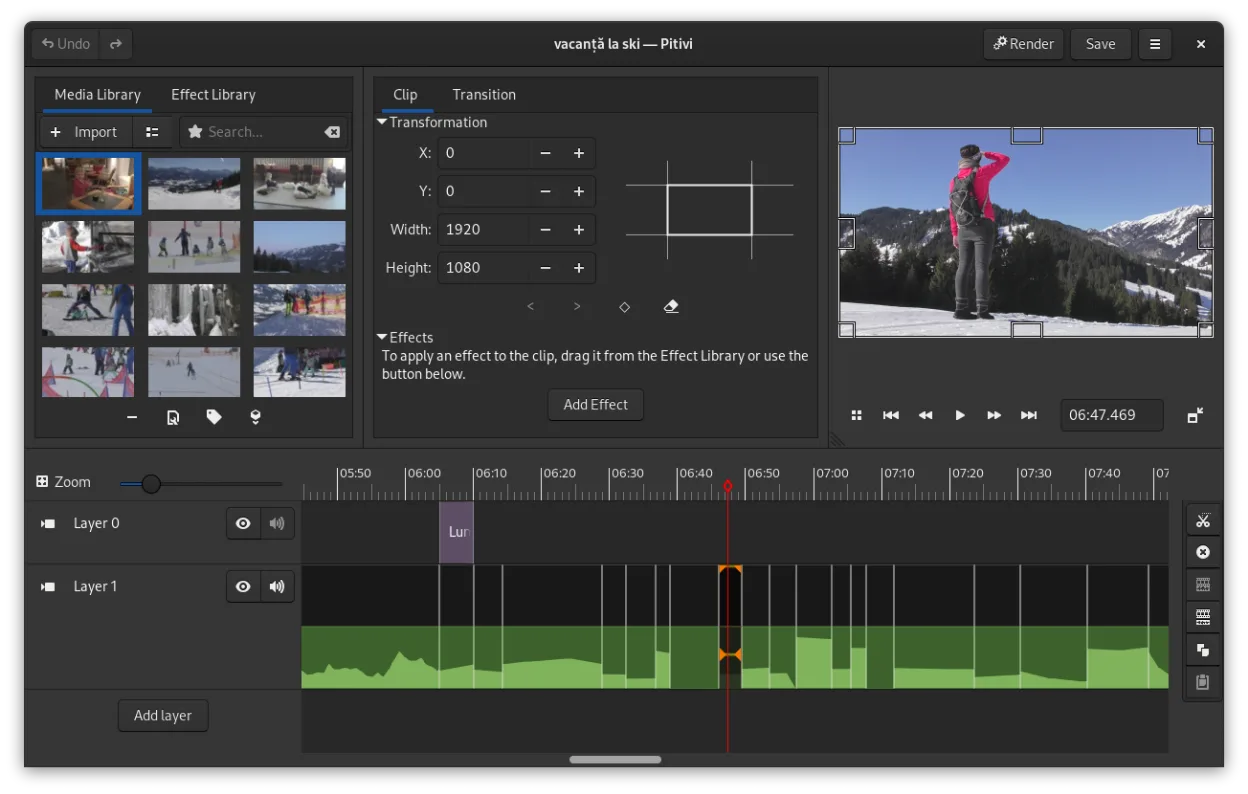
PiTiVi is a reasonable replacement for Pinnacle Studio only for basic non-linear editing on Linux, but not for most typical Pinnacle Studio users. It handles common video codecs and offers solid timeline editing with keyframing and transitions, which suits hobbyists. However, it lacks built-in DVD/Blu-ray authoring and custom disc menu creation, critical features in Pinnacle Studio. If your goal is simple video editing and export to MP4 or AVCHD, PiTiVi works. For full disc production workflows, it falls short.
- Licença
- LGPL-2.0+
- Preço
- Grátis
- Versão mais recente
- 2023.03 (26 de março de 2023)
- Avaliação
- —
O que funciona igual
- Non-linear editing with ripple and roll functions
- Support for common video codecs via GStreamer
- Title and text overlay capabilities
- Crossfades and standard video transitions
- Export to AVCHD and MP4 formats
O que muda
- PiTiVi has no built-in DVD or Blu-ray authoring
- No custom disc menu creation tools
- No native support for burning discs
- Simpler audio mixing compared to Pinnacle Studio
- Fewer advanced effects and less polished rendering presets
Abrindo seus arquivos do Pinnacle Studio
PiTiVi can open most common video file formats supported by GStreamer, such as MP4, AVI, and MOV, which covers many files created in Pinnacle Studio. However, it cannot directly open Pinnacle Studio project files (.pds). You must export the video from Pinnacle Studio as an intermediate file first. There is no known converter for Pinnacle project files on Linux, so manual recreation of edits in PiTiVi is necessary.
Trocando o Pinnacle Studio pelo PiTiVi, passo a passo
- Export your Pinnacle Studio projects to an intermediate format like MP4 or MOV
- Install PiTiVi via your distribution's package manager or Flathub
- Import exported video files into PiTiVi for editing
- Recreate titles, transitions, and effects in PiTiVi's timeline
- Use a separate tool like DVDStyler or Brasero for DVD/Blu-ray authoring if needed
Principais recursos do PiTiVi
- Edição não linear com linha do tempo independente da taxa de quadros
- Suporta qualquer formato processado pelo GStreamer
- Animação de keyframes para efeitos e filtros
- Edição ripple e roll para ajustes eficientes na linha do tempo
- Proporções de tela, taxas de quadros e presets de renderização personalizados
- Crossfades e transições padrão SMPTE
- Painéis de interface destacáveis para configurações com múltiplos monitores
- Fluxo de trabalho de edição não modal com design centrado no playhead
Como instalar o PiTiVi no Linux
flatpak install flathub org.pitivi.Pitivisudo apt install pitivisudo apt install pitivisudo dnf install pitivisudo pacman -S pitivisudo zypper install pitiviPerguntas frequentes
Can PiTiVi burn DVDs or Blu-rays directly?
No, PiTiVi cannot burn discs. Use external tools like DVDStyler for DVD authoring or mkisofs with a burner for Blu-ray.
Does PiTiVi support Pinnacle Studio project files?
No. Pinnacle Studio project files (.pds) are not supported. You must export video and re-edit in PiTiVi.
Is PiTiVi suitable for professional editing?
It's usable for light professional work, but lacks advanced color grading, multi-cam, and effects common in professional suites.
Outras 3 alternativas ao Pinnacle Studio
 OpenShotOpenShot é um editor de vídeo não linear gratuito, de código aberto, para Linux e outras plataformas…Código abertoGrátisFlatpakOpenShot vs Pinnacle Studio
 KdenliveO Kdenlive é um editor de vídeo não linear gratuito e repleto de recursos, construído sobre o framework MLT.Código abertoGrátisFlatpakKdenlive vs Pinnacle Studio
 CinelerraCinelerra is a professional‑grade, open‑source non‑linear video editor and compositor for Linux.Código abertoGrátisCinelerra vs Pinnacle Studio