
 PiTiViLinux
vs
Wondershare FilmoraWindows
PiTiViLinux
vs
Wondershare FilmoraWindows
PiTiVi como alternativa Linux ao Wondershare Filmora
Atualizado em
Nossa avaliação
PiTiVi can replace Wondershare Filmora for users who need a free, open‑source editor that works offline and supports 4K export. It offers drag‑and‑drop timeline editing, built‑in effects, transitions, and basic color grading. However, it lacks Filmora’s cloud‑based export workflow and some advanced presets. It’s best suited for hobbyists and Linux‑only users who want a GNOME‑native experience.
- Licença
- LGPL-2.0+
- Preço
- Grátis
- Versão mais recente
- 2023.03 (26 de março de 2023)
- Avaliação
- —
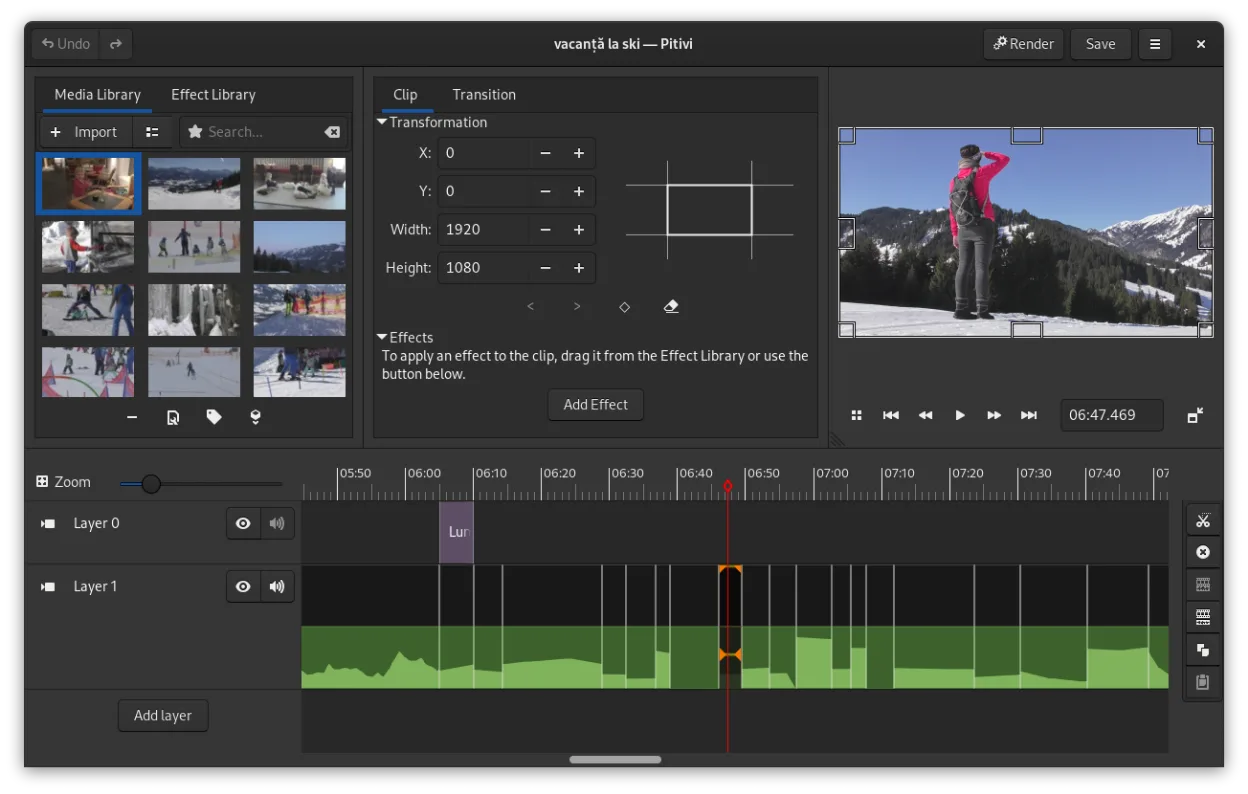
O que funciona igual
- Drag‑and‑drop timeline editing
- Built‑in effects and transitions
- Export to common video formats (MP4, MOV)
- Support for 4K and higher resolutions
- Keyboard shortcuts and basic color grading
O que muda
- PiTiVi requires a local installation and no internet for export, while Filmora needs an online connection
- PiTiVi’s interface is GNOME‑centric and may feel less polished than Filmora’s UI
- PiTiVi lacks Filmora’s proprietary preset library and some advanced color grading tools
- PiTiVi does not offer a subscription model or cloud collaboration features
- PiTiVi’s export options are limited to GStreamer codecs, whereas Filmora supports a broader set of codecs out of the box
Abrindo seus arquivos do Wondershare Filmora
PiTiVi cannot directly open Wondershare Filmora project files (.wfm or .filmora). Users must export their Filmora projects to a common format (e.g., MP4, MOV, or a raw timeline format) and then import that media into PiTiVi. Exporting from Filmora is straightforward, but re‑creating the exact timeline in PiTiVi will require manual re‑assembly.
Trocando o Wondershare Filmora pelo PiTiVi, passo a passo
- Export your Filmora project to an MP4 or MOV file with the desired resolution and frame rate.
- Launch PiTiVi and create a new project with the same aspect ratio and frame rate as your exported video.
- Import the exported file into PiTiVi’s media pool and drag it onto the timeline.
- Re‑apply any effects, transitions, or color grading that were used in Filmora by selecting the clip and using PiTiVi’s filter panel.
- Save the PiTiVi project for future edits and export the final video to your preferred format.
- faq
- :
Principais recursos do PiTiVi
- Edição não linear com linha do tempo independente da taxa de quadros
- Suporta qualquer formato processado pelo GStreamer
- Animação de keyframes para efeitos e filtros
- Edição ripple e roll para ajustes eficientes na linha do tempo
- Proporções de tela, taxas de quadros e presets de renderização personalizados
- Crossfades e transições padrão SMPTE
- Painéis de interface destacáveis para configurações com múltiplos monitores
- Fluxo de trabalho de edição não modal com design centrado no playhead
Como instalar o PiTiVi no Linux
flatpak install flathub org.pitivi.Pitivisudo apt install pitivisudo apt install pitivisudo dnf install pitivisudo pacman -S pitivisudo zypper install pitiviOutras 5 alternativas ao Wondershare Filmora
 KdenliveO Kdenlive é um editor de vídeo não linear gratuito e repleto de recursos, construído sobre o framework MLT.Código abertoGrátisFlatpakKdenlive vs Wondershare Filmora
 ShotcutShotcut é um editor de vídeo gratuito e de código aberto para Linux, com suporte a uma ampla variedade de…Código abertoGrátisFlatpakShotcut vs Wondershare Filmora
 OpenShotOpenShot é um editor de vídeo não linear gratuito, de código aberto, para Linux e outras plataformas…Código abertoGrátisFlatpakOpenShot vs Wondershare Filmora
 BlenderBlender é uma suíte 3D gratuita e de código aberto para modelagem, animação, renderização e edição de vídeo.Código abertoGrátisFlatpakBlender vs Wondershare Filmora
 FlowbladeFlowblade é um editor de vídeo não linear, multifaixa, rápido e estável para Linux, adequado para iniciantes…Código abertoGrátisFlatpakFlowblade vs Wondershare Filmora