

Windows · Sound & Video
Die besten Linux-Alternativen zu Easy CD-DA Extractor
Easy CD-DA Extractor rips audio CDs to formats like MP3 and FLAC on Windows, with several free Linux alternatives available.
Aktualisiert am
Kurz gesagt
Die beste Linux-Alternative zu Easy CD-DA Extractor ist Asunder. Weitere gute Optionen: Sound Juicer, Audex, Goobox.
6 Linux-Alternativen zu Easy CD-DA Extractor
-
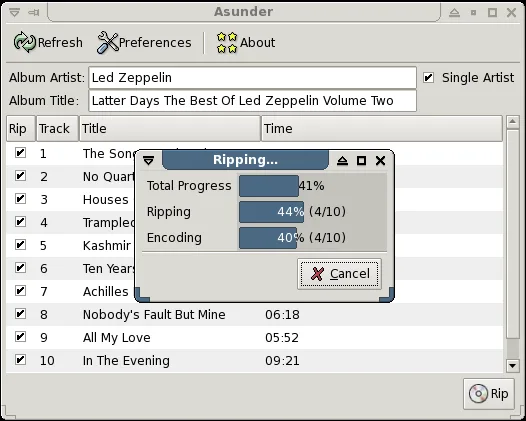
Asunder is a lightweight GTK CD‑ripper that extracts audio CDs to formats like MP3, OGG, FLAC and more.
Asunder is a solid Linux alternative for users who need a straightforward CD ripper with support for the common output formats that Easy CD-DA Extractor provides. It works well for people who prefer a lightweight GTK interface, want automatic CDDB tagging, and don't need deep batch‑processing…
Funktionsabdeckung78% -

Sound Juicer is a GNOME‑centric CD‑ripping tool that extracts audio tracks to common file formats.
Sound Juicer is a solid, straightforward replacement for Easy CD-DA Extractor if you prioritize ease of use over granular control. It handles the core job of ripping audio CDs to MP3, OGG, and FLAC with automatic MusicBrainz metadata lookup. However, it lacks the advanced gapless processing and…
Funktionsabdeckung75% -

Audex is a KDE‑based CD ripper that extracts audio tracks and encodes them with metadata support.
Audex is a solid replacement for Easy CD-DA Extractor if you're on Linux and want a straightforward, GUI-based CD ripper. It handles accurate CD-DA extraction, supports MP3, FLAC, OGG, and WAV, and pulls metadata and album art via MusicBrainz and CDDB. Gapless ripping is preserved, and batch…
Funktionsabdeckung90% -

Goobox is a lightweight GNOME CD player and audio ripper for Linux.
Goobox can replace Easy CD-DA Extractor for users who only need basic CD ripping and playback on a GNOME desktop. It supports MP3, OGG, and WAV output, automatic CD detection, and batch ripping, so most everyday tasks are covered. However, it lacks some advanced features such as high‑quality FLAC…
Funktionsabdeckung70% -

SoundKonverter is a KDE-based audio converter that uses FFmpeg to transcode files between numerous formats with a simple interface.
SoundKonverter is a solid Linux audio converter, but it is not a direct replacement for Easy CD-DA Extractor. The core difference is that SoundKonverter converts existing audio files, whereas Easy CD-DA Extractor rips audio directly from physical CDs. If you already have your music as digital…
Funktionsabdeckung30% -
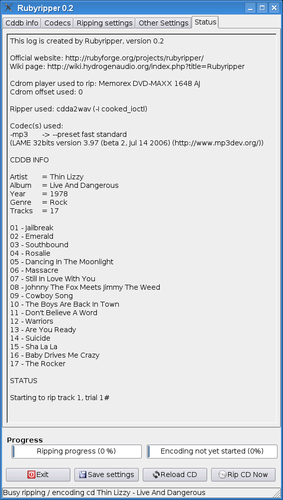
Rubyripper is a Linux CD ripper that aims for secure, accurate audio extraction.


Was ist Easy CD-DA Extractor?
Easy CD-DA Extractor is a Windows tool for ripping audio CDs. Users extract tracks from physical discs into digital files like MP3, FLAC, or WAV. It is popular among those who still collect music on CD and want to back up their library or convert it for portable players. The software handles the conversion process directly, making it a one-stop solution for CD owners who need digital copies of their audio collections.
The original software is commercial, meaning it requires a paid license for full use. While a trial version may be available, long-term usage typically involves purchasing a key. This stands in contrast to the Linux ecosystem, where most CD ripping tools are open-source and free. Users moving to Linux often find that they can achieve the same results without any licensing costs, which is a significant advantage for those who rip discs regularly.
People look for Linux alternatives primarily to avoid proprietary software restrictions and licensing fees. As many users migrate to Linux for privacy or performance reasons, they need reliable tools to manage their physical media. The goal is to find a native application that can accurately extract audio, apply metadata, and convert files to desired formats without relying on Windows compatibility layers or paid software.
Was ein Ersatz für Easy CD-DA Extractor können muss
- Accurate extraction of CD-DA audio tracks
- Support for multiple output formats (MP3, FLAC, OGG, WAV)
- Automatic fetching of track metadata and album art
- Gapless playback support for accurate ripping
- Batch processing for entire albums
- Bitrate and quality control options
- Compatibility with standard Linux audio libraries
Läuft Easy CD-DA Extractor unter Linux?
Easy CD-DA Extractor is a native Windows application and does not have an official Linux version. It is not a web-based service. While it might theoretically run under Wine, CD ripping involves low-level access to the optical drive and audio device, which can be unstable or problematic in compatibility layers. It is generally recommended to use native Linux tools for reliability and better integration with the system's audio stack.
Welche Alternative passt zu Ihnen?
For most users, Asunder or Audex are excellent starting points. Audex is part of the KDE suite and is very stable for standard rips. Asunder is lightweight and works well in any environment. Rubyripper is a good choice if you prefer a more traditional, simple interface focused on ripping. Goobox is a full media player that also rips, suitable if you want to listen and rip in one app. Sound Juicer is a simple, GNOME-integrated option for casual users. SoundKonverter is better if you need to convert existing files rather than rip from a CD, though it can handle some CD inputs depending on configuration.
Dateien und Gewohnheiten aus Easy CD-DA Extractor mitnehmen
There is no direct data migration from the Windows software to Linux, as the process is stateless. You simply insert the CD and rip it again using the new Linux tool. Since the output is standard audio files (MP3, FLAC, etc.), there is no compatibility issue. Your existing ripped files from Windows will play perfectly on Linux. You only need to re-rip discs if you want to change the format or quality settings, or if you previously used a lossy format and now want lossless copies.
Direkter Vergleich
| Programm | Lizenz | Flatpak | Aktuelle Version | Funktionsabdeckung | Bewertung |
|---|---|---|---|---|---|
| Asunder | GPL-2.0-only | ✓ | 3.0.2 | 78% | — |
| Sound Juicer | GPL-2.0+ | ✓ | 3.40.0 | 75% | — |
| Audex | GPL-3.0-or-later | ✓ | 26.08.2 | 90% | — |
| Goobox | GPL-2.0+ | — | 3.6.0 | 70% | — |
| SoundKonverter | GPL-2.0-or-later | — | 3.0.1.32 | 30% | — |
| Rubyripper | GPL-2.0 | — | — | — | — |
Easy CD-DA Extractor: häufige Fragen
Can I rip a CD to FLAC on Linux?
Yes, all the listed alternatives support FLAC output. It is a lossless format that preserves the original CD quality and is widely recommended for archiving.
Do I need to burn the CD to rip it?
No, you rip directly from the physical disc. The software reads the digital audio tracks and converts them to files on your hard drive.
Which tool is best for gapless playback?
Asunder and Audex generally handle gapless ripping well. Ensure you select the appropriate settings to avoid adding silence between tracks, which is common with certain formats like MP3.
Can I use these tools for DVD audio?
No, these are specifically for CD-DA (Compact Disc Digital Audio). DVD audio requires different software and codecs, which are not covered by these specific CD rippers.
Wie wichtig ist Ihnen Easy CD-DA Extractor?
Kennen Sie eine bessere Alternative? Alternative vorschlagen