
 EvolutionLinux
vs
Microsoft Outlook CalendarWindows
Evolution als Linux-Alternative zu Microsoft Outlook Calendar
Aktualisiert am
Unser Fazit
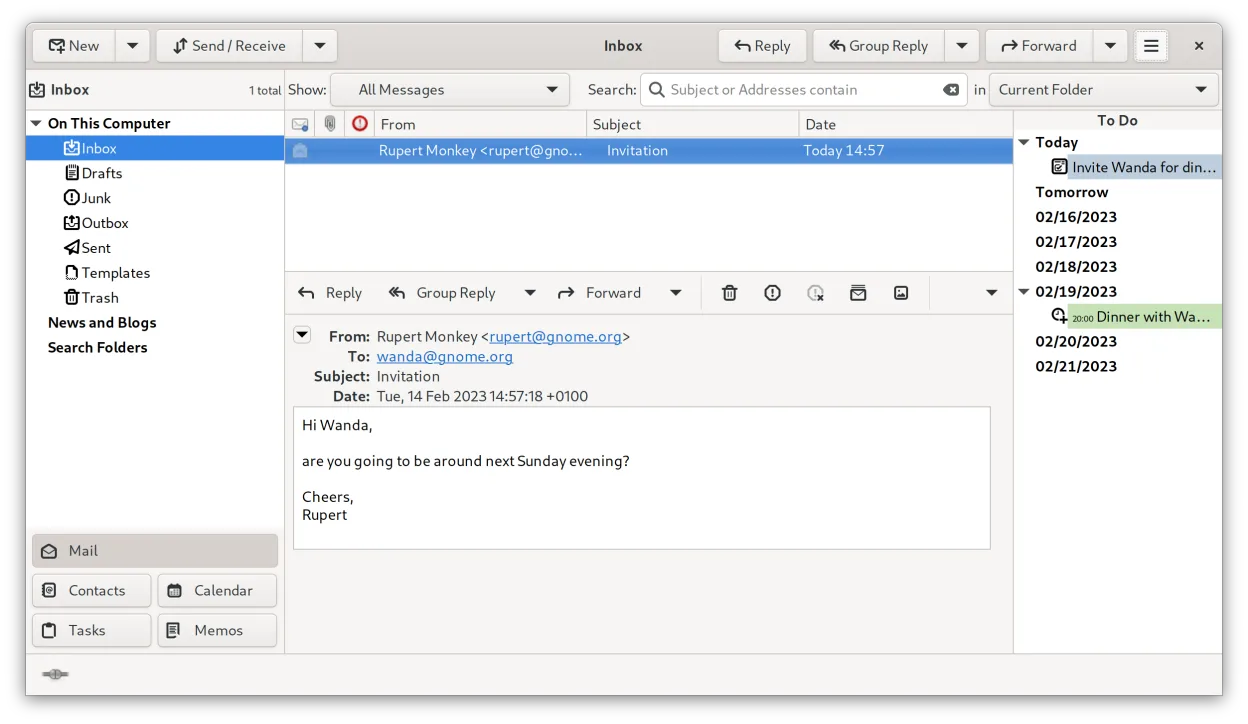
Evolution is a solid replacement for Microsoft Outlook Calendar, especially for users who rely on integrated email, calendar, and contact management on Linux. It handles daily appointments, meeting invites, reminders, recurring events, and task lists reliably. If you use Exchange via EWS or CalDAV, Evolution syncs well and supports shared calendars. It’s particularly suited for home users, small offices, or organizations prioritizing open standards and privacy. While the interface feels dated, it’s functional and stable.
- Lizenz
- GPL-2.0+ and GFDL-1.3
- Preis
- Kostenlos
- Aktuelle Version
- 3.62.1 (9. Oktober 2026)
- Bewertung
- —
Was gleich funktioniert
- Integrated calendar, email, contacts, and tasks in one app
- Supports recurring events, reminders, and daily scheduling
- Full CalDAV and Exchange Web Services (EWS) support
- Shared calendar and meeting scheduling capabilities
- Task and to-do list integration with calendar view
Was anders ist
- No native Outlook .pst file support
- Limited integration with Microsoft 365 beyond EWS (e.g., Teams, Planner)
- Fewer collaboration features for large enterprise environments
- Interface is less modern and customizable than Outlook
- No built-in support for Exchange ActiveSync (only EWS and CalDAV)
Ihre Microsoft Outlook Calendar-Dateien öffnen
Evolution does not open Outlook .pst or .ost files directly. However, it can import calendar and contact data exported as iCalendar (.ics) or vCard (.vcf) files from Outlook. For migration, export events and tasks from Outlook as .ics, then import them into Evolution. Calendar sharing and syncing work best via CalDAV or EWS, not file exchange.
Von Microsoft Outlook Calendar zu Evolution wechseln – Schritt für Schritt
- Export Outlook Calendar data to .ics files
- In Evolution, go to File > Import and select the .ics file
- Set up email and calendar accounts using IMAP, EWS, or CalDAV
- Configure contacts via LDAP, local address book, or vCard import
- Enable task list and link to calendar if needed
- Adjust reminders and notification settings under Preferences
Wichtige Funktionen von Evolution
- Integrierte E-Mail, Kalender, Kontakte und Aufgaben in einem Fenster
- Vollständige Unterstützung für IMAP, POP3, SMTP, CalDAV und EWS
- Standarddatenformate (MIME, iCalendar, vCard)
- Integrierte Verschlüsselung mit GnuPG und S/MIME
- Adressbuch mit LDAP und lokaler Speicherung
- Kalenderfreigabe und Terminplanung über CalDAV
- E-Mail-Filterregeln und Suche
- Anpassbare Tastenkürzel
Evolution unter Linux installieren
flatpak install flathub org.gnome.Evolutionsudo apt install evolutionsudo apt install evolutionsudo dnf install evolutionsudo pacman -S evolution-spamassassinsudo zypper install evolutionHäufige Fragen
Can Evolution connect to Microsoft Exchange?
Yes, Evolution supports Exchange via Exchange Web Services (EWS). It does not support Exchange ActiveSync. Most calendar, contact, and email functions work, but advanced features like public folders may be limited.
Does Evolution support shared calendars with coworkers?
Yes, Evolution supports shared calendars over CalDAV and EWS. You can subscribe to or publish calendars, invite others to meetings, and view free/busy status if the server supports it.
Can I use Evolution with Gmail and Google Calendar?
Yes, via CalDAV and CardDAV. Enable IMAP in Gmail settings and use Google's CalDAV server to sync calendar and contacts. No native Google integration, but standard protocols work reliably.
4 weitere Alternativen zu Microsoft Outlook Calendar
 ThunderbirdThunderbird ist ein kostenloser, quelloffener Client für E‑Mail, Newsfeeds, Chat und Kalender.Open SourceKostenlosFlatpakThunderbird vs. Microsoft Outlook CalendarGNOME CalendarGNOME Calendar ist eine einfache Kalender-App zur Verwaltung von Terminen und Ereignissen, die in GNOME und…Open SourceKostenlosGNOME Calendar vs. Microsoft Outlook CalendarKOrganizerKOrganizer ist ein Kalender- und Aufgabenmanager aus der KDE-Suite, der entwickelt wurde, um Tools wie Asana…Open SourceKostenlosKOrganizer vs. Microsoft Outlook CalendarOrageA lightweight, KDE-based calendar application for managing events, reminders, and to-do lists with a simple…Open SourceKostenlosOrage vs. Microsoft Outlook Calendar