

Windows · Sound & Video
Die besten Linux-Alternativen zu Exact Audio Copy (EAC)
Exact Audio Copy is a Windows CD ripper known for high-accuracy, error-corrected audio extraction using AccurateRip.
Aktualisiert am
Kurz gesagt
Die beste Linux-Alternative zu Exact Audio Copy (EAC) ist Sound Juicer. Weitere gute Optionen: SoundKonverter, Audex, Goobox.
6 Linux-Alternativen zu Exact Audio Copy (EAC)
-

Sound Juicer is a GNOME‑centric CD‑ripping tool that extracts audio tracks to common file formats.
Sound Juicer is a decent replacement for Exact Audio Copy (EAC) if your priority is simplicity and basic ripping with metadata, but not if you demand bit-perfect accuracy and error correction. It lacks AccurateRip verification and advanced error handling, which are core to EAC’s reliability…
Funktionsabdeckung60% -

SoundKonverter is a KDE-based audio converter that uses FFmpeg to transcode files between numerous formats with a simple interface.
SoundKonverter is a decent alternative for users who only need basic CD ripping and format conversion. It can read audio CDs, perform batch conversions, and export to lossless formats like FLAC. However, it lacks the advanced error‑correction, AccurateRip verification, and bit‑perfect extraction…
Funktionsabdeckung60% -

Audex is a KDE‑based CD ripper that extracts audio tracks and encodes them with metadata support.
Audex is a solid, native Linux alternative for general CD ripping, but it is not a direct 1:1 replacement for Exact Audio Copy. While both extract audio to lossless formats like FLAC, EAC is specifically engineered for forensic-level accuracy using its proprietary error-correction algorithms and…
Funktionsabdeckung65% -

Goobox is a lightweight GNOME CD player and audio ripper for Linux.
Goobox can serve as a basic replacement for Exact Audio Copy if you only need simple ripping to common formats and are comfortable with a lighter, GNOME‑centric workflow. It lacks EAC’s advanced error‑correction, AccurateRip verification, and bit‑perfect extraction modes, so it is best suited for…
Funktionsabdeckung45% -
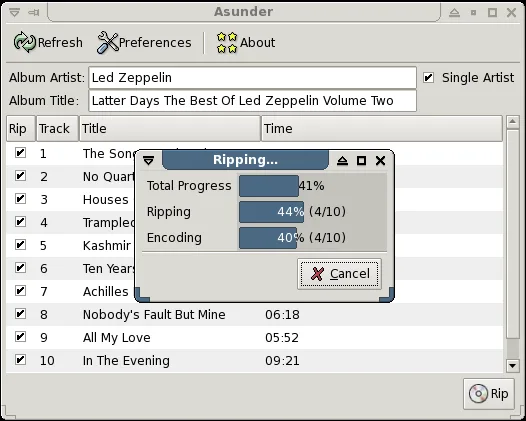
Asunder is a lightweight GTK CD‑ripper that extracts audio CDs to formats like MP3, OGG, FLAC and more.
Asunder can replace Exact Audio Copy for users who need a quick, lightweight ripper that outputs common lossless formats like FLAC and supports simultaneous encoding. It is suitable for casual listeners and those on non‑Windows desktops. However, it lacks the advanced error‑correction and…
Funktionsabdeckung65% -
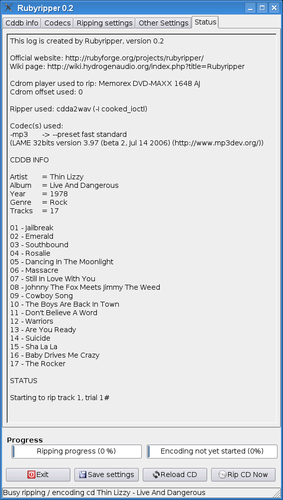
Rubyripper is a Linux CD ripper that aims for secure, accurate audio extraction.




Was ist Exact Audio Copy (EAC)?
Exact Audio Copy is a specialized tool for ripping audio CDs to digital formats. It is used by audiophiles and archivists who need to ensure their digital copies match the original disc data exactly. The software focuses on precision rather than speed, making it a go-to choice for lossless audio preservation.
The program is freeware for Windows. It has been developed by Andre Wiethoff since 1998. While free to use, it is not open-source in the traditional sense, and its development has slowed in recent years. It remains a staple in the Windows audio community for its reliability.
Users look for Linux alternatives because they want to maintain their high-fidelity workflow on a Linux system. Many prefer not to rely on Wine for critical audio tasks or want native integration with their Linux desktop environment. Finding a tool that offers similar error correction and verification features is the primary goal.
Was ein Ersatz für Exact Audio Copy (EAC) können muss
- AccurateRip database verification
- Bit-perfect extraction modes
- Error correction algorithms
- Support for lossless formats like FLAC
- Gap detection and handling
- Batch ripping capabilities
Läuft Exact Audio Copy (EAC) unter Linux?
There is no official native Linux version of Exact Audio Copy. It is a Windows-only application. You can run it via Wine, but performance and stability may vary depending on your specific Wine configuration. It is not available on Proton or Bottles as a native app, though those tools use Wine under the hood. For a native experience, you must use one of the Linux alternatives listed.
Welche Alternative passt zu Ihnen?
If you need the closest match to EAC's accuracy features, look at SoundKonverter or Goobox, which offer detailed ripping options and error correction. Audex is a solid choice for KDE users who want a simple, reliable interface with good CDDB support. Sound Juicer is best for beginners who just want to rip CDs without complex settings. Asunder and Rubyripper are also viable options, with Rubyripper offering a more traditional, feature-rich interface similar to older Windows rippers.
Dateien und Gewohnheiten aus Exact Audio Copy (EAC) mitnehmen
Since EAC primarily outputs audio files, migration is straightforward. You do not need to export settings or databases, as AccurRip is a public database. Simply rip your new CD collection using your chosen Linux tool to FLAC or another lossless format. Ensure your Linux rippers are configured to use the same error correction settings as EAC to maintain consistency in your library.
Direkter Vergleich
| Programm | Lizenz | Flatpak | Aktuelle Version | Funktionsabdeckung | Bewertung |
|---|---|---|---|---|---|
| Sound Juicer | GPL-2.0+ | ✓ | 3.40.0 | 60% | — |
| SoundKonverter | GPL-2.0-or-later | — | 3.0.1.32 | 60% | — |
| Audex | GPL-3.0-or-later | ✓ | 26.08.2 | 65% | — |
| Goobox | GPL-2.0+ | — | 3.6.0 | 45% | — |
| Asunder | GPL-2.0-only | ✓ | 3.0.2 | 65% | — |
| Rubyripper | GPL-2.0 | — | — | — | — |
Exact Audio Copy (EAC): häufige Fragen
Does EAC work on Linux?
No, it is Windows-only. You can run it via Wine, but native Linux rippers are recommended for better integration and stability.
What is AccurRip?
AccurRip is a database that verifies if your rip matches other users' rips of the same CD, ensuring bit-perfect accuracy.
Can I use EAC settings on Linux?
No, EAC settings are not portable. You will need to configure your Linux ripper's error correction and output settings manually.
Is EAC still being updated?
Development has slowed significantly, but it remains functional. Many users have moved to native Linux tools for ongoing support.
Wie wichtig ist Ihnen Exact Audio Copy (EAC)?
Kennen Sie eine bessere Alternative? Alternative vorschlagen