
 OpenRGBLinux
vs
Alienware Command CenterWindows
OpenRGB als Linux-Alternative zu Alienware Command Center
Aktualisiert am
Unser Fazit
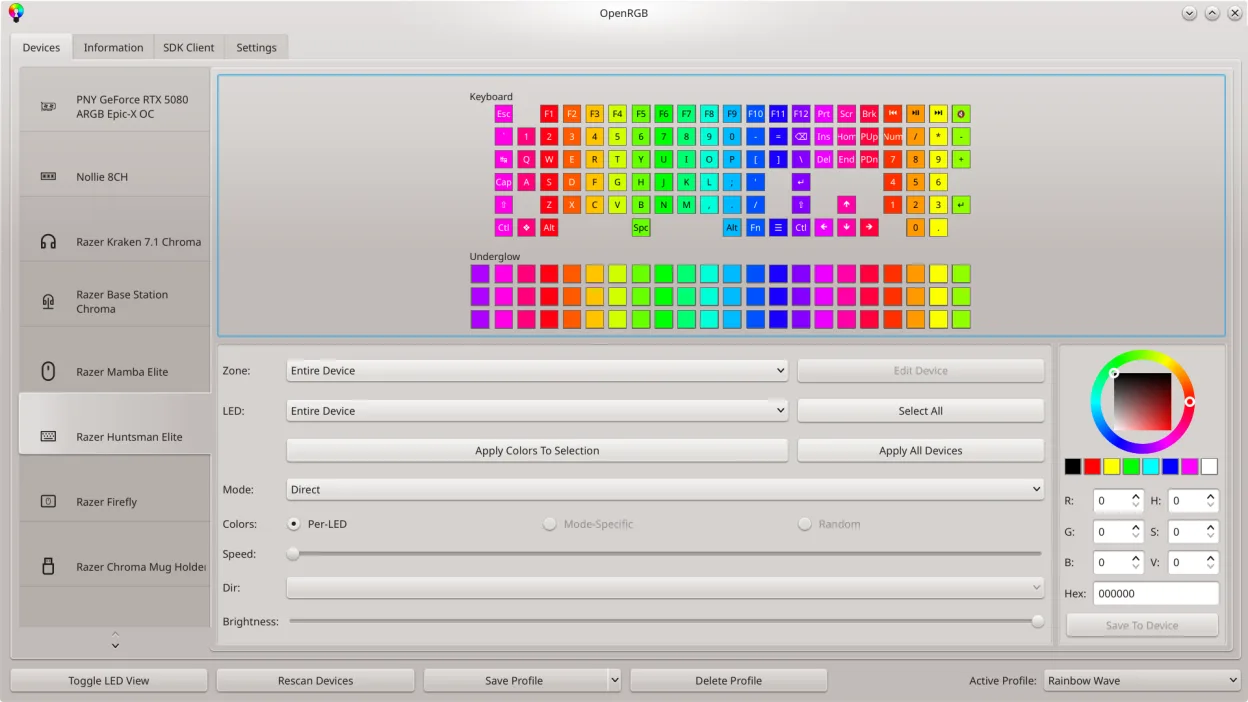
OpenRGB can replace Alienware Command Center for most users who need RGB lighting control on a Linux system. It covers color and effect settings, profile saving, and basic fan‑speed monitoring through its device‑info viewer, but it lacks the integrated performance‑profile selection and the deep hardware‑sensor integration that Alienware Command Center offers on Windows. If you’re mainly concerned with lighting and simple fan control, OpenRGB is a solid choice. If you rely on the performance‑boosting profiles or detailed thermal monitoring that Alienware’s proprietary tools provide, you’ll find OpenRGB lacking.
- Lizenz
- GPL-2.0-or-later
- Preis
- Kostenlos
- Aktuelle Version
- 1.1 (16. Oktober 2026)
- Bewertung
- —
Was gleich funktioniert
- Both allow setting colors and selecting effect modes for RGB hardware
- Both support saving and loading custom profiles
- Both provide a graphical interface for device LED mapping
- Both can be controlled via command line or SDK for automation
Was anders ist
- OpenRGB does not expose performance‑profile selection or CPU/GPU over‑clocking options
- It lacks the proprietary sensor data and detailed temperature graphs that Alienware Command Center offers
- OpenRGB does not integrate with Alienware’s hardware‑specific fan‑control curves
- It cannot manage system performance states or power limits like the Windows app
- OpenRGB’s fan control is limited to basic speed adjustments, not advanced profiles
Ihre Alienware Command Center-Dateien öffnen
Alienware Command Center uses proprietary configuration files that are not readable by OpenRGB. OpenRGB cannot import or export these files, so any existing profiles or settings must be recreated manually within OpenRGB.
Von Alienware Command Center zu OpenRGB wechseln – Schritt für Schritt
- Identify which RGB devices are attached to your Alienware laptop (e.g., keyboard, chassis, fans).
- Install OpenRGB from your distribution’s package manager or Flathub.
- Launch OpenRGB and let it detect the devices; verify each is listed in the device viewer.
- Recreate your desired lighting profiles in OpenRGB, saving them for future use.
- If fan control is needed, adjust the speed sliders in OpenRGB’s device panel; note that advanced profiles are unavailable.
Wichtige Funktionen von OpenRGB
- Farben und Effekte für viele RGB‑Geräte steuern
- Eigene Profile speichern und laden
- SDK für Drittanbieter‑Integration
- Befehlszeilenschnittstelle für Skripting
- Mehrfachinstanz‑Synchronisation über PCs
- Eigenständiger Client/Server‑Modus
- Grafische LED‑Karte für Musterdesign
- Geräte‑Info‑Viewer
OpenRGB unter Linux installieren
flatpak install flathub org.openrgb.OpenRGBsudo dnf install openrgbsudo pacman -S openrgbsudo zypper install OpenRGBHäufige Fragen
Does OpenRGB support my Alienware laptop’s RGB keyboard?
Yes, OpenRGB detects most Alienware keyboards and allows you to set colors, effects, and custom patterns via its LED map.
Can I use OpenRGB to control fan speeds on my Alienware laptop?
OpenRGB provides basic fan‑speed adjustments for supported devices, but it does not offer the detailed fan curves or temperature‑based control that Alienware Command Center provides.
Is OpenRGB free and open source?
OpenRGB is released under the GPL‑2.0‑or‑later license and is available free of charge on Flathub, Arch, Fedora, and openSUSE.
2 weitere Alternativen zu Alienware Command Center
 fancontrolfancontrol ist ein Linux-Werkzeug zur automatischen Anpassung der Lüfterdrehzahlen basierend auf…Open SourceKostenlosFlatpakfancontrol vs. Alienware Command Center