
 PiTiViLinux
vs
Microsoft ClipchampWindows
PiTiVi as a Linux alternative to Microsoft Clipchamp
Updated
Our verdict
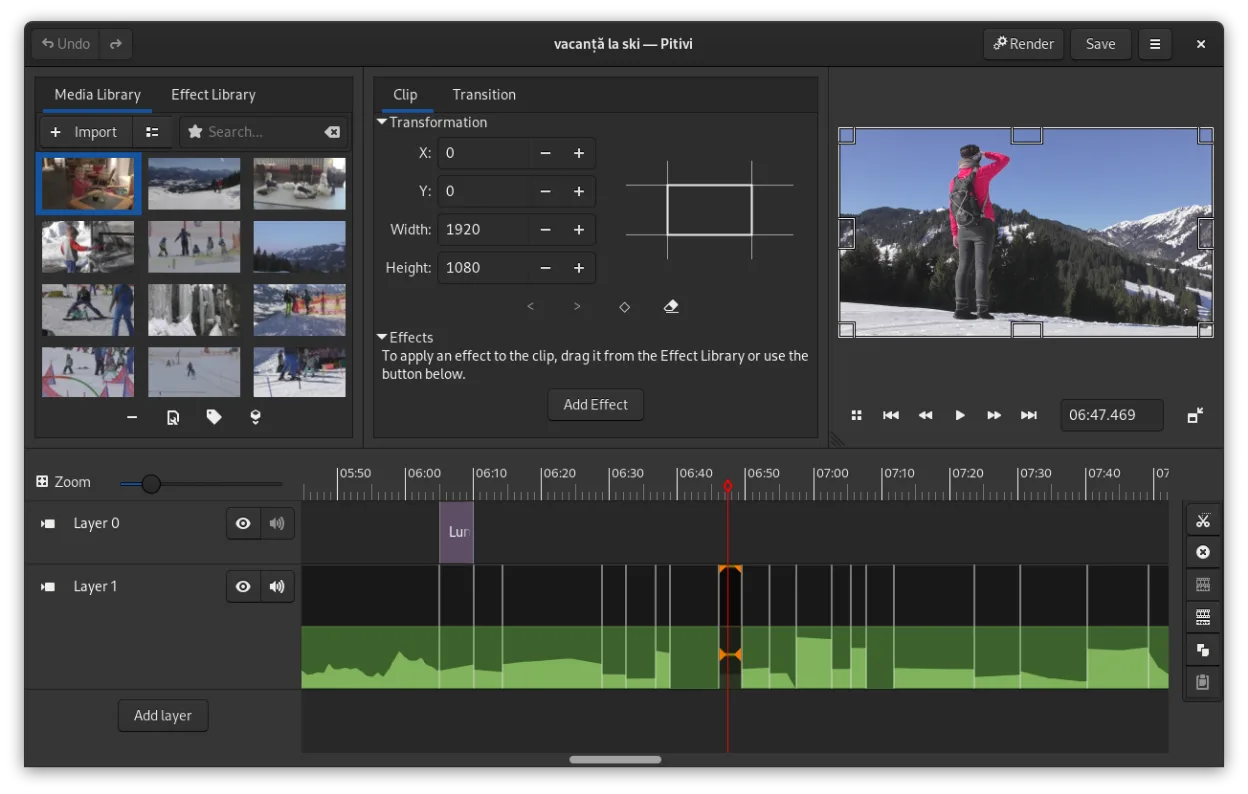
PiTiVi is a solid replacement for Microsoft Clipchamp if you're on Linux and want offline, no-watermark video editing without relying on a browser. It handles basic tasks like trimming, splitting, adding transitions, and text overlays cleanly. The interface is intuitive for beginners but also scales to more advanced use thanks to keyframing and timeline precision. However, it lacks built-in cloud export and has fewer preset effects than Clipchamp. If you value privacy, open-source software, and don't need web integration, PiTiVi works well for simple to mid-level projects.
- License
- LGPL-2.0+
- Price
- Free
- Latest version
- 2023.03 (March 26, 2023)
- Rating
- —
What works the same
- Simple drag-and-drop timeline editing with visual clarity
- Supports basic transitions including crossfades
- Text overlay and audio track editing available
- Exports to common formats like MP4 and MOV
- Free to use with no forced watermarking
What is different
- PiTiVi is desktop-only and lacks Clipchamp's cloud-based workflow
- No built-in stock media library or online templates
- Fewer automated features like voice-over recording or auto-reframe
- Interface is GNOME-integrated but less flashy than Clipchamp's web UI
- No direct cloud export or rendering option
Opening your Microsoft Clipchamp files
PiTiVi supports any format GStreamer can handle, which includes MP4, MOV, AVI, and more—common formats used in Clipchamp. You can import and edit Clipchamp-exported videos without issue. However, project files aren't interchangeable since Clipchamp saves online and PiTiVi uses its own project format. If you have raw media from Clipchamp, PiTiVi will work with it. Project continuity isn't possible, but media is compatible.
Switching from Microsoft Clipchamp to PiTiVi, step by step
- Install PiTiVi via Flathub or your distro's package manager
- Copy your video clips, audio, and images to a local folder
- Open PiTiVi and create a new project
- Drag media into the timeline and edit as needed
- Export using built-in presets for MP4 or custom settings
Key features of PiTiVi
- Non-linear editing with a framerate-independent timeline
- Supports any format handled by GStreamer
- Keyframe animation for effects and filters
- Ripple and roll editing for efficient timeline adjustments
- Custom aspect ratios, framerates, and render presets
- Crossfades and SMPTE-standard transitions
- Detachable UI panels for multi-monitor setups
- Non-modal editing workflow with playhead-centric design
How to install PiTiVi on Linux
flatpak install flathub org.pitivi.Pitivisudo apt install pitivisudo apt install pitivisudo dnf install pitivisudo pacman -S pitivisudo zypper install pitiviFrequently asked questions
Can I use PiTiVi without an internet connection?
Yes, PiTiVi runs entirely offline once installed. No internet is needed for editing or rendering.
Does PiTiVi add a watermark to exports?
No. PiTiVi is free and open-source, and does not add watermarks to any exported video.
Is PiTiVi harder to learn than Clipchamp?
It has a steeper initial curve for absolute beginners, but the layout is logical and efficient once you know basic timeline editing.
4 other alternatives to Microsoft Clipchamp
 KdenliveKdenlive is a free, feature‑rich non‑linear video editor built on the MLT framework.Open sourceFreeFlatpakKdenlive vs Microsoft Clipchamp
 OliveOlive is a free, open‑source non‑linear video editor for Linux.Open sourceFreeFlatpakOlive vs Microsoft Clipchamp
 ShotcutShotcut is a free, open-source video editor for Linux with support for a wide range of formats via FFmpeg.Open sourceFreeFlatpakShotcut vs Microsoft Clipchamp
 OpenShotOpenShot is a free, open-source, non-linear video editor for Linux and other platforms, built with Python and…Open sourceFreeFlatpakOpenShot vs Microsoft Clipchamp