
 VuzeLinux
vs
VuzeLinux
vs
 µTorrent (uTorrent)Windows
Vuze als Linux-Alternative zu µTorrent (uTorrent)
Aktualisiert am
Unser Fazit
Vuze can replace uTorrent for users who want a full‑featured client with built‑in media playback, RSS feeds and a plugin system. It is heavier and consumes more RAM than uTorrent, so it is not ideal for low‑end machines or those who value minimalism. For power users who need advanced scheduling, encryption, and the ability to stream directly from torrents, Vuze is a solid choice. It will not satisfy users who simply want a lightweight, ad‑free client that runs quietly in the tray.
- Lizenz
- —
- Preis
- Kostenlos
- Aktuelle Version
- —
- Bewertung
- —
Was gleich funktioniert
- Supports .torrent files and magnet links
- Provides queue management and prioritization
- Allows bandwidth scheduling
- Runs natively on Linux
- Offers a system tray icon for quick access
Was anders ist
- Vuze is Java‑based and requires a Java runtime, increasing resource usage
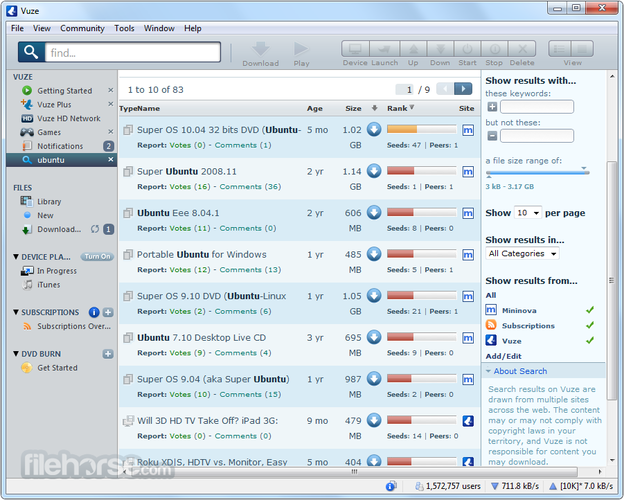
- Built‑in media player streams torrents, unlike uTorrent's minimal UI
- Vuze includes an advanced search and RSS feed system not present in uTorrent
- Plugin architecture allows extended features but adds complexity
- Vuze is discontinued, meaning no new updates or security patches
- uTorrent is proprietary but lightweight, whereas Vuze is open source but heavier
Ihre µTorrent (uTorrent)-Dateien öffnen
Vuze can open standard .torrent files and magnet links just like uTorrent. It does not import uTorrent’s .config or .torrent files directly, but any .torrent file will work. If you have a .torrent list exported from uTorrent, you can simply drag it into Vuze or use the File → Open menu. No special export or conversion is needed.
Von µTorrent (uTorrent) zu Vuze wechseln – Schritt für Schritt
- Install Java Runtime Environment (OpenJDK 11 or newer).
- Download the latest Vuze .deb or .rpm package from the official site.
- Install the package using your distribution’s package manager.
- Open Vuze, go to Preferences → Downloads, and set the default download folder to match your uTorrent folder.
- Add any existing .torrent files or magnet links by dragging them into Vuze or using File → Open.
- Configure bandwidth limits, queue size, and other settings to match your previous uTorrent configuration.
Wichtige Funktionen von Vuze
- Java‑based cross‑platform GUI
- Built‑in media player for streaming torrents
- Advanced search and RSS feeds
- Plugin architecture for extended functionality
- Bandwidth and download scheduling
- Torrent encryption support
Häufige Fragen
Does Vuze run on all Linux distributions?
Yes, Vuze provides .deb and .rpm packages that work on most Debian‑based and Red‑Hat‑based distributions. It also runs from the command line on any distro that has a Java runtime. However, newer distributions may require manual installation of the Java runtime if it is not present.
Will Vuze show ads or install extra software?
Vuze itself does not display ads. However, the installer may bundle optional components if you choose the default installation. To avoid this, use the minimal install option or download the standalone Java archive.
Is Vuze still maintained?
Vuze is listed as discontinued, meaning the developers have stopped releasing new versions. Existing releases are still usable, but there will be no security updates. Users should weigh the risk of running an unmaintained application.
5 weitere Alternativen zu µTorrent (uTorrent)
 qBittorrentqBittorrent ist ein kostenloser, quelloffener BitTorrent-Client mit einer durchdachten Benutzeroberfläche und…Open SourceKostenlosFlatpakqBittorrent vs. µTorrent (uTorrent)
 DelugeDeluge ist ein kostenloser, quelloffener BitTorrent-Client mit einem Client/Server-Modell für lokale und…Open SourceKostenlosFlatpakDeluge vs. µTorrent (uTorrent)
 TransmissionTransmission ist ein leichtgewichtiger, quelloffener BitTorrent-Client für Linux, macOS und Windows mit…Open SourceKostenlosFlatpakTransmission vs. µTorrent (uTorrent)
 KTorrentKTorrent ist ein vollwertiger BitTorrent-Client für KDE, der DHT, Verschlüsselung und Webseeds mit starker…Open SourceKostenlosFlatpakKTorrent vs. µTorrent (uTorrent)
 BitTornadoBitTornado is a lightweight, open‑source BitTorrent client for Linux.Open SourceKostenlosEingestelltBitTornado vs. µTorrent (uTorrent)