
Windows · Games
Best Linux alternatives to Epic Games Launcher
The Epic Games Launcher lets users download, install, and manage games from the Epic Games Store on Windows.
Updated
Quick answer
The best Linux alternative to Epic Games Launcher is Heroic Games Launcher. Other strong options: Lutris, Steam, Bottles.
6 Linux alternatives to Epic Games Launcher
-
Heroic Games Launcher is an open‑source tool that lets Linux users install and launch games from Epic, GOG, Steam, and other stores.
Heroic Games Launcher is a solid replacement for the Windows Epic Games Launcher for Linux users who are comfortable with a community‑maintained client. It lets you log in to your Epic account, download and launch games, and handles updates, while automatically selecting Proton or Steam…
Feature parity80% -

Lutris is a free, open‑source platform that centralises installation and launching of PC and console games on Linux.
Lutris can serve as a practical replacement for the Epic Games Launcher for most Linux gamers who are comfortable with a community‑driven tool. It lets you log into your Epic account, download and install titles, and keep them updated, all from a single library that also aggregates Steam, GOG and…
Feature parity70% -

Steam is a digital game distribution platform with built-in store, updates, cloud saves, and social features.
Steam can replace Epic Games Launcher for Linux users who mainly want to play games from the Epic Games Store. It supports downloading, installing, and updating those titles via Proton, offers free game claiming, cloud saves, and account integration. The main audience is gamers who already have an…
Feature parity70% -

Bottles runs Windows applications on Linux, managing them in isolated environments.
Bottles is a functional but indirect replacement for Epic Games Launcher. It does not provide a native client; instead, it runs the Windows version of the launcher inside a managed Wine or Proton environment. This works well for users comfortable with Linux gaming tools who need access to the Epic…
Feature parity65% -
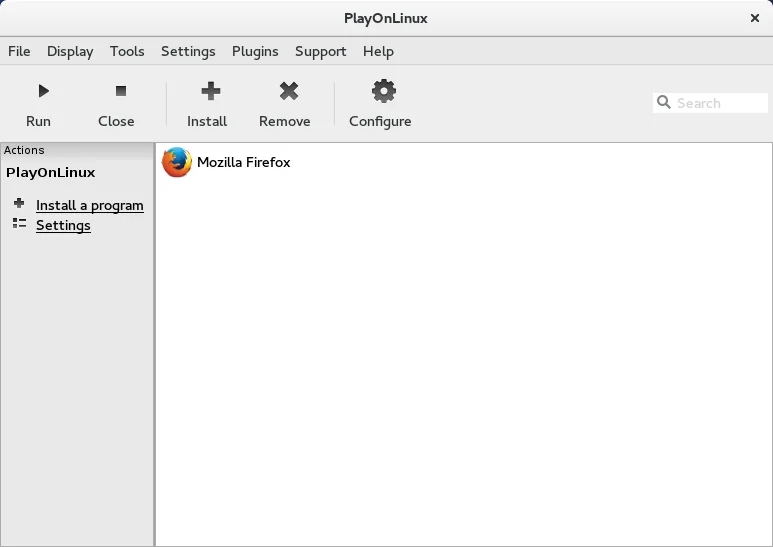
PlayOnLinux is a graphical front‑end for Wine that lets you install and run Windows games and applications on Linux with a few clicks.
PlayOnLinux 4 is a functional but imperfect replacement for the Epic Games Launcher. It works by running the Windows version of the launcher inside a Wine prefix, so you get access to the store, library, and game installation features. However, it is not a native Linux app, which means performance…
Feature parity60% -

Heroic is an open‑source launcher that lets you play Epic, GOG and Amazon games on Linux, with built‑in Wine/Proton support.
Heroic is a solid replacement for the Epic Games Launcher if you are comfortable with Wine or Proton. It handles the core tasks: downloading, installing, and launching Epic titles, plus claiming free games. It also supports GOG and Amazon, which the official launcher does not. The main trade-off is…
Feature parity85%


What is Epic Games Launcher?
The Epic Games Launcher is a desktop application primarily used by gamers to access free and paid games distributed through the Epic Games Store. It includes features like timed free game giveaways, cloud saves, and friend lists. The launcher is tightly integrated with its storefront and runs only on Windows and macOS.
Epic Games offers the launcher and many of its games for free, but earns revenue through game sales and developer revenue sharing. The platform takes a 12% cut from developers, lower than some competitors. Licensing is proprietary, and the client itself is free to download and use.
People seek Linux alternatives because Epic does not provide a native Linux client. While some games are available on Linux, the launcher is not. Users want ways to access Epic's free games, manage installations, and sync progress without running Windows.
What a replacement for Epic Games Launcher must do
- Access to Epic Games Store games
- Download and install management
- Free game claiming support
- Cloud save synchronization
- Account integration
- Game updates and library organization
- Support for Proton or Wine backends
Can you run Epic Games Launcher on Linux?
There is no native Linux version of the Epic Games Launcher. It does not run reliably under Wine or Proton on its own. Some users have had limited success using it through Bottles or Wine with extensive configuration, but performance and login issues are common. No official web-based version exists to manage games, though account access is available via browser.
Which alternative should you choose?
Heroic Games Launcher is best for users who want a dedicated, lightweight tool to claim and run Epic games via Wine. Lutris suits those managing games from multiple stores with deep customization. Steam is ideal if you prefer a mature Linux-native platform, even though it doesn't support Epic titles directly. Bottles and PlayOnLinux 4 help users who need to run the launcher manually in a controlled Wine environment.
Moving your Epic Games Launcher files and habits
There is no direct way to migrate game installations or save files from Windows to Linux. Save data is typically stored in the cloud via Epic's account system, but local files may need manual transfer. Game files themselves must be re-downloaded on Linux. Heroic can import some configurations, but compatibility depends on Proton and the specific game.
Side-by-side comparison
| App | License | Flatpak | Latest version | Feature parity | Rating |
|---|---|---|---|---|---|
| Heroic Games Launcher | GPL-3.0 | — | 2.22.4 | 80% | — |
| Lutris | GPL-3.0-or-later | ✓ | 0.5.22 | 70% | — |
| Steam | LicenseRef-proprietary | ✓ | 1.0.0.87 | 70% | — |
| Bottles | GPL-3.0-only | ✓ | 67.4 | 65% | — |
| PlayOnLinux 4 | GPL-3.0 | ✓ | 4.4 | 60% | — |
| Heroic | GPL-3.0 | ✓ | v2.22.4 | 85% | — |
Epic Games Launcher: frequently asked questions
Can I run the Epic Games Launcher on Linux?
Not natively. It may work poorly under Wine or Bottles, but is not officially supported. Heroic Games Launcher is a better option for accessing the store.
How do I claim free games on Linux?
Use a browser to claim games on the Epic website. You can then launch them via Heroic Games Launcher or Lutris if they run under Wine/Proton.
Are my Epic games saved on Linux?
If the game supports cloud saves through Epic's account system, progress may sync. Otherwise, manual save file management is required.
Is Proton or Wine required?
Yes. Most Linux methods rely on Wine or Proton to run Windows-based games, including those from the Epic Games Store.
How important is Epic Games Launcher to you?
Know a better alternative? Suggest an alternative