
 digiKamLinux
vs
Nik CollectionWindows
digiKam como alternativa Linux a Nik Collection
Actualizado el
Nuestra opinión
digiKam is not a direct replacement for the Nik Collection. It is a photo manager with basic editing tools, but it lacks the specialized plugin integration, advanced colour grading, and creative stylisation filters that Nik Collection provides. Photographers who need a lightweight, organized library with simple RAW adjustments may find digiKam useful, but those who rely on Nik’s retouching, noise reduction, or creative effects will need a different Linux solution such as Darktable or RawTherapee.
- Licencia
- GPL-2.0+
- Precio
- Gratis
- Última versión
- 9.1.0 (7 de junio de 2026)
- Valoración
- —
Lo que funciona igual
- Both run on Linux, Windows, and macOS
- Both support RAW files
- Both offer basic colour adjustments and sharpening
- Both can be used as standalone applications
Lo que cambia
- digiKam is a photo manager, not a plugin suite
- No plugin integration with host editors in digiKam
- Lacks advanced colour grading and creative stylisation filters
- Missing noise reduction and dedicated black‑and‑white conversion tools
- digiKam does not handle Nik Collection file formats
Abrir tus archivos de Nik Collection
digiKam cannot open or export Nik Collection plugin files (.lrn, .dng presets, etc.). The Nik Collection files are proprietary and require Adobe Lightroom, Photoshop, or the native Nik host applications. If you need to migrate presets, you would have to recreate them manually in a compatible editor on Linux.
Pasar de Nik Collection a digiKam, paso a paso
- Export your Nik presets or settings from the host editor as a file or note them down.
- Identify equivalent tools in your chosen Linux editor (e.g., Darktable, RawTherapee).
- Recreate the adjustments manually, using the same parameters where possible.
- Save the new adjustments as presets in the Linux editor for future use.
- Verify the results by applying the new preset to a sample image.
Funciones clave de digiKam
- Importación directa desde cámaras, tarjetas SD y unidades USB con reglas configurables
- Sistemas avanzados de etiquetado, calificación y etiquetas para la organización de bibliotecas complejas
- Potente motor de búsqueda que soporta criterios de metadatos EXIF, IPTC y XMP
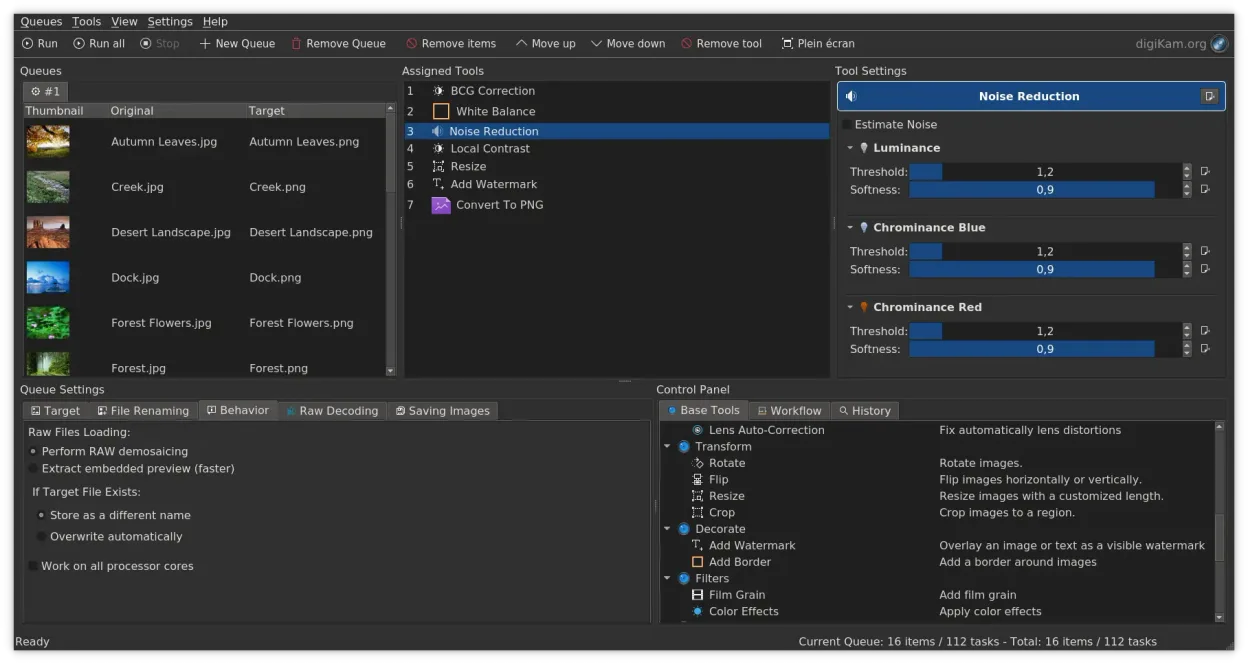
- Edición no destructiva con ajustes de color, recorte y nitidez
- Soporte nativo para archivos RAW mediante LibRaw para decodificación y vista previa
- Catalogación de video y extracción de metadatos usando backends de FFmpeg
- Organización de álbumes con interfaz de arrastrar y soltar
- Disponibilidad multiplataforma para Linux, Windows y macOS
Cómo instalar digiKam en Linux
flatpak install flathub org.kde.digikamsudo apt install digikamsudo apt install digikamsudo dnf install digikamsudo pacman -S digikamsudo zypper install digikamPreguntas frecuentes
Can I use digiKam to edit photos the same way I use Nik Collection plugins?
No, digiKam offers basic editing such as colour balance, cropping, and sharpening, but it does not provide the advanced retouching or creative filters that Nik Collection plugins deliver.
Does digiKam support the same file formats as Nik Collection?
Both support RAW files, but digiKam cannot read or write the proprietary Nik Collection preset files. It works with standard image formats like JPEG, TIFF, and DNG.
Is there a way to integrate Nik Collection plugins into digiKam?
No. digiKam does not support third‑party plugin architectures like the Nik Collection. You would need to use a host editor that can load Nik plugins, such as GIMP with the Nik Collection plugin bridge, if available.
Otras 4 alternativas a Nik Collection
 GIMPGIMP es un editor de gráficos rasterizados gratuito y de código abierto para edición fotográfica, pintura…Código abiertoGratisFlatpakGIMP vs Nik Collection
 darktabledarktable es un editor de fotos gratuito y de código abierto que gestiona archivos raw y ofrece un flujo de…Código abiertoGratisFlatpakdarktable vs Nik Collection
 RawTherapeeRawTherapee es un programa de desarrollo fotográfico raw de código abierto y multiplataforma.Código abiertoGratisFlatpakRawTherapee vs Nik Collection
 LightZoneLightZone es un editor de fotos RAW gratuito y de código abierto con un flujo de trabajo no destructivo…Código abiertoGratisFlatpakLightZone vs Nik Collection