
 GPartedLinux
vs
EaseUS Partition MasterWindows
GPartedLinux
vs
EaseUS Partition MasterWindows
GParted como alternativa Linux a EaseUS Partition Master
Actualizado el
Nuestra opinión
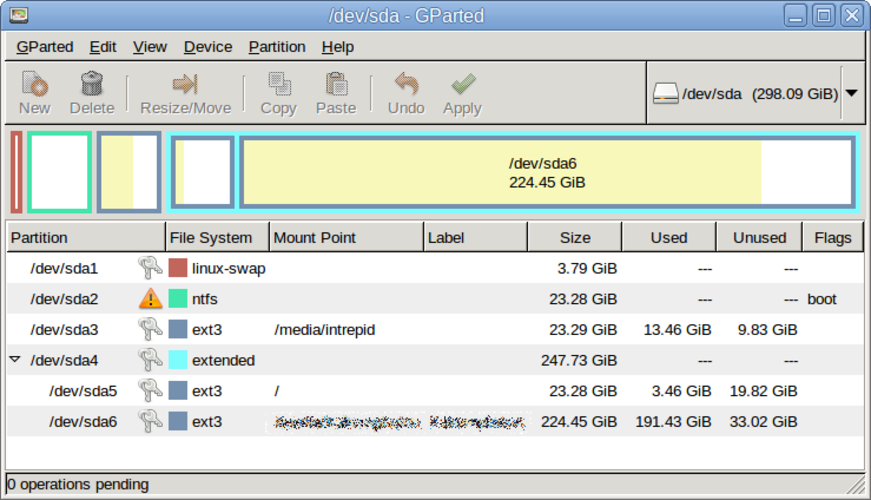
GParted is a solid replacement for EaseUS Partition Master for most Linux users who need to create, delete, extend, and shrink partitions and work with FAT, NTFS, and exFAT file systems. It offers a free, open‑source GUI and live‑USB support, making it suitable for system maintenance and storage expansion. Users who rely on advanced backup features or a highly polished Windows‑style interface may prefer the commercial tool, but for everyday partition tasks GParted covers the core needs.
- Licencia
- GPL-3.0
- Precio
- Gratis
- Última versión
- 1.8.1
- Valoración
- —
Lo que funciona igual
- Both allow creation, deletion, resizing, and moving of partitions
- Both support FAT, NTFS, and exFAT file systems
- Both provide a graphical user interface for partition management
Lo que cambia
- GParted is open‑source and free, whereas EaseUS is commercial
- GParted lacks a built‑in backup wizard; users must back up manually
- EaseUS offers a more polished, Windows‑style UI
- GParted supports a wider range of Linux file systems (ext4, XFS, Btrfs, etc.)
- EaseUS provides additional disk health tools not in GParted
Abrir tus archivos de EaseUS Partition Master
EaseUS Partition Master stores its project data in proprietary XML files that GParted cannot read. To migrate, you must manually recreate the partitions in GParted; no direct import/export is available.
Pasar de EaseUS Partition Master a GParted, paso a paso
- 1. Back up all data from the partitions you plan to modify.
- 2. Boot a GParted live‑USB or install GParted on your Linux system.
- 3. Open GParted and locate the disks you want to edit.
- 4. Use GParted’s tools to create, delete, resize, or copy partitions as needed.
- 5. Apply all pending operations and reboot into your operating system.
- 6. Verify data integrity and adjust mount points if necessary.
Funciones clave de GParted
- Interfaz gráfica de GTK para GNU Parted
- Soporta redimensionar, mover, copiar y eliminar particiones
- Independiente del sistema de archivos: ext4, NTFS, FAT32, XFS, Btrfs, etc.
- Soporte para USB booteable para edición previa al arranque
- Deshacer/rehacer para operaciones de particiones
- Verificación de sumas de control para la integridad de los datos
- Modo por lotes mediante línea de comandos para scripting
Cómo instalar GParted en Linux
sudo apt install gpartedsudo apt install gpartedsudo dnf install gpartedsudo pacman -S gpartedsudo zypper install gpartedPreguntas frecuentes
Can GParted handle Windows partitions?
Yes, GParted can resize, move, and delete FAT, NTFS, and exFAT partitions, but it does not perform Windows‑specific recovery tasks.
Does GParted need a backup before resizing?
While GParted does not offer an automatic backup wizard, it is strongly recommended to back up data manually before making changes.
Is GParted suitable for dual‑boot setups?
Absolutely. GParted can create free space for a new OS, resize existing partitions, and manage bootloader configurations when used alongside other tools.