
 PiTiViLinux
vs
CyberLink PowerDirectorWindows
PiTiVi como alternativa Linux a CyberLink PowerDirector
Actualizado el
Nuestra opinión
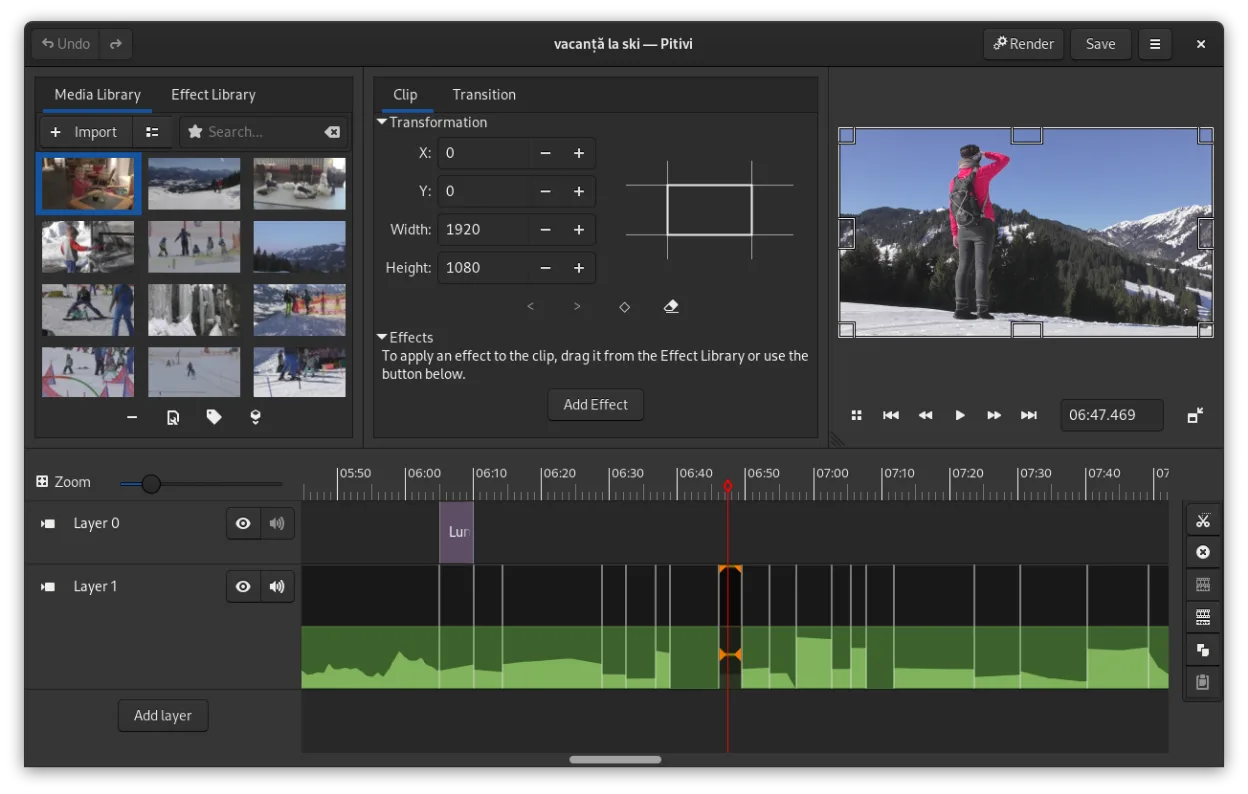
PiTiVi is a decent replacement for CyberLink PowerDirector if you value simplicity, open-source software, and GNOME integration. It handles basic to intermediate editing tasks well—cutting, trimming, transitions, color correction, and exporting to common formats like MP4 and WebM. However, it lacks some of the advanced effects, 4K performance polish, and guided workflows that PowerDirector offers. It's best suited for hobbyists, educators, or light content creators who don’t need Hollywood-grade effects or multi-cam editing.
- Licencia
- LGPL-2.0+
- Precio
- Gratis
- Última versión
- 2023.03 (26 de marzo de 2023)
- Valoración
- —
Lo que funciona igual
- Both support multi-track timeline editing and non-linear workflows
- Offer video cutting, trimming, and ripple editing
- Support color correction and basic grading
- Include visual transitions like crossfades and SMPTE-standard effects
- Export to common formats including MP4 and WebM
Lo que cambia
- PiTiVi lacks PowerDirector’s AI-powered effects and motion tracking
- No built-in royalty-free stock media or template library
- Fewer presets and guided editing tools for beginners
- PowerDirector supports more advanced 4K and HDR workflows
- PiTiVi has fewer third-party plugin integrations
Abrir tus archivos de CyberLink PowerDirector
PiTiVi cannot open CyberLink PowerDirector project files (.PDS, .PDR). There is no direct import support, and no known converter tools exist. You’ll need to re-edit your footage manually in PiTiVi. However, PiTiVi can read most video formats via GStreamer, so your original media files (MP4, AVI, MOV, etc.) will likely import without issue. Exported videos from PowerDirector can be re-edited in PiTiVi as long as you have the source clips.
Pasar de CyberLink PowerDirector a PiTiVi, paso a paso
- Export your original media files from PowerDirector if not already accessible
- Install PiTiVi via Flathub or your distribution’s package manager
- Import media directly into PiTiVi; organize clips in the project view
- Rebuild your timeline using PiTiVi’s ripple and roll editing tools
- Use keyframes for effects and transitions, then export using built-in presets
Funciones clave de PiTiVi
- Edición no lineal con una línea de tiempo independiente de la velocidad de fotogramas
- Admite cualquier formato manejado por GStreamer
- Animación por fotogramas clave para efectos y filtros
- Edición ripple y roll para ajustes eficientes de la línea de tiempo
- Relaciones de aspecto, velocidades de fotogramas y preajustes de renderizado personalizados
- Fundidos cruzados y transiciones estándar SMPTE
- Paneles UI desmontables para configuraciones de varios monitores
- Flujo de trabajo no modal con diseño centrado en la cabeza de reproducción
Cómo instalar PiTiVi en Linux
flatpak install flathub org.pitivi.Pitivisudo apt install pitivisudo apt install pitivisudo dnf install pitivisudo pacman -S pitivisudo zypper install pitiviPreguntas frecuentes
Can PiTiVi handle 4K footage?
Yes, PiTiVi supports 4K footage through GStreamer, but performance depends on your hardware and system setup. It may not be as smooth as PowerDirector on lower-end systems.
Is PiTiVi stable for long editing sessions?
It’s generally stable, especially in the 2023.03 release, but some users report occasional crashes with complex timelines. Save frequently.
Does PiTiVi support color grading?
Yes, it supports basic color correction and grading via effects with keyframeable properties, though not as advanced as PowerDirector’s tools.
Otras 3 alternativas a CyberLink PowerDirector
 KdenliveKdenlive es un editor de video no lineal gratuito y con muchas funciones, basado en el framework MLT.Código abiertoGratisFlatpakKdenlive vs CyberLink PowerDirector
 ShotcutShotcut es un editor de video gratuito y de código abierto para Linux con soporte para una amplia gama de…Código abiertoGratisFlatpakShotcut vs CyberLink PowerDirector
 OpenShotOpenShot es un editor de vídeo no lineal gratuito, de código abierto, para Linux y otras plataformas…Código abiertoGratisFlatpakOpenShot vs CyberLink PowerDirector