
 PiTiViLinux
vs
OpenShotWindows
PiTiVi como alternativa Linux a OpenShot
Actualizado el
Nuestra opinión
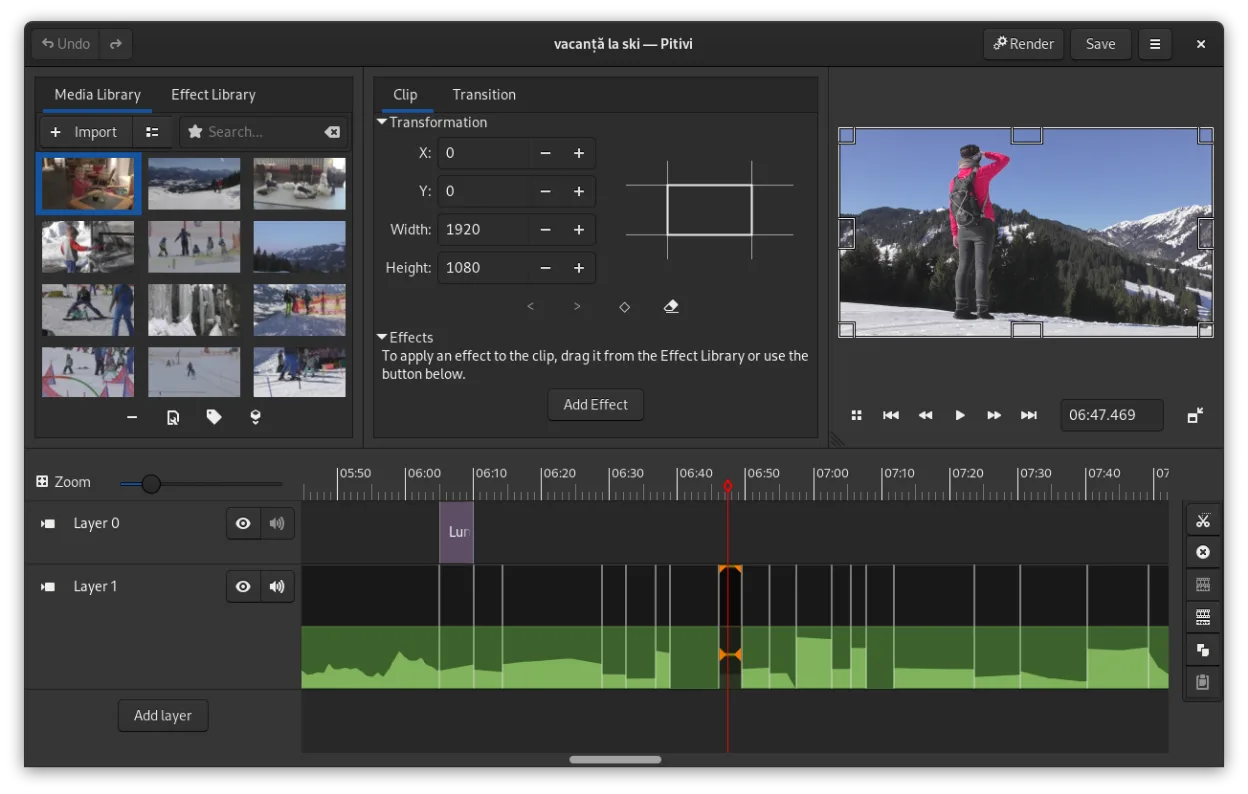
PiTiVi is a strong replacement for OpenShot if you are comfortable with a slightly steeper learning curve. While OpenShot is often praised for its immediate simplicity, PiTiVi offers a more robust non-linear editing experience with a framerate-independent timeline. It handles basic trimming, splitting, and transitions well, and its GStreamer backend ensures broad codec support. The interface is clean and GNOME-integrated, making it feel native on Linux desktops. However, expect a brief adjustment period as the workflow is playhead-centric rather than drag-and-drop simple. For users needing reliable open-source editing without the bloat of commercial tools, PiTiVi is an excellent choice.
- Licencia
- LGPL-2.0+
- Precio
- Gratis
- Última versión
- 2023.03 (26 de marzo de 2023)
- Valoración
- —
Lo que funciona igual
- Both are free, open-source, non-linear video editors designed for Linux.
- Both support multi-track timelines for simultaneous video and audio editing.
- Both allow basic operations like trimming, splitting, and applying transitions.
- Both export to common formats like MP4 and WebM using standard codecs.
- Both feature intuitive interfaces aimed at beginners and hobbyists.
Lo que cambia
- PiTiVi uses a framerate-independent timeline, which can feel different from OpenShot's fixed-frame approach.
- PiTiVi offers keyframe animation for effects, a feature OpenShot lacks in basic usage.
- PiTiVi's UI is deeply integrated with GNOME, whereas OpenShot has a more generic GTK look.
- PiTiVi supports ripple and roll editing for faster timeline adjustments, which OpenShot handles less efficiently.
- PiTiVi allows detachable UI panels for multi-monitor setups, a flexibility OpenShot does not offer.
Abrir tus archivos de OpenShot
PiTiVi does not natively open OpenShot project files (.osp). You will need to re-create your project timeline in PiTiVi. However, since both editors rely on standard media files, you can import the original video and audio assets directly into PiTiVi. Exporting from OpenShot to a common format like MP4 or MOV and then importing that into PiTiVi is also a viable, though lossy, workaround if you only need to make minor adjustments to a finished edit.
Pasar de OpenShot a PiTiVi, paso a paso
- Install PiTiVi via your package manager or Flathub.
- Import your original video and audio source files into the PiTiVi media library.
- Reconstruct your timeline by adding clips to the tracks in the same order.
- Re-apply any transitions or effects using PiTiVi's keyframe and transition tools.
- Set your export presets to match your desired resolution, framerate, and codec.
- Render the project and verify the output quality.
Funciones clave de PiTiVi
- Edición no lineal con una línea de tiempo independiente de la velocidad de fotogramas
- Admite cualquier formato manejado por GStreamer
- Animación por fotogramas clave para efectos y filtros
- Edición ripple y roll para ajustes eficientes de la línea de tiempo
- Relaciones de aspecto, velocidades de fotogramas y preajustes de renderizado personalizados
- Fundidos cruzados y transiciones estándar SMPTE
- Paneles UI desmontables para configuraciones de varios monitores
- Flujo de trabajo no modal con diseño centrado en la cabeza de reproducción
Cómo instalar PiTiVi en Linux
flatpak install flathub org.pitivi.Pitivisudo apt install pitivisudo apt install pitivisudo dnf install pitivisudo pacman -S pitivisudo zypper install pitiviPreguntas frecuentes
Is PiTiVi harder to learn than OpenShot?
It has a steeper initial learning curve because it uses a playhead-centric, non-modal workflow. However, once you understand the timeline logic, many users find it more efficient for complex edits.
Does PiTiVi support H.265 (HEVC)?
Yes, PiTiVi uses GStreamer, which supports H.265 if the necessary codecs are installed on your system. You may need to install additional codec packages depending on your distribution.
Can I use PiTiVi on Windows?
No, PiTiVi is a native Linux application. It is not available for Windows or macOS. If you need cross-platform editing, you should stick with OpenShot or consider other cross-platform options.
Otras 4 alternativas a OpenShot
 KdenliveKdenlive es un editor de video no lineal gratuito y con muchas funciones, basado en el framework MLT.Código abiertoGratisFlatpakKdenlive vs OpenShot
 ShotcutShotcut es un editor de video gratuito y de código abierto para Linux con soporte para una amplia gama de…Código abiertoGratisFlatpakShotcut vs OpenShot
 FlowbladeFlowblade es un editor de vídeo no lineal multitrack rápido, estable y compatible con Linux, adecuado para…Código abiertoGratisFlatpakFlowblade vs OpenShot
 OliveOlive es un editor de vídeo no lineal gratuito y de código abierto para Linux.Código abiertoGratisFlatpakOlive vs OpenShot