
 Xournal++Linux
vs
Adobe Acrobat Reader DCWindows
Xournal++ como alternativa Linux a Adobe Acrobat Reader DC
Actualizado el
Nuestra opinión
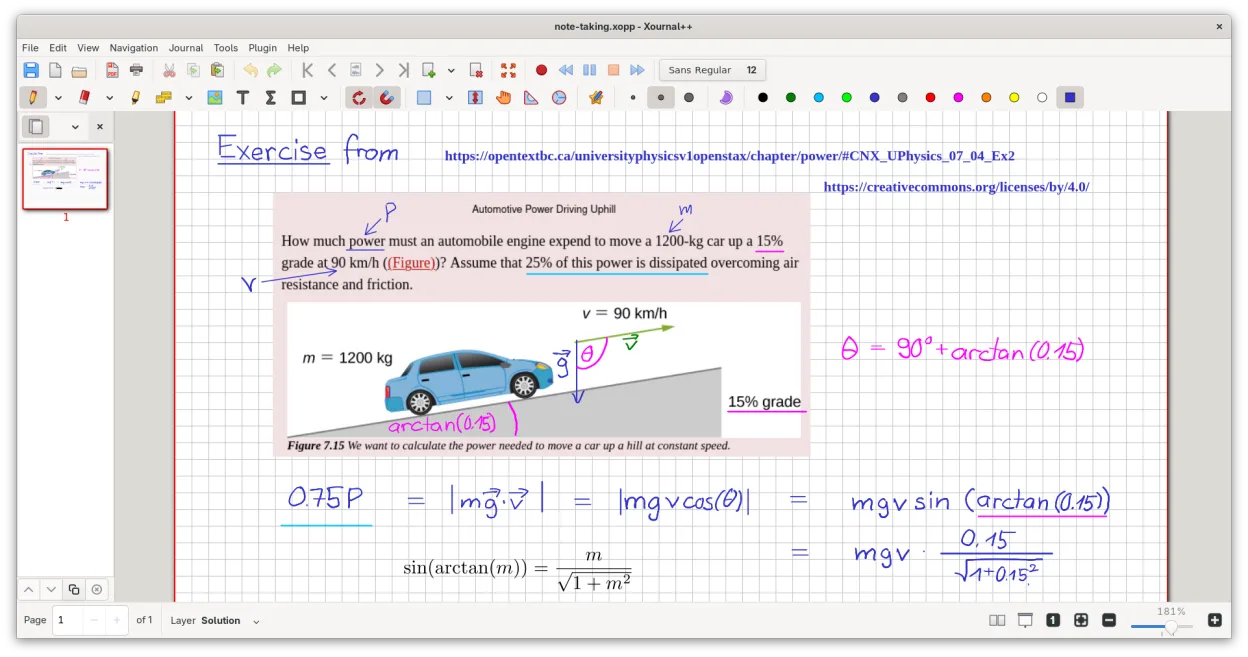
Xournal++ is a good replacement for Adobe Acrobat Reader DC if your main need is annotating PDFs, especially with a stylus. It excels at handwritten notes, drawing, and marking up documents. However, it lacks built-in support for filling complex PDF forms and password-protected PDF handling. While it can view and export PDFs, signing and advanced form features in Acrobat are not fully replicated. Best for students, educators, or anyone prioritizing inking over form processing.
- Licencia
- GPL-2.0
- Precio
- Gratis
- Última versión
- 1.3.8 (25 de septiembre de 2026)
- Valoración
- —
Lo que funciona igual
- Both allow PDF annotation including highlighting and text markup
- Support stylus input for handwriting and drawing
- Export annotated documents to PDF and image formats
- Offer cross-platform compatibility (Linux, Windows, macOS)
- Enable text selection and link following from source PDF
Lo que cambia
- Xournal++ lacks native form-filling and digital signature features
- No built-in password protection or decryption of PDFs
- Focuses on note-taking rather than document management
- Does not include cloud sync or Adobe's online services
- Requires external LaTeX for equation rendering
Abrir tus archivos de Adobe Acrobat Reader DC
Xournal++ can open most standard PDFs and preserves text and links. Annotations are overlaid and saved in Xournal++'s format (.xopp) or exported to PDF, PNG, or SVG. Users can export to plain PDF for sharing, but original form fields may not remain interactive. Compatibility with heavily encrypted or DRM-locked PDFs is limited, as Xournal++ does not handle password decryption beyond basic support if libraries are installed.
Pasar de Adobe Acrobat Reader DC a Xournal++, paso a paso
- Install Xournal++ via Flathub or your package manager
- Import your PDFs by opening them directly in Xournal++
- Use the pen or highlighter tools to annotate as needed
- Export annotated files to PDF for sharing
- Enable LaTeX support if needed, ensuring a LaTeX distribution is installed
- Customize toolbar and stylus buttons for efficiency
Funciones clave de Xournal++
- Soporte de lápiz óptico sensible a la presión para tablets Wacom, Huion y XP-Pen
- Anotar, resaltar y tachar texto sobre archivos PDF
- Exportar notas a PDF, PNG y SVG vía GUI o línea de comandos
- Herramientas de dibujo que incluyen bolígrafo, resaltador, formas y soporte LaTeX
- Estabilización de entrada para escritura más fluida
- Barra de herramientas personalizable y asignación de botones del lápiz
- Barra lateral con vistas previas de página, marcadores PDF y gestión de capas
Cómo instalar Xournal++ en Linux
flatpak install flathub com.github.xournalpp.xournalppsudo apt install xournalppsudo apt install xournalppsudo dnf install xournalppsudo pacman -S xournalppsudo zypper install xournalppPreguntas frecuentes
Can Xournal++ fill out and save PDF forms like Acrobat Reader DC?
It can write over form fields but does not support interactive form filling. You cannot save entered data in digital form fields reliably.
Does Xournal++ support signing PDFs digitally?
No, it lacks digital signature support. You can insert a scanned signature image manually, but it won't provide cryptographic signing.
Can I edit text in a PDF like in Acrobat?
No. Xournal++ only allows adding new text or annotations. You cannot edit existing text in a PDF.
Otras 3 alternativas a Adobe Acrobat Reader DC
 OkularOkular es un visor de documentos universal para KDE que maneja PDF, EPUB y cómics con soporte de anotaciones.Código abiertoGratisFlatpakOkular vs Adobe Acrobat Reader DC
 EvinceEvince es el visor de documentos estándar de GNOME para PDF, PostScript y archivos de cómics, ofreciendo…Código abiertoGratisFlatpakEvince vs Adobe Acrobat Reader DC
 Master PDF EditorUn editor PDF propietario para Linux que permite editar texto, formularios y firmas digitales con una…FlatpakMaster PDF Editor vs Adobe Acrobat Reader DC