
 Evolution MailLinux
vs
Evolution MailLinux
vs
 Becky!Windows
Evolution Mail, alternative Linux à Becky!
Mis à jour le
Notre avis
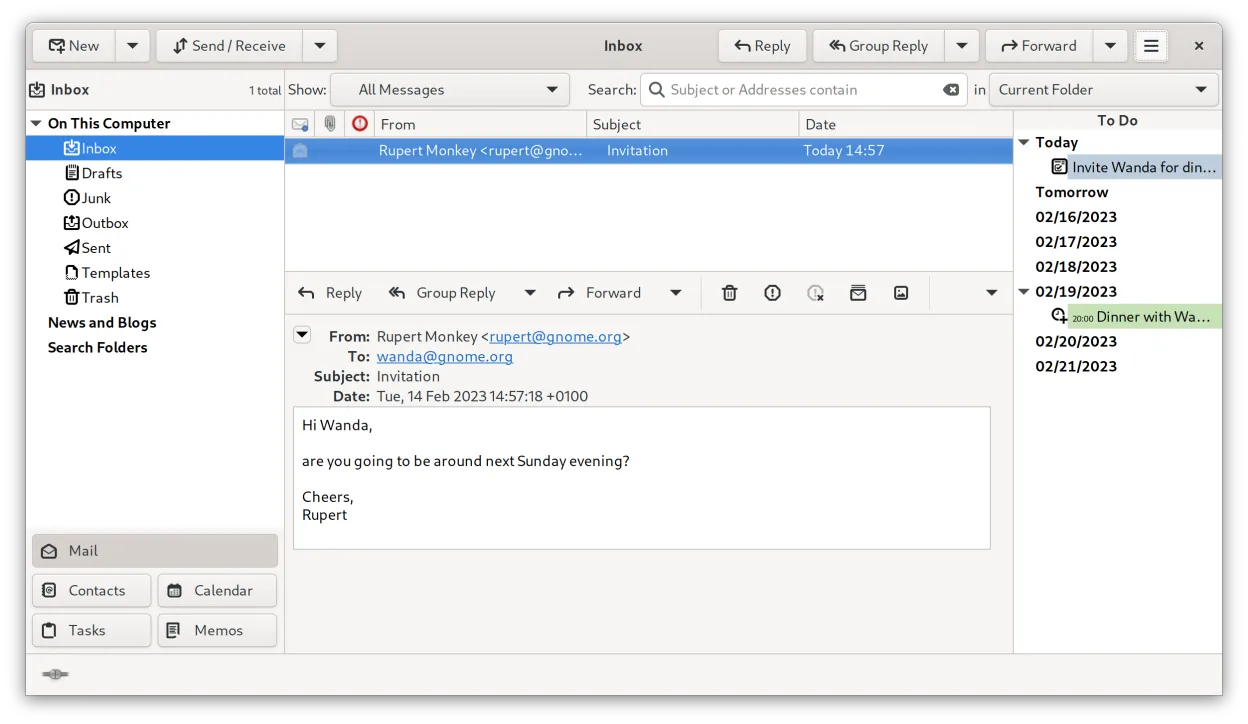
Evolution can replace Becky! for users who need a full‑featured email client with calendar and contacts integrated. It handles POP3/IMAP, multiple accounts, filtering, address‑book import/export and basic HTML rendering, all while staying within the GNOME desktop. However, it is heavier than Becky! and brings many extra modules that may feel unnecessary to those who only want a simple, low‑resource mail reader. If you are comfortable with a more complex UI and want the added calendar/task features, Evolution is a solid choice; if you prefer a tiny, single‑purpose client, you might look elsewhere.
- Licence
- GPL-2.0+ and GFDL-1.3
- Prix
- Gratuit
- Dernière version
- 3.62.1 (9 octobre 2026)
- Note
- —
Ce qui fonctionne pareil
- POP3 and IMAP support
- Multiple accounts and identities
- Local mail storage (mbox or maildir)
- Message filtering/rules
- Address‑book import and export
Ce qui change
- Heavier resource usage than Becky!
- Integrated calendar and tasks add UI complexity
- No built‑in support for Becky!‑specific address‑book format
- Lacks the ultra‑minimalist interface Becky! is known for
- No native Windows‑style pop‑up notifications
Ouvrir vos fichiers Becky!
Evolution cannot directly open Becky! proprietary data files. Becky! stores mail in mbox files, which Evolution can read, but address‑book formats differ. You will need to export contacts from Becky! to a standard format such as CSV or vCard before importing them into Evolution. The exact steps depend on the Becky! version you have, so consult its documentation for export options.
Passer de Becky! à Evolution Mail, étape par étape
- Export Becky! mail folders as mbox files
- Export contacts to CSV or vCard from Becky!
- In Evolution, add a new mail account and point the local storage to the exported mbox files
- Import the CSV/vCard file via Evolution’s address‑book import wizard
- Set up any needed filters or rules in Evolution to match your previous setup
Fonctionnalités clés de Evolution Mail
- Prise en charge de la messagerie IMAP, POP3 et SMTP
- Intégration Microsoft Exchange via EWS
- Calendrier intégré avec prise en charge de iCal et CalDAV
- Annuaire avec synchronisation LDAP et CardDAV
- Gestion des tâches et des notes
- Chiffrement PGP/GPG et signature S/MIME
- Recherche dans la messagerie, les contacts et les événements
- Extensible via des plugins
Installer Evolution Mail sous Linux
flatpak install flathub org.gnome.EvolutionQuestions fréquentes
Can Evolution handle large mailboxes like Becky! does?
Yes, Evolution works with both mbox and maildir formats and can manage large mail stores, though it may be slower than Becky! on very low‑end hardware.
Is there a way to keep Evolution’s UI simple?
You can hide the calendar and tasks panels and use the mail view only, which reduces clutter but the underlying application remains the same.
Will my existing Outlook/Exchange accounts work in Evolution?
Evolution supports Exchange via EWS, so most Exchange accounts will function, though some advanced features may require additional configuration.
4 autres alternatives à Becky!
 Mozilla ThunderbirdMozilla Thunderbird est un client de messagerie, agenda et flux d'actualités gratuit et open‑source pour…Open sourceGratuitMozilla Thunderbird ou Becky!
 SylpheedSylpheed est un client de messagerie et de nouvelles léger, basé sur GTK, conçu pour Linux, Windows et macOS.Open sourceGratuitSylpheed ou Becky!
 Claws MailClaws Mail est un client de messagerie GTK léger et rapide pour Linux.Open sourceGratuitFlatpakClaws Mail ou Becky!
 KMailKMail est le client de messagerie complet de KDE, faisant partie de la suite Kontact, prenant en charge IMAP…Open sourceGratuitKMail ou Becky!