
 MyPaintLinux
vs
SketchBookWindows
MyPaint, alternative Linux à SketchBook
Mis à jour le
Notre avis
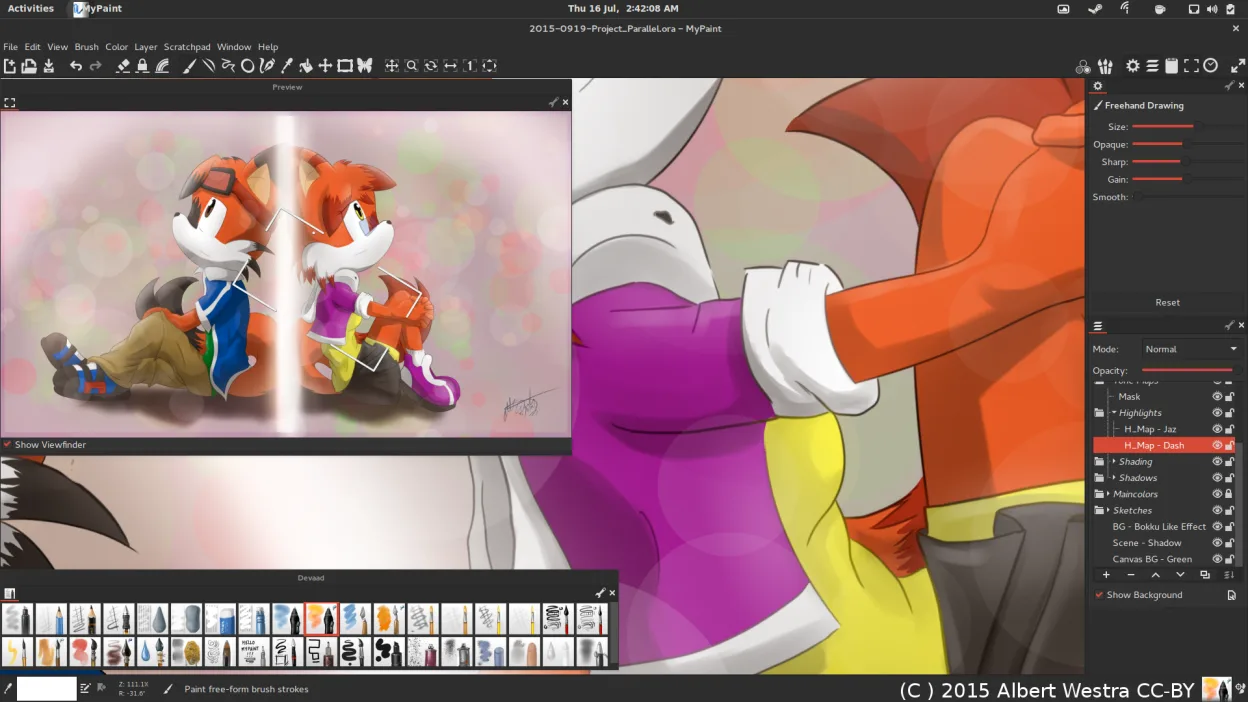
MyPaint is a solid replacement for SketchBook if you prioritize brush fidelity and tablet performance over polished UI. It matches SketchBook's core strength: pressure-sensitive raster drawing with a minimal interface. However, it is not a drop-in swap. MyPaint lacks the tight, modern workflow and specific toolset some SketchBook users rely on. It is ideal for concept artists and illustrators who value open-source flexibility and unlimited undo. Avoid it if you need advanced vector tools or a highly structured layer system with complex masking, as MyPaint keeps layers simple by design.
- Licence
- GPL-2.0+
- Prix
- Gratuit
- Dernière version
- 2.0.1 (29 mai 2020)
- Note
- —
Ce qui fonctionne pareil
- Pressure-sensitive raster drawing engine
- Minimal, canvas-focused interface
- Support for graphics tablets and tilt
- Export to standard formats like PNG and JPEG
- Free to use on Linux
Ce qui change
- MyPaint has simpler layer management without advanced masking
- SketchBook offers a more polished, modern UI with integrated tutorials
- MyPaint is open-source (GPL-2.0+) while SketchBook is proprietary
- MyPaint relies on Python plugins for extension, unlike SketchBook's closed ecosystem
Ouvrir vos fichiers SketchBook
MyPaint does not natively open SketchBook's proprietary .skb files. You will need to export your SketchBook work as PNG or JPEG before importing it into MyPaint. MyPaint supports OpenRaster (.ora) for native saving, which preserves layers, but this format is not used by SketchBook. Always keep a backup of your original files before migrating.
Passer de SketchBook à MyPaint, étape par étape
- Install MyPaint via your package manager or Flathub
- Export all existing SketchBook projects as high-resolution PNGs
- Import the PNGs into MyPaint as new canvases
- Configure your tablet drivers to ensure pressure sensitivity works
- Test the default brush pack to match your SketchBook workflow
- Save new projects in OpenRaster format to preserve layers
Fonctionnalités clés de MyPaint
- Moteur de pinceaux avec des centaines de paramètres configurables
- Prise en charge de la sensibilité à la pression et de l’inclinaison sur les tablettes graphiques
- Interface simple, sans distraction, centrée sur la toile
- Support des calques avec des modes de fusion basiques
- Exportation vers PNG, JPEG, OpenRaster et d’autres formats courants
- Extensible via des plugins Python
- Packs de pinceaux pré‑installés fournis par des artistes professionnels
- Historique d’annulation/rétablissement avec un nombre illimité d’étapes
Installer MyPaint sous Linux
flatpak install flathub org.mypaint.MyPaintsudo apt install mypaintsudo apt install mypaintsudo dnf install mypaintsudo pacman -S mypaintsudo zypper install mypaintQuestions fréquentes
Does MyPaint support tilt sensitivity?
Yes, MyPaint supports both pressure and tilt sensitivity on compatible graphics tablets, allowing for more natural brush strokes.
Can I use custom brushes in MyPaint?
Yes, you can import custom brushes or configure existing ones using the extensive brush engine. You can also write Python plugins to create new brush behaviors.
Is MyPaint suitable for beginners?
It is very approachable due to its simple interface and pre-made professional brushes. However, the lack of a traditional menu bar might require a short learning curve for users coming from complex suites like Photoshop.
4 autres alternatives à SketchBook
 KritaKrita est un programme de peinture numérique et d'illustration open‑source complet.Open sourceGratuitFlatpakKrita ou SketchBook
 GIMPGIMP est un éditeur de graphiques raster gratuit et open source, conçu pour la retouche photo, la peinture…Open sourceGratuitFlatpakGIMP ou SketchBook
 PintaPinta est un éditeur de bitmap gratuit et open source qui imite Paint.NET avec une interface simple et la…Open sourceGratuitFlatpakPinta ou SketchBook
 Xournal++Une application de prise de notes open source multiplateforme pour l'écriture manuscrite, l'annotation de PDF…Open sourceGratuitFlatpakXournal++ ou SketchBook