
 ShotwellLinux
vs
Windows Photo ViewerWindows
ShotwellLinux
vs
Windows Photo ViewerWindows
Shotwell, alternative Linux à Windows Photo Viewer
Mis à jour le
Notre avis
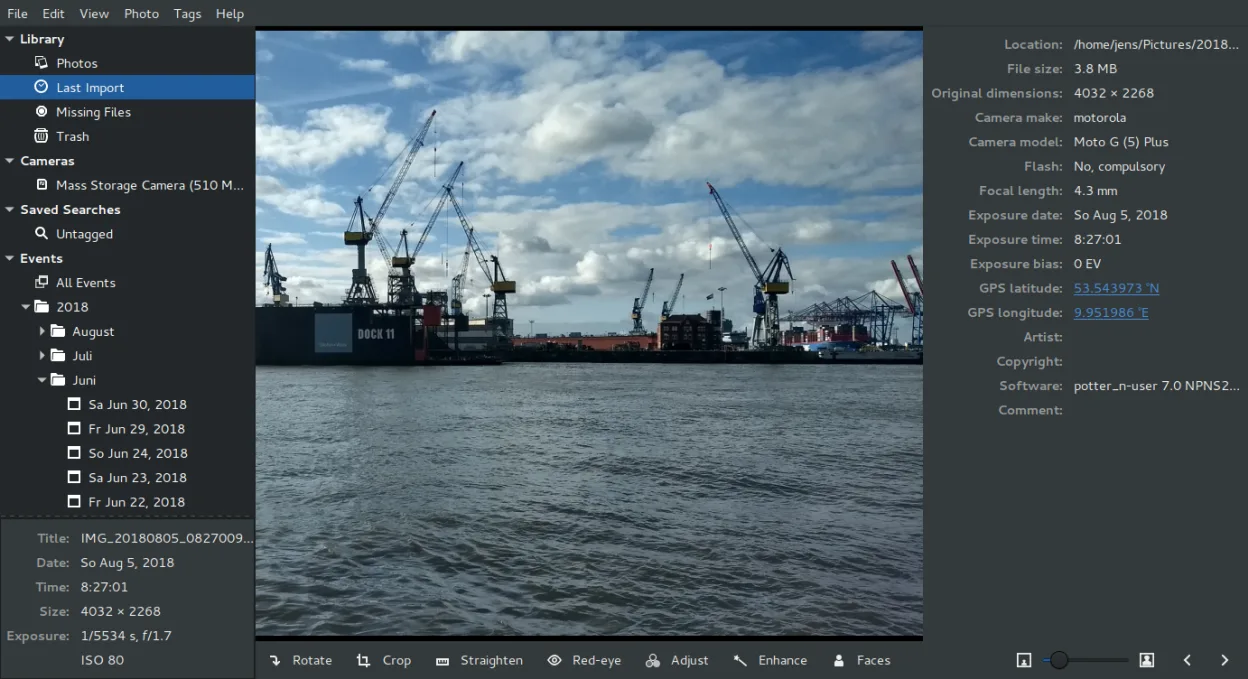
Shotwell is a decent replacement for Windows Photo Viewer if you're okay with a slight shift from pure viewing to light organization. It opens common formats quickly and has solid fullscreen navigation with keyboard support. However, it's designed around importing and managing photos, not just opening them ad hoc. For users who want simple, fast viewing without library tracking, it may feel slightly heavy. But on GNOME systems, it starts quickly and handles basic edits and slideshows well, making it a functional upgrade for most casual users.
- Licence
- LGPL-2.1+
- Prix
- Gratuit
- Dernière version
- 33.0 (13 septembre 2026)
- Note
- —
Ce qui fonctionne pareil
- Supports common image formats like JPEG, PNG, BMP, and GIF
- Fast startup and responsive interface on modern systems
- Full-screen view with zoom and keyboard navigation (arrow keys, spacebar)
- Basic slideshow functionality with adjustable timing
- Clean, minimal UI focused on the image
Ce qui change
- Designed as a photo organizer with import and library management, not just a viewer
- No direct 'open any image from anywhere' context menu focus — prefers importing
- Lacks the barebones simplicity of Windows Photo Viewer for single-image quick checks
- Slight startup delay when launching outside the desktop environment
- No built-in print or 'set as wallpaper' shortcuts in all distributions
Ouvrir vos fichiers Windows Photo Viewer
Shotwell opens JPEG, PNG, and TIFF without issue, and also supports GIFs and many RAW formats. BMP files are generally supported if the system's underlying GDK libraries handle them, which most modern distributions do. You won’t need to convert standard photos from a Windows system. It doesn’t export to BMP, but you can save edits in JPEG, PNG, or TIFF. Compatibility with less common variants depends on the backend libraries, but everyday photos from phones or cameras will open reliably.
Passer de Windows Photo Viewer à Shotwell, étape par étape
- Install Shotwell via your distribution's package manager (e.g., sudo apt install shotwell on Debian/Ubuntu)
- Open Shotwell and set preferences to 'Copy files to Pictures folder' or 'Leave files in place' based on your preference
- Use the file manager to right-click images and choose 'Open With Shotwell' for direct viewing
- For full library use, import folders of photos through the Import menu
- Use fullscreen mode (F) for viewing, arrow keys to navigate, and spacebar for slideshow
Fonctionnalités clés de Shotwell
- Importer des photos depuis un appareil photo ou un disque
- Organiser par date, balises, notes
- Recadrage, correction des yeux rouges, couleurs, redressement non destructifs
- Prise en charge des formats RAW, JPEG, PNG, TIFF
- Téléversement vers Flickr, Google Photos, etc.
- Interface rapide et légère
- Intégré au gestionnaire de fichiers GNOME
Installer Shotwell sous Linux
flatpak install flathub org.gnome.Shotwellsudo apt install shotwellsudo apt install shotwellsudo dnf install shotwellsudo pacman -S shotwellsudo zypper install shotwellQuestions fréquentes
Can I use Shotwell just as a viewer without importing photos?
Yes, you can open individual images directly from the file manager without importing. However, some features like editing and tagging work best within the library.
Does Shotwell support animated GIFs?
Yes, it displays animated GIFs in the library and fullscreen view, though performance may vary depending on the system's graphics stack.
Is Shotwell available on non-GNOME desktops?
Yes, it runs on other desktop environments like XFCE or KDE, but may require extra GNOME libraries and integration won't be as tight.
5 autres alternatives à Windows Photo Viewer
 gThumb Image ViewergThumb est un visionneuse, un éditeur et un organisateur d'images intégré à GNOME pour Linux.Open sourceGratuitFlatpakgThumb Image Viewer ou Windows Photo Viewer
 Eye of GNOMEEye of GNOME est un visionneur d'images léger pour GNOME, conçu pour parcourir et faire pivoter des images…Open sourceGratuitFlatpakEye of GNOME ou Windows Photo Viewer
 nomacs - Image LoungeNomacs est un visionneuse d'images gratuite et open source qui prend en charge les vignettes, les…Open sourceGratuitFlatpaknomacs - Image Lounge ou Windows Photo Viewer
 GwenViewGwenView est le visionneur d’images rapide de KDE, doté d’outils d’édition et d’annotation de base, idéal…Open sourceGratuitFlatpakGwenView ou Windows Photo ViewermirageMirage est un visionneur d'images léger pour Linux, conçu pour une navigation rapide avec un minimum de…Open sourceGratuitmirage ou Windows Photo Viewer