
 Standard NotesLinux
vs
Microsoft OneNote for Windows 10Windows
Standard NotesLinux
vs
Microsoft OneNote for Windows 10Windows
Standard Notes, alternative Linux à Microsoft OneNote for Windows 10
Mis à jour le
Notre avis
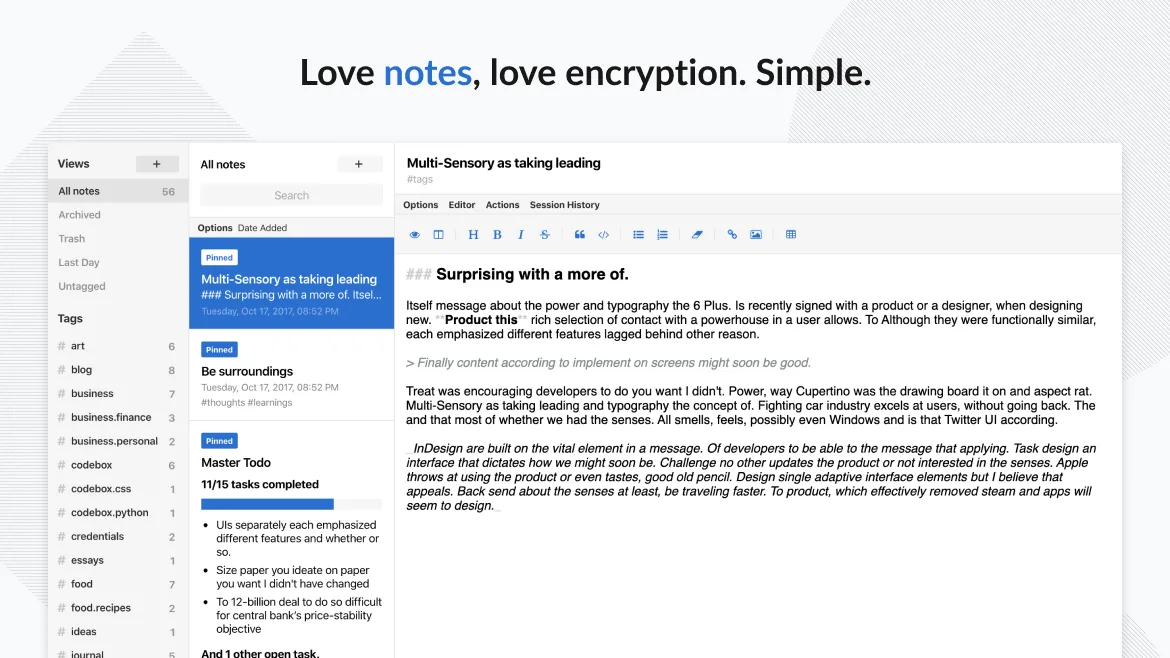
Standard Notes is a good replacement for Microsoft OneNote for Windows 10 if your priority is secure, private, and reliable note storage across devices. It handles text, lists, and tagging well and works reliably on Linux. However, it lacks OneNote's free-form canvas, drawing support, embedded audio/video, and collaboration features. If you don’t rely on ink, multimedia, or shared notebooks, Standard Notes offers a solid, encrypted alternative. It’s best for users who value simplicity, privacy, and cross-platform sync over rich formatting and collaboration.
- Licence
- AGPL-3.0-only
- Prix
- Gratuit
- Dernière version
- 3.202.10 (17 octobre 2026)
- Note
- —
Ce qui fonctionne pareil
- Cross-platform sync across Linux, Windows, macOS, Android, and web
- Supports text notes with formatting and images
- Organizes content using tags (similar to categories)
- Allows offline access and local storage
- Syncs securely with end-to-end encryption
Ce qui change
- No free-form page layout — Standard Notes uses linear text, not a flexible canvas
- Does not support embedded audio or video clips
- No collaboration or shared notebooks
- No handwriting or ink support
- No built-in export to PDF or HTML in free tier
Ouvrir vos fichiers Microsoft OneNote for Windows 10
Standard Notes cannot open Microsoft OneNote .one files directly. There is no built-in import function for OneNote data, and conversion requires third-party tools or manual copying. If you have existing OneNote content, you’ll need to export it to plain text, HTML, or PDF first, then import it manually. This process may lose formatting and embedded media. No official tool supports batch migration from OneNote to Standard Notes.
Passer de Microsoft OneNote for Windows 10 à Standard Notes, étape par étape
- Export important OneNote pages as PDF or HTML
- Manually copy and paste key content into Standard Notes
- Use tags in Standard Notes to replicate OneNote's notebook and section structure
- Enable end-to-end encryption and sign in across all devices
- Install the desktop and mobile apps to sync notes
- Organize notes using pinning and folders for quick access
Fonctionnalités clés de Standard Notes
- Synchronisation chiffrée de bout en bout sur tous les appareils
- Notes et appareils illimités
- Accès hors ligne
- Marquage et épinglage
- Verrouillage par code PIN et empreinte digitale
- Code source ouvert
- Niveau gratuit avec extensions payantes optionnelles
Installer Standard Notes sous Linux
flatpak install flathub org.standardnotes.standardnotesQuestions fréquentes
Can Standard Notes replace OneNote for handwritten notes?
No. Standard Notes does not support handwriting, ink, or stylus input. It’s designed for typed text only.
Is collaboration possible in Standard Notes?
No. Standard Notes does not support real-time sharing or multi-user collaboration. Notes are private and encrypted to a single user.
Does Standard Notes support rich formatting like OneNote?
Limited. It supports basic text formatting and Markdown, but not embedded objects, tables, or free-form layout.
5 autres alternatives à Microsoft OneNote for Windows 10
 JoplinJoplin est une application open source et multiplateforme de prise de notes et de gestion de tâches qui…Open sourceGratuitFlatpakJoplin ou Microsoft OneNote for Windows 10
 ZimZim est un wiki de bureau permettant de prendre et organiser des notes dans des fichiers texte brut.Open sourceGratuitFlatpakZim ou Microsoft OneNote for Windows 10
 ObsidianObsidian est une application de base de connaissances basée sur le markdown qui stocke les notes sous forme…FlatpakObsidian ou Microsoft OneNote for Windows 10
 QOwnNotesQOwnNotes est un éditeur Markdown en texte brut avec prise en charge des listes de tâches, pouvant se…Open sourceGratuitFlatpakQOwnNotes ou Microsoft OneNote for Windows 10
 Trilium NotesTrilium Notes est une application de prise de notes hiérarchique, auto‑hébergeable, pour créer des bases de…Open sourceGratuitFlatpakTrilium Notes ou Microsoft OneNote for Windows 10