
 SylpheedLinux
vs
ThunderbirdWindows
SylpheedLinux
vs
ThunderbirdWindows
Sylpheed as a Linux alternative to Thunderbird
Updated
Our verdict
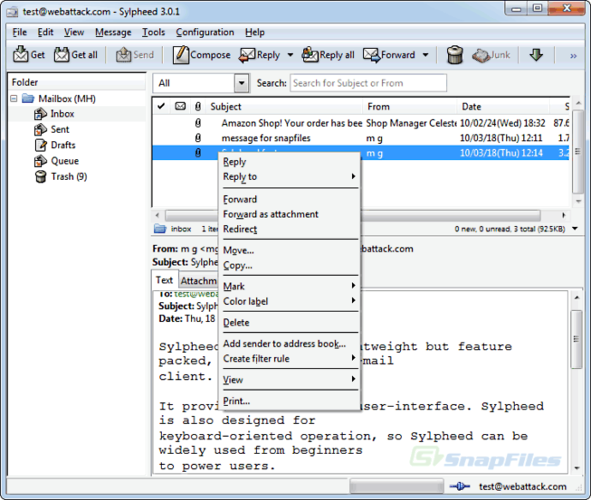
Sylpheed can replace Thunderbird for users who need a lightweight, fast mail client with basic calendar and contact features, but it lacks the rich calendar, chat, and RSS integration that Thunderbird offers. It is suitable for users who prefer a small footprint and simple configuration, such as developers or those on older hardware.
- License
- GPL-2.0-or-later
- Price
- Free
- Latest version
- 3.7.0
- Rating
- —
What works the same
- Supports IMAP/POP3/SMTP for email
- Built‑in address book with LDAP lookup
- Rule‑based filtering
- Multiple account handling
- Spell checking via Enchant
What is different
- No integrated calendar or contacts sync beyond address book
- No native RSS feed reader
- No chat (IRC/XMPP/Matrix) support
- No Usenet support beyond basic NNTP
- No advanced message threading or conversation view
Opening your Thunderbird files
Sylpheed stores mail in the MH format, which is not compatible with Thunderbird’s mbox or Maildir. Direct import of Thunderbird profiles is not supported; users would need to export messages to a common format (e.g., mbox) and then use a conversion tool before importing into Sylpheed.
Switching from Thunderbird to Sylpheed, step by step
- Export Thunderbird mail to mbox or Maildir using the Export feature.
- Export contacts to a CSV or vCard file from Thunderbird’s Address Book.
- Install Sylpheed from your distribution’s package manager (e.g., apt install sylpheed).
- Configure your email accounts in Sylpheed using the same server settings as Thunderbird.
- Import the exported mail files into Sylpheed’s MH mailbox directory or use a conversion script.
- Re‑import contacts into Sylpheed’s address book via the CSV/vCard import option.
Key features of Sylpheed
- MH mailbox storage
- GTK+ graphical interface
- Support for SMTP, POP3, IMAP and NNTP
- Built‑in address book with LDAP lookup
- Filtering and rule‑based mail processing
- Multiple accounts and folder hierarchy
- Spell checking via Enchant
- Portable configuration files
How to install Sylpheed on Linux
sudo apt install sylpheedsudo apt install sylpheedsudo dnf install sylpheedFrequently asked questions
Does Sylpheed support the same email protocols as Thunderbird?
Yes, Sylpheed supports SMTP, POP3, IMAP, and NNTP, so it can handle the same email servers as Thunderbird.
Can I use Sylpheed on Windows?
Yes, Sylpheed is cross‑platform and runs on Windows, but it is primarily developed for Linux and uses the GTK+ toolkit.
Will my existing Thunderbird settings work automatically in Sylpheed?
No. Sylpheed does not read Thunderbird configuration files; you must manually re‑create account settings and import mail and contacts.
5 other alternatives to Thunderbird
 MailspringA fast, feature-rich desktop email client for Linux with a C++ sync engine and unified inbox.Open sourceFreeFlatpakMailspring vs Thunderbird
 Claws MailClaws Mail is a lightweight, fast GTK‑based email client for Linux.Open sourceFreeFlatpakClaws Mail vs Thunderbird
 EvolutionEvolution is a full‑featured personal information manager that combines email, calendar, contacts and tasks…Open sourceFreeFlatpakEvolution vs Thunderbird
 KMailKMail is KDE's full-featured email client, part of the Kontact suite, supporting IMAP, POP3, and local…Open sourceFreeKMail vs Thunderbird
 GearyGeary is a GNOME‑based email client for Linux that lets you send, receive, and organize mail in conversation…Open sourceFreeFlatpakGeary vs Thunderbird