
 GNOME System MonitorLinux
vs
HWiNFOWindows
GNOME System MonitorLinux
vs
HWiNFOWindows
GNOME System Monitor as a Linux alternative to HWiNFO
Updated
Our verdict
GNOME System Monitor is a poor replacement for HWiNFO. It handles basic process and resource tracking but lacks the deep hardware telemetry HWiNFO provides. You will not find detailed voltage readings, specific component identification, or fan control here. It is suitable only for users who need to check which process is eating CPU or memory, not for enthusiasts monitoring thermal limits or power draw. If you need precise sensor data, stick to command-line tools or dedicated hardware monitors.
- License
- GPL-2.0
- Price
- Free
- Latest version
- 51.1
- Rating
- 5/5 (1)
What works the same
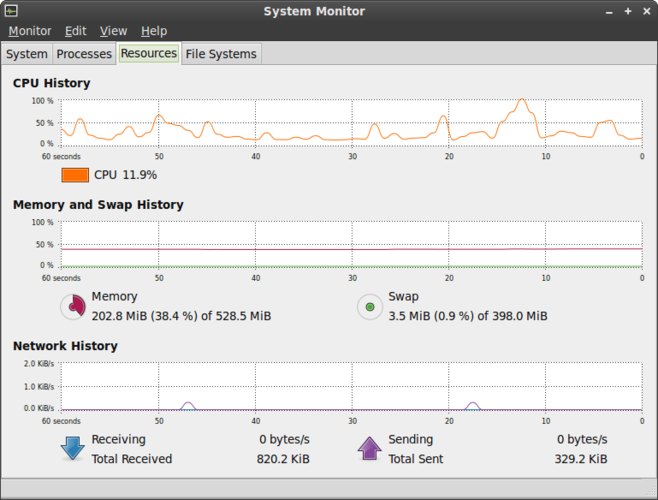
- Displays real-time CPU and memory usage graphs
- Shows system uptime and load averages
- Provides a list of running processes with resource consumption
- Runs as a lightweight background application
What is different
- Lacks detailed hardware sensor data like voltage and precise per-core temperatures
- No fan speed monitoring or control capabilities
- Does not identify specific hardware components or models
- No built-in data logging for historical analysis
- Missing GPU and drive-specific thermal monitoring
Opening your HWiNFO files
GNOME System Monitor does not open or export HWiNFO log files. It generates its own process lists but has no import function for external sensor data. If you have historical data in HWiNFO formats, you must use a different tool to view or convert them, as this application is strictly a live process viewer.
Switching from HWiNFO to GNOME System Monitor, step by step
- Install GNOME System Monitor if not already present via your package manager
- Open the application from your application menu
- Use the Processes tab to identify high-resource consumers
- Check the Resources tab for overall CPU and memory load
- Accept that hardware sensor details are unavailable in this tool
- Supplement with terminal commands like 'sensors' for basic temperature checks
Key features of GNOME System Monitor
- List all running processes with CPU and memory usage
- Sort processes by name, PID, user, or resource consumption
- View detailed information for a specific process
- End or kill running processes
- Monitor system-wide CPU and memory load
- Display system uptime and load average
- Show network activity overview
- Integrate with GNOME desktop environment
How to install GNOME System Monitor on Linux
sudo apt install gnome-system-monitorsudo apt install gnome-system-monitorsudo dnf install gnome-system-monitorsudo pacman -S gnome-system-monitorsudo zypper install gnome-system-monitorFrequently asked questions
Can I see GPU temperatures in GNOME System Monitor?
No, it does not display specific GPU or drive temperatures. It only shows aggregate system resource usage.
Does it replace lm-sensors?
No, it does not replace lm-sensors. It does not read hardware sensors directly. Use lm-sensors for temperature and fan data.
Is there a way to log data in this app?
No, GNOME System Monitor does not have a built-in logging feature for historical data analysis.