 InsomniaLinux
vs
PostmanWindows
InsomniaLinux
vs
PostmanWindows
Insomnia as a Linux alternative to Postman
Updated
Our verdict
Insomnia is a strong, open-source alternative to Postman for most API development tasks. It handles standard HTTP requests, collections, and scripting effectively. The main advantage is its MIT license and lack of forced cloud dependency, allowing fully local workflows. It is ideal for developers who prefer open-source tools or need to avoid Postman's subscription tiers. However, if you rely heavily on Postman's specific ecosystem integrations or advanced mock server features, you may face some friction. For standard REST and GraphQL work, it is a direct and capable replacement.
- License
- MIT
- Price
- Free
- Latest version
- 13.3.0 (September 23, 2026)
- Rating
- —
What works the same
- Supports sending arbitrary HTTP requests (GET, POST, PUT, DELETE) with full response inspection.
- Organizes requests into collections and folders for structured API management.
- Supports pre-request and test scripts using JavaScript for automation and validation.
- Handles various authentication methods including Basic, OAuth, and API keys.
- Cross-platform availability including native Linux support via AppImage or package managers.
What is different
- Insomnia is fully open-source (MIT), whereas Postman is proprietary with freemium limitations.
- Insomnia includes native support for gRPC, WebSockets, and SSE alongside REST and GraphQL.
- Postman has a more mature mock server feature, while Insomnia's mock server is still in development or recently released.
- Insomnia uses its own collection format, requiring conversion for Postman JSON files.
- Postman offers a larger marketplace of plugins and integrations compared to Insomnia's smaller ecosystem.
Opening your Postman files
Insomnia does not natively open Postman collection JSON files directly. You must use the built-in import feature to convert Postman v2.1 format JSON files into Insomnia's internal format. This process is generally reliable for standard collections but may require manual adjustment for complex environment variables or script dependencies. Exporting from Insomnia to Postman format is not natively supported, so you should keep your source of truth in Insomnia once migrated.
Switching from Postman to Insomnia, step by step
- Export your Postman collections as JSON files (v2.1 format).
- Open Insomnia on your Linux machine.
- Go to the Collections menu and select 'Import Data'.
- Choose the 'Postman' format and select your exported JSON files.
- Review the imported collections to ensure environments and variables were mapped correctly.
- Test a few requests to verify authentication and script behavior.
Key features of Insomnia
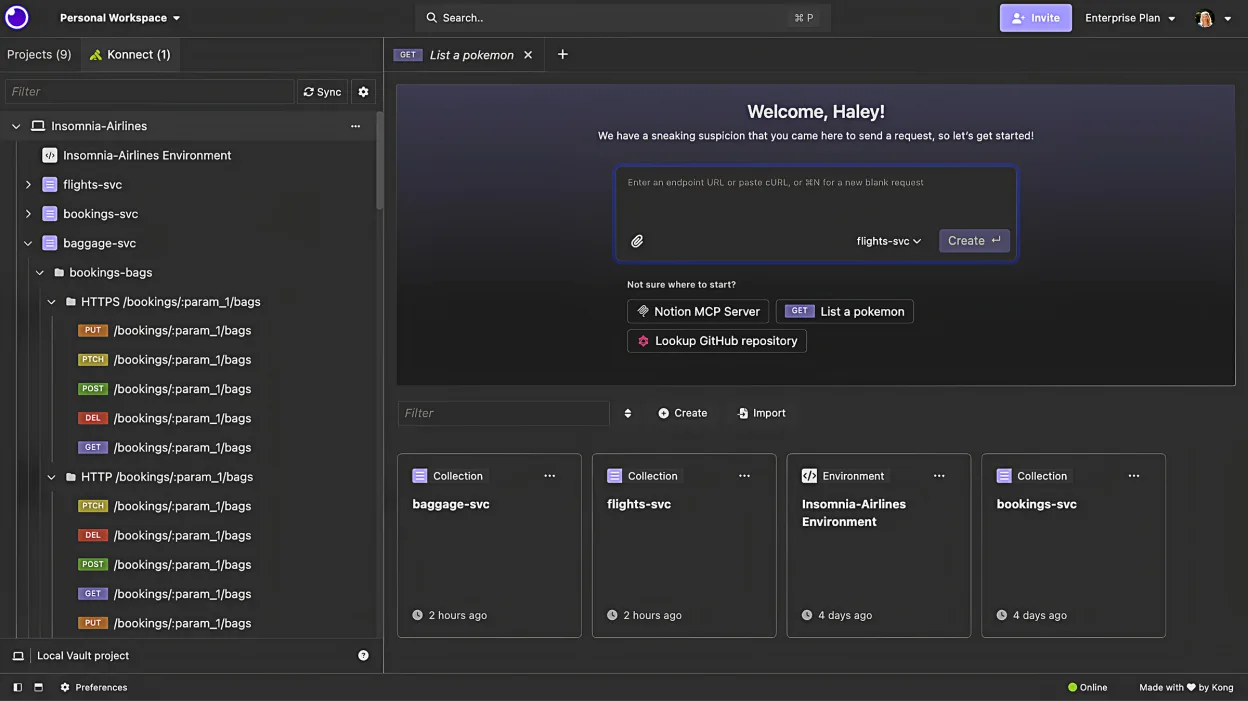
- Cross‑platform support for GraphQL, REST, WebSockets, SSE, gRPC
- Native OpenAPI editor with visual preview
- Built‑in test suites and CLI for linting and testing
- Local Vault, Cloud Sync, and Git Sync storage options
- Encrypted cloud collaboration
- Future mock server support (coming 2023)
How to install Insomnia on Linux
flatpak install flathub rest.insomnia.InsomniaFrequently asked questions
Does Insomnia work offline?
Yes. Insomnia is designed to work locally without an account. You can store all collections in the Local Vault and perform all API testing without an internet connection, unlike Postman which often pushes cloud sync.
Can I use Insomnia for GraphQL?
Yes, Insomnia has native GraphQL support, including schema introspection and query building, making it a solid choice for GraphQL API development alongside REST.
Is there a free tier with no limitations?
Yes, the entire application is free and open-source under the MIT license. There are no feature locks or subscription requirements for core functionality like collections, scripting, or local storage.