

Linux · Programming
HTTPie
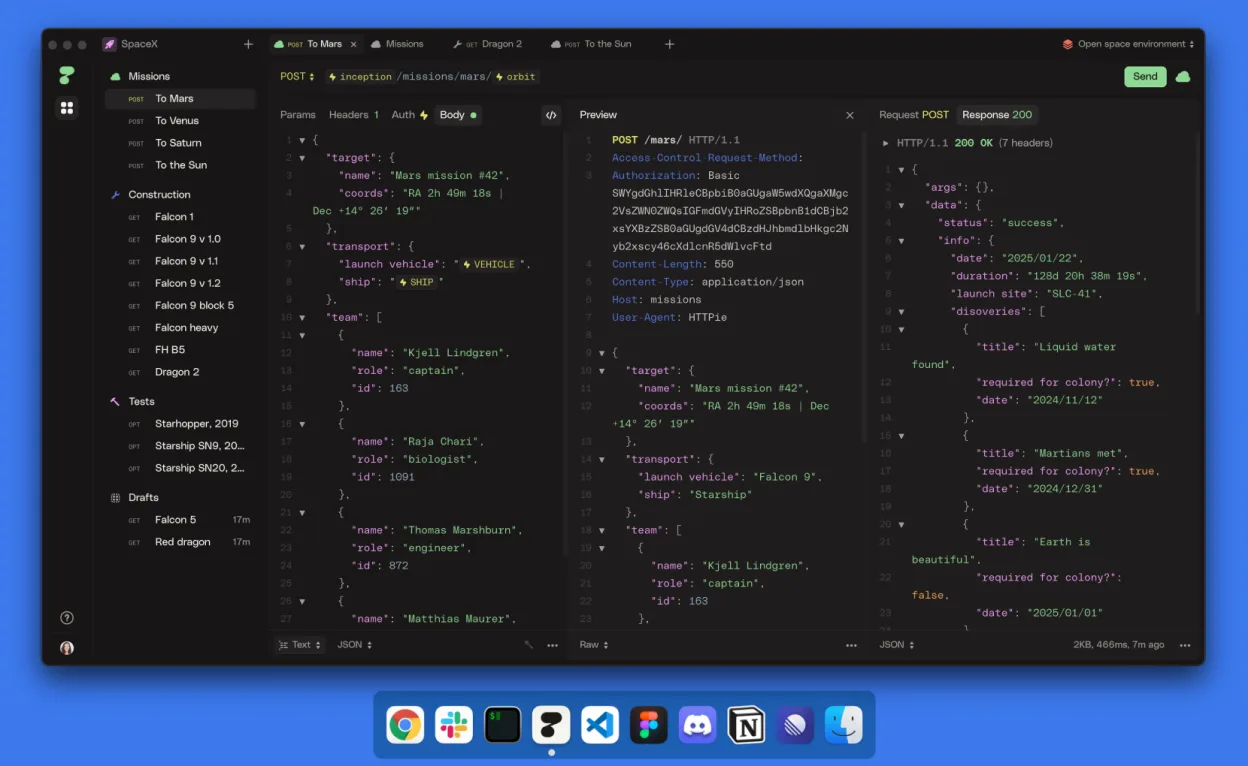
HTTPie Desktop is a cross‑platform graphical API client that mirrors the command‑line httpie experience.
- License
- LicenseRef-proprietary=https://httpie.io…
- Latest version
- 2025.2.0 (March 14, 2025)
- Developer
- HTTPie
- Installs
- 294 (Flathub, 30 days)
What is HTTPie?
HTTPie Desktop brings the simplicity of the httpie CLI to a tidy GUI. It was released in early 2025 and builds on the mature httpie project that has been a favorite among developers for years. The app is packaged for major distros and available on Flathub, making installation straightforward.
It targets developers, testers, and power users who need a quick, human‑friendly way to craft and send HTTP requests. Unlike bulky Windows tools, it keeps the focus on the request itself, with minimal clutter.
Compared to Postman, HTTPie Desktop feels more lightweight and consistent with the terminal workflow. It offers fewer bells and whistles but delivers a clean, intuitive interface that many find easier to learn.
Best for: Developers who prefer a lightweight, terminal‑style API client with a graphical front‑end.
Key features of HTTPie
- Sleek graphical interface for crafting requests
- AI‑assisted request building
- Spaces, collections, and tabs for organization
- Variables and environments for parameterisation
- Auto‑save and real‑time sync across devices
- Offline mode without an account
Pros
- Fast and responsive UI
- Consistent with httpie CLI syntax
- Cross‑platform and well‑maintained
- Built-in AI assistance
- Good organization tools
Cons
- Proprietary license limits transparency
- No extensive plugin ecosystem
- Less feature‑rich than Postman
- Requires internet for sync (if used)
Windows programs HTTPie replaces
How to install HTTPie on Linux
flatpak install flathub io.httpie.Httpiesudo apt install httpiesudo apt install httpiesudo dnf install httpiesudo pacman -S httpiesudo zypper install httpieTips for Windows users
If you’re coming from Postman, you’ll notice that HTTPie Desktop uses the same request syntax as the httpie CLI, so you can paste your curl‑style commands directly. There’s no native support for Postman collections, so you’ll need to recreate collections manually or export them as JSON and import them into a new collection. Keyboard shortcuts mirror common actions: Ctrl+S to save, Ctrl+N for a new request, and Ctrl+Shift+S to sync. Workflow shifts from a heavy, feature‑rich environment to a focused, minimal interface, so expect a learning curve in finding the AI‑assisted builder and variable management.
Recent releases
- 2025.2.0 —
✨ Enhancements - 📤 Export/Import — Backup, share, or publish your data as JSON. - 🗂️ Export a whole space — Transfer entire workspaces with all content. - 🔒 Export private items — Include drafts and local environments in exports. - 📂 Collection export — Share…
- 2025.1.0 —
✨ Enhancements - 💇♀️ UI refresh — A cleaner and more focused UI. - ⚡ Variable autocomplete — Searchable autocomplete for variables. - 🎛️ Interactive references — Interact with variables as tokens. - 🗃 Variables context menu — All the actions in one place. -…
- 2024.1.2 —
🪲 Fixed a bug introduced in 2024.1.1 that led to Control-W on Linux and Windows unintentionally closing the app window instead of just the current tab.
- 2024.1.1 —
✨ Enhancements - 📙 New documentation site — quickly access it via the Help menu (httpie.io/docs/desktop) - ♻️ New sync protocol — groundwork for upcoming multiplayer mode - 🚜 Selective field merging — changes are now applied on the field level, not doc level…
HTTPie: frequently asked questions
Is HTTPie Desktop free to use?
Yes, it is free. The application is distributed under a proprietary license but does not require payment for use.
Does it support Windows?
No, HTTPie Desktop is only available for Linux, macOS, and Windows via the official website, but the Linux package is the focus here.
Can I sync my requests across devices?
Yes, if you sign in, the app syncs your work in real time across devices. Offline mode is also available without an account.
How does the AI assistance work?
The AI feature suggests request parameters and headers based on the endpoint you’re targeting, but it’s optional and can be disabled in settings.
Updated