

Linux · Office
Evince
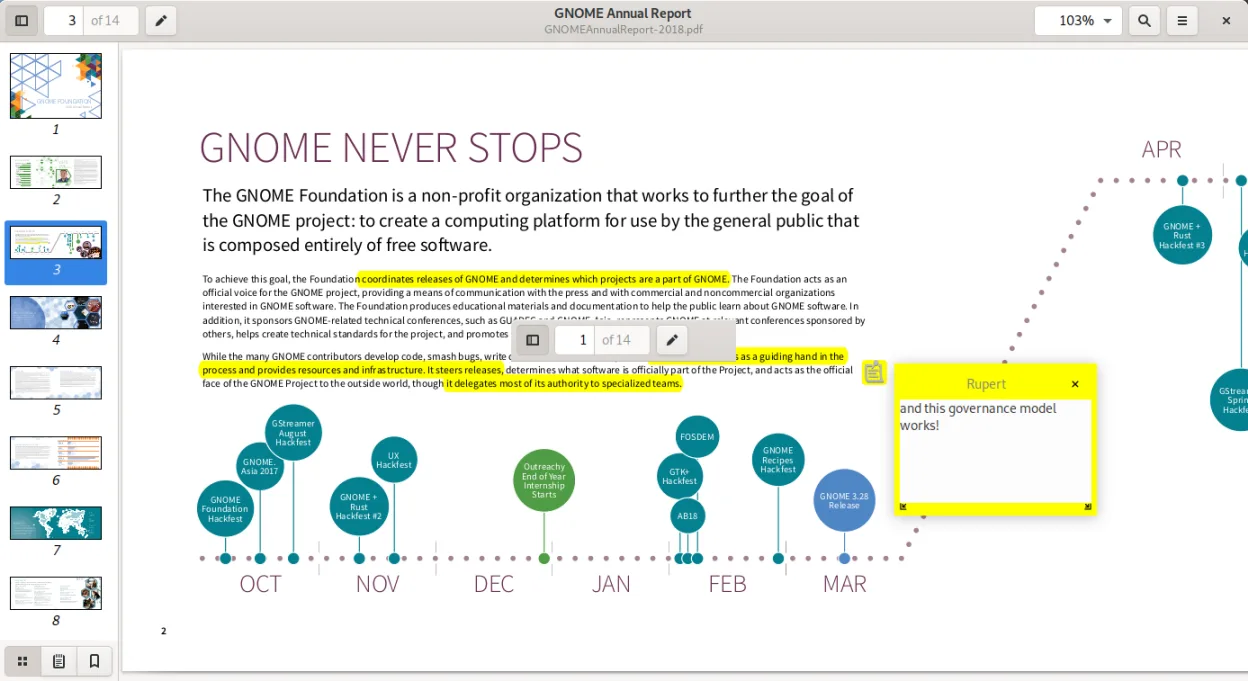
Evince is the standard GNOME document viewer for PDF, PostScript, and comic book archives, offering basic annotation and search.
- License
- GPL-2.0-or-later
- Latest version
- 48.4 (May 19, 2026)
- Developer
- The GNOME Project
- Installs
- 3,288 (Flathub, 30 days)

What is Evince?
Evince has served as the default document viewer for the GNOME desktop for over two decades. It was built to provide a lightweight, native experience for reading digital documents without the bloat of commercial suites. The project is mature, stable, and deeply integrated into the GNOME ecosystem, ensuring it receives consistent updates alongside the desktop environment itself.
It is ideal for users who need a reliable, distraction-free tool for reading PDFs, PostScript files, or comic book archives. If you are on a GNOME-based distribution like Fedora or Ubuntu, Evince is likely already installed. It suits those who value simplicity and native integration over advanced editing capabilities or heavy feature sets.
Compared to Adobe Reader or Sumatra PDF, Evince feels lighter and more integrated with the Linux desktop. It lacks some of the advanced form-filling or security features of Adobe but offers a cleaner interface. For basic reading and light annotation, it is often faster and more responsive than the heavier Windows alternatives.
Best for: GNOME users who need a simple, fast, and native way to read PDFs and other common document formats.
Key features of Evince
- Supports PDF, PS, EPS, XPS, DjVu, TIFF, DVI, and CBR/CBZ/CBT/CB7 formats
- Basic annotation tools for highlighting and adding text notes
- Full-text search within documents
- Integration with GNOME desktop for consistent theming and behavior
- Support for DVI files with SyncTeX for LaTeX users
- Available via Flathub and major distro repositories
Pros
- Native integration with GNOME desktop environment
- Lightweight and fast for standard document viewing
- Open source with active maintenance by the GNOME Project
- Supports a wide range of document formats including comic books
Cons
- Limited annotation features compared to dedicated PDF editors
- No support for advanced PDF form filling or digital signatures
- Interface is minimal, which may frustrate users needing complex tools
Windows programs Evince replaces
 Sumatra PDF
 Adobe Reader
How to install Evince on Linux
flatpak install flathub org.gnome.Evincesudo apt install evincesudo apt install evincesudo dnf install evincesudo pacman -S evince-lib-docssudo zypper install evinceTips for Windows users
If you are coming from Adobe Reader, note that Evince does not support complex PDF forms or digital signatures; you may need a separate tool like Okular or LibreOffice Draw for those tasks. File associations are handled by the GNOME desktop, so right-clicking a PDF should open Evince by default. Keyboard shortcuts are similar to other GNOME apps: Ctrl+F for search, Ctrl+P for print, and arrow keys for navigation. For comic book archives, Evince handles CBR and CBZ files natively, which is a feature Sumatra PDF also provides but Adobe Reader does not.
Recent releases
- 48.4 —
Bug fixes and improvements.
- 48.1 —
Bug fixes and improvements.
- 48.0 —
Improves support for Adobe PDF open parameters, and fixes the modification time when saving a document. When "saving as.." don't copy the original file modification time.
- 48~rc —
Improves support for Adobe PDF open parameters, and fixes the modification time when saving a document
Evince: frequently asked questions
Can Evince edit PDFs?
No, Evince is a viewer only. It allows basic annotations like highlighting and notes, but it cannot modify the underlying PDF content, add pages, or fill complex forms.
Does Evince support comic book archives?
Yes, it supports CBR, CBT, CBZ, and CB7 formats, making it a viable alternative to dedicated comic readers for GNOME users.
Why isn't Evince opening my PDF?
Check your default application settings in GNOME. You can right-click the file, select 'Open With', and choose Evince. Ensure the package is installed via your distribution's package manager or Flathub.
Is Evince better than Okular?
It depends on your desktop. Evince is native to GNOME and feels more integrated there, while Okular (KDE) offers more advanced annotation and format support. For simple reading on GNOME, Evince is usually the smoother choice.
Updated