

Linux · Science & Education
JabRef
JabRef is a cross-platform Java application for managing BibTeX and biblatex databases, designed for academic citation handling.
- License
- MIT
- Latest version
- 5.15 (July 10, 2024)
- Developer
- JabRef
- Installs
- 367 (Flathub, 30 days)
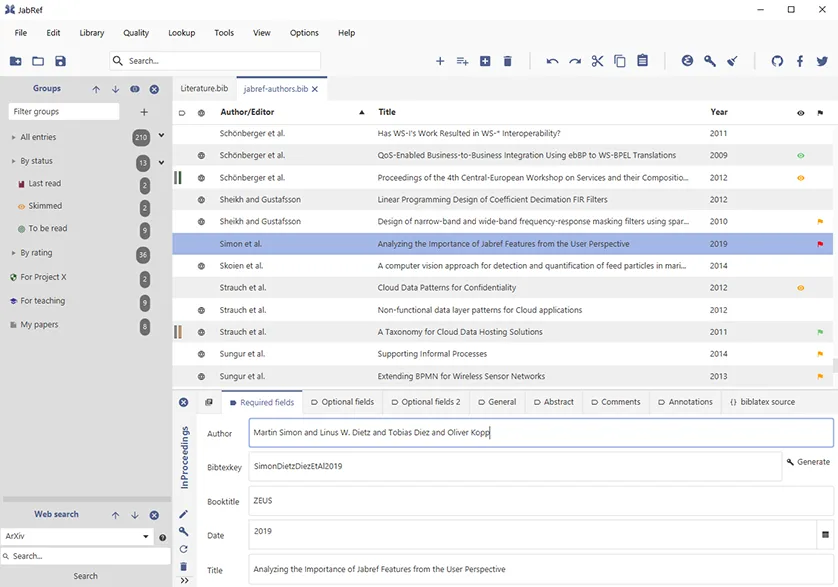
What is JabRef?
JabRef is a mature, open-source reference manager that has been a staple in the LaTeX community for over two decades. It handles the full lifecycle of academic references, from collecting PDFs and metadata to organizing them into structured .bib files. The software is actively maintained, with recent updates ensuring compatibility with modern biblatex standards and improving the user interface for complex library management.
It is primarily for researchers, students, and academics who rely on LaTeX for document preparation. If you use Word with Mendeley or EndNote, JabRef might feel less intuitive initially, but it offers superior control over citation formatting. It is the de facto standard for anyone serious about typesetting academic papers without proprietary lock-in or cloud dependency.
Compared to Mendeley, JabRef feels more utilitarian and precise. While Mendeley focuses on cloud syncing and social discovery, JabRef prioritizes local data integrity and deep customization of citation styles. The interface is denser and requires more configuration, but it rewards users with a tool that never changes its core file format or forces a subscription for basic features.
Best for: Academics and researchers using LaTeX who need a reliable, local-first citation manager with no subscription costs.
Key features of JabRef
- Supports BibTeX and biblatex database formats
- Automatic metadata retrieval from DOI, ISBN, and PubMed
- Integrated PDF viewer with annotation support
- Customizable citation styles via CSL (Citation Style Language)
- Duplicate detection and merging tools
- Cross-platform compatibility via Java runtime
- Plugin system for extending functionality
- Command-line interface for batch processing
Pros
- Fully open-source with no paywalls or feature restrictions
- Excellent support for LaTeX and biblatex workflows
- Local-first data management ensures privacy and reliability
- Highly customizable interface and citation styles
Cons
- Steeper learning curve than consumer-oriented tools like Mendeley
- Requires a Java runtime environment to function
- Cloud synchronization is not built-in, requiring manual setup or third-party solutions
- Interface can feel cluttered for users who only need basic reference storage
Windows programs JabRef replaces
How to install JabRef on Linux
flatpak install flathub org.jabref.jabrefsudo apt install jabrefsudo apt install jabrefTips for Windows users
If you are moving from Mendeley, export your library as a .bib file and import it into JabRef. Note that Mendeley’s cloud sync does not transfer automatically; you will need to manage your .bib files manually or use a sync tool like Syncthing. JabRef does not replace the social discovery features of Mendeley, so keep using Zotero or Mendeley for finding papers, but use JabRef for managing and citing them in your LaTeX documents. Familiarize yourself with the 'Search for Updates' feature to refresh metadata, as this replaces Mendeley’s automatic cloud updates.
Recent releases
- 5.15 —
- 5.14 —
- 5.13 —
- 5.12 —
JabRef: frequently asked questions
Does JabRef work with Word?
JabRef is designed for LaTeX and biblatex. While you can use it to manage references for Word, you will need a separate plugin like JabRef Word Plugin or use Zotero for direct Word integration. It is not a native Word citation tool.
Can I sync my JabRef library across multiple computers?
JabRef does not have built-in cloud sync. You can sync your .bib files using tools like Syncthing, Nextcloud, or Git. Many users keep their library in a version-controlled repository to ensure consistency.
Is JabRef free to use?
Yes, JabRef is completely free and open-source under the MIT license. There are no premium tiers, paywalls, or feature restrictions.
How do I install JabRef on Linux?
You can install JabRef via your distribution’s package manager (apt, dnf, pacman) or download the AppImage/Flatpak. The Flatpak version from Flathub is often the most up-to-date.
Updated