

Linux · Office
KPresenter
KPresenter is the former presentation program from KDE's KOffice suite, now succeeded by Calligra Stage.
What is KPresenter?
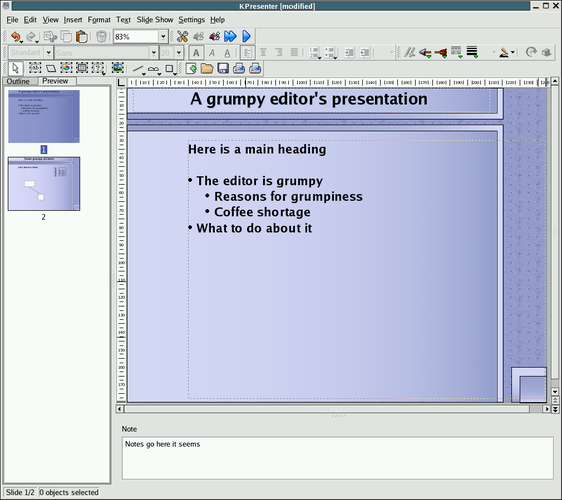
KPresenter was the presentation component of the KOffice suite, a KDE‑based office package that existed from the early 2000s until around 2012. It offered basic slide creation, transitions, and embedding of images and charts, and it integrated with the rest of KOffice. Development stopped when KOffice was split and the Calligra project took over, with Calligra Stage continuing the legacy.
The tool was aimed at Linux users who needed a free alternative to Microsoft PowerPoint, especially those already using KDE desktop environments. Its interface follows the classic KDE look‑and‑feel, with menus and dialogs that feel familiar to long‑time KDE users but may seem dated compared with modern Office suites.
In practice, KPresenter works for simple presentations and for users comfortable with open‑source file formats. It lacks some of the polish and advanced animation features of PowerPoint, but it handles ODP and PPT files well enough for everyday use.
Best for: Linux users who need a simple, free presentation tool and are comfortable with KDE’s workflow.
Key features of KPresenter
- Create and edit slides with text, images, and basic shapes
- Support for ODP (OpenDocument Presentation) and limited PPT import
- Simple transition effects
- Integration with other KOffice components (e.g., KSpread charts)
- Customizable slide layouts
- Export to PDF for easy sharing
- Keyboard shortcuts for common actions
Pros
- Free and open source
- Works well with KDE desktop
- Handles ODP natively
- Lightweight compared to large Office suites
Cons
- No longer maintained; missing recent features
- Limited PPT compatibility and animation support
- Interface feels outdated
Tips for Windows users
When moving from PowerPoint, export your existing .ppt/.pptx files to ODP if possible, then open them in KPresenter; expect some formatting loss, especially with complex animations. Learn the KDE shortcut conventions (e.g., Ctrl+N for new slide, Ctrl+S to save) and use the PDF export for final distribution, as it preserves layout more reliably than native formats.
KPresenter: frequently asked questions
Can KPresenter open Microsoft PowerPoint files?
It can import basic .ppt files, but complex layouts and animations may not translate correctly.
Is there a way to edit KPresenter slides on Windows?
KPresenter is Linux‑only; on Windows you can use Calligra Stage via the Windows Subsystem for Linux or export to ODP and edit with LibreOffice Impress.
What file format does KPresenter use?
Native format is .kpr, but it also reads and writes ODP and can import PPT.
Is KPresenter still receiving updates?
No, development stopped; the modern replacement is Calligra Stage.
Updated