

Linux · Others
Krusader
Krusader is a free, dual‑pane file manager for KDE that emulates Norton/Total Commander with advanced archive, FTP, and sync features.
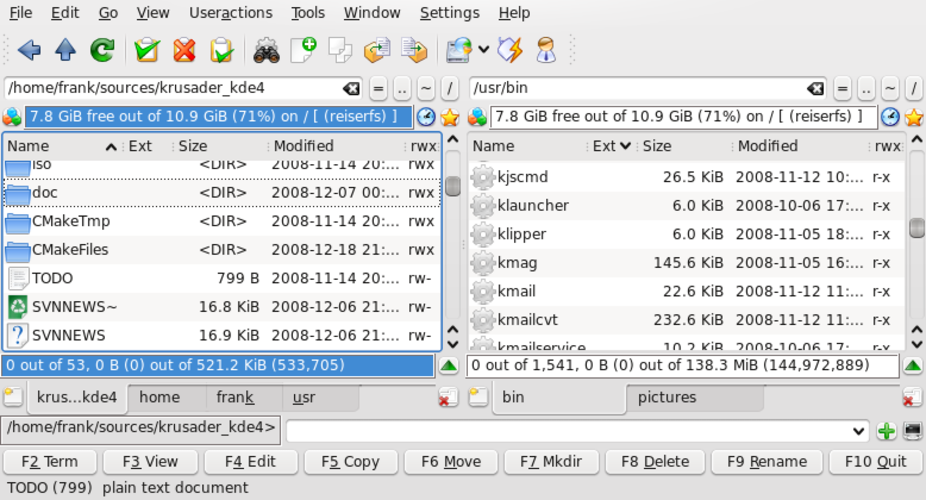
What is Krusader?
Krusader started in 2004 as a KDE fork of the orthodox file manager concept, quickly gaining a reputation for depth and configurability. Over the years it has been maintained across major Linux distributions, making it a mature choice for power users. It feels like a polished, feature‑rich version of Total Commander, but with full KDE integration and a steeper learning curve.
The tool is aimed at users who need more than a basic file manager: those who work with archives, remote files, or need batch operations. Its dual‑pane layout and keyboard‑centric workflow match the efficiency of Windows counterparts.
Compared to Total Commander, Krusader offers native KDE look‑and‑feel, better integration with the desktop, and more modern features such as directory sync and file comparison, but it can feel heavier and less intuitive for casual users.
Best for: Power users who need a feature‑rich, keyboard‑driven file manager on KDE.
Key features of Krusader
- Dual‑pane interface with split view
- Built‑in archive handling (zip, tar, rar, etc.)
- FTP/SFTP client support
- Directory synchronization and comparison
- Batch renaming with regex
- Advanced search and preview
- Configurable keybindings
- Plugin architecture for extensions
Pros
- Free and open source
- Cross‑distribution availability
- Rich feature set for advanced users
- Strong KDE integration
Cons
- Learning curve steep for beginners
- Occasional performance lag with large directories
- Limited documentation compared to mainstream file managers
Windows programs Krusader replaces
 Total Commander
How to install Krusader on Linux
sudo apt install krusadersudo apt install krusadersudo dnf install krusadersudo pacman -S krusadersudo zypper install krusaderTips for Windows users
If you come from Total Commander, the two‑pane layout is the same, but Krusader uses KDE shortcuts (Ctrl+E for edit, Ctrl+R for rename, etc.). Archive handling is built‑in, so you can open a zip directly. FTP connections are managed via the sidebar. Workflow differences include more reliance on mouse for plugin activation, but most actions can be done via the keyboard. File formats are the same; no conversion needed.
Krusader: frequently asked questions
Is Krusader still maintained?
Yes, it receives regular updates on major distributions like Arch, Debian, Fedora, Ubuntu, and openSUSE.
Can I use it on a non‑KDE desktop?
It works on other desktops, but the best experience is with KDE due to native integration.
Does it support network shares?
Yes, it can mount SMB/CIFS shares and access them via the sidebar.
How do I install it on Ubuntu?
Run sudo apt install krusader from the terminal; the package is available in the official repositories.
Updated