

Linux · Others
QCAD
QCAD is an open‑source 2D CAD program for creating technical drawings on Linux.
- License
- GPL-3.0
- Latest version
- 3.33.1
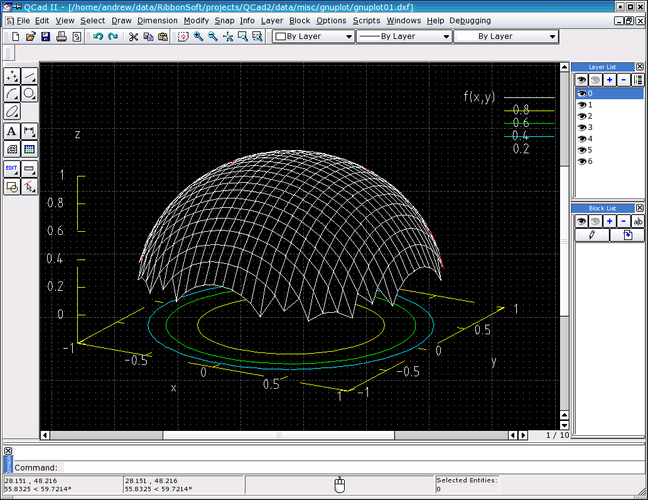
What is QCAD?
QCAD has been around since the early 2000s and focuses on 2‑dimensional drafting. It grew out of the Qt‑based community and is now maintained as a stable, mature project with regular releases. The core application is free, with an optional commercial add‑on pack for extra libraries.
It targets engineers, architects, and hobbyists who need to produce schematics, floor plans, or mechanical drawings without the cost of a full‑blown 3D suite. The interface mimics classic CAD tools: a drawing canvas, toolbars, and a properties panel, making the transition from AutoCAD relatively straightforward.
Compared with Autodesk AutoCAD on Windows, QCAD feels lighter and less feature‑rich—there’s no 3D modeling or advanced parametric tools—but for pure 2D work it’s perfectly adequate. The learning curve is gentle, and the Qt‑based UI integrates well with the GNOME/KDE desktops.
Best for: Users who need reliable 2D drafting without paying for a heavyweight CAD package.
Key features of QCAD
- Layer management with visibility toggles
- Extensive DXF import/export support
- Basic dimensioning and annotation tools
- Customizable line styles and hatches
- Scriptable via ECMAScript (JavaScript)
- Printing to PDF and raster formats
- Snap and grid options for precise drafting
Pros
- Free core application
- Stable, mature codebase
- Cross‑platform (Linux, Windows, macOS)
- Good DXF compatibility
Cons
- No 3D modeling capabilities
- Advanced features require paid add‑ons
- Interface feels dated compared to modern CAD suites
Windows programs QCAD replaces
 Autodesk AutoCAD
How to install QCAD on Linux
sudo dnf install qcadsudo pacman -S qcadTips for Windows users
Most AutoCAD users will find QCAD's DXF handling familiar; simply open your .dwg files by converting them to DXF first (many free converters exist). Keyboard shortcuts are similar for basic commands like line, circle, and trim, but some advanced shortcuts differ—spend a few minutes customizing QCAD's shortcut map to match your workflow. Expect a simpler toolset, so focus on 2D tasks and avoid looking for 3D features that aren’t present.
QCAD: frequently asked questions
Can QCAD open native AutoCAD .dwg files?
QCAD does not read .dwg directly; you need to convert the file to DXF first, which it can import without issues.
Is there a package for QCAD in Arch Linux?
Yes, QCAD is available in the Arch community repository and can be installed with pacman.
Does QCAD support scripting or automation?
QCAD includes an ECMAScript (JavaScript) engine for writing scripts that automate repetitive tasks.
What is the difference between the free and paid versions?
The free version provides all core 2D drafting tools; the paid add‑on pack adds extra libraries, more file format support, and some advanced line and hatch options.
Updated