
 PlannerLinux
vs
 FastTrack ScheduleWindows
Planner as a Linux alternative to FastTrack Schedule
Updated
Our verdict
Planner is not a suitable replacement for FastTrack Schedule. It is a lightweight, discontinued GNOME app designed for simple personal task lists, not complex project management. It lacks critical features like resource leveling, detailed budgeting, and portfolio management. If you need to manage team resources, track costs, or handle large-scale Gantt charts, Planner will feel like a toy. Only consider it if your needs have shrunk to basic drag-and-drop scheduling for a single user and you specifically prefer the GNOME ecosystem over more robust alternatives like OpenProject or GanttProject.
- License
- GPL-3.0
- Price
- Free
- Latest version
- —
- Rating
- —
What works the same
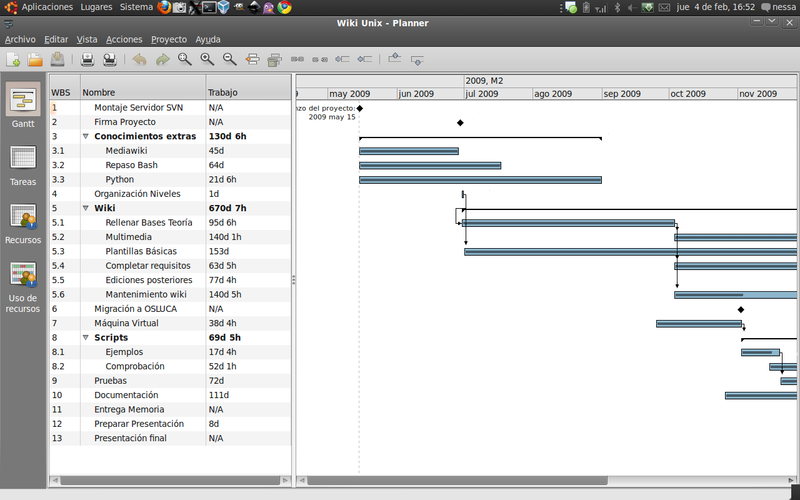
- Both allow creation and editing of Gantt charts
- Both support basic task scheduling via drag-and-drop
- Both track project milestones
- Both are available on Linux (Planner natively, FastTrack via Wine)
What is different
- Planner lacks resource allocation and leveling features
- Planner has no cost or budget tracking capabilities
- Planner does not support project portfolio management
- Planner is discontinued and no longer receiving updates
- Planner lacks collaboration features for shared projects
Opening your FastTrack Schedule files
Planner does not natively open FastTrack Schedule project files (.ftsp or similar proprietary formats). You would need to export your data from FastTrack Schedule to a common format like CSV or XML first. Planner can import CSV files, but this process is manual and will likely lose complex relationships, resource assignments, and budget data. There is no direct conversion tool between the two.
Switching from FastTrack Schedule to Planner, step by step
- Export your FastTrack Schedule project to CSV format
- Clean up the CSV file to match Planner's expected column structure
- Open Planner and use the import function to load the CSV
- Manually re-establish task dependencies in Planner
- Verify that all tasks and dates appear correctly
- Note that resources and budgets will need to be managed elsewhere
Key features of Planner
- Create and edit Gantt charts
- Drag‑and‑drop task scheduling
- Simple resource allocation
- Milestone tracking
- Export to CSV
- Keyboard shortcuts for common actions
- Integration with GNOME desktop
Frequently asked questions
Can Planner handle large projects with hundreds of tasks?
It may struggle with performance and usability. Planner is designed for simple, lightweight use cases. For large projects, you need a dedicated tool like OpenProject or GanttProject.
Is Planner still being developed?
No, GNOME Planner is discontinued. It is no longer receiving updates or bug fixes. You should look for active alternatives if you need a long-term solution.
Does Planner support multiple users working on the same project?
No, Planner is a local, single-user application. It does not have built-in collaboration features, shared workspaces, or real-time syncing.
4 other alternatives to FastTrack Schedule
 KPlatoKPlato is a KDE‑based project management and scheduling tool, formerly part of KOffice and now succeeded by…Open sourceFreeDiscontinuedKPlato vs FastTrack Schedule
 TaskJugglerTaskJuggler is a free, GPL‑licensed project‑management tool for Linux, Unix and Windows, built in C++ with…Open sourceFreeDiscontinuedTaskJuggler vs FastTrack Schedule
 GanttProjectGanttProject is a free, open-source tool for creating and managing project schedules using Gantt charts.Open sourceFreeDiscontinuedGanttProject vs FastTrack Schedule
 OpenProjOpenProj is a free, open‑source project‑management tool that reads and writes Microsoft Project files.Open sourceFreeDiscontinuedOpenProj vs FastTrack Schedule