

Windows · Office
Best Linux alternatives to FastTrack Schedule
FastTrack Schedule is a commercial project management tool for Windows and Mac that handles planning, scheduling, budgeting, and resource allocation.
Updated
Quick answer
The best Linux alternative to FastTrack Schedule is Planner. Other strong options: KPlato, TaskJuggler, GanttProject.
5 Linux alternatives to FastTrack Schedule
-
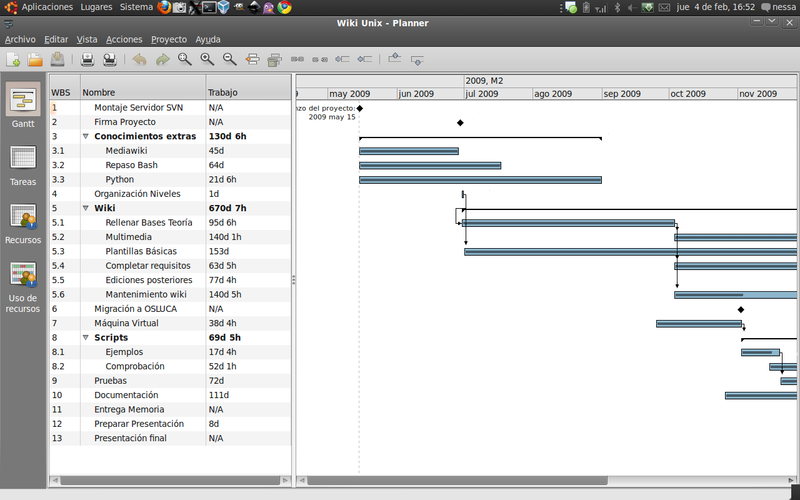
GNOME Planner is a free, lightweight project management tool for GNOME desktops, aimed at simple scheduling tasks.
Planner is not a suitable replacement for FastTrack Schedule. It is a lightweight, discontinued GNOME app designed for simple personal task lists, not complex project management. It lacks critical features like resource leveling, detailed budgeting, and portfolio management. If you need to manage…
Feature parity15% -

KPlato is a KDE‑based project management and scheduling tool, formerly part of KOffice and now succeeded by Calligra Plan.
KPlato is a capable Linux project‑management tool that covers many of the core tasks FastTrack Schedule users need: Gantt chart creation, resource assignment, and basic cost tracking. However, it lacks the advanced portfolio management, built‑in budgeting, and robust collaboration features that…
Feature parity60% -

TaskJuggler is a free, GPL‑licensed project‑management tool for Linux, Unix and Windows, built in C++ with Qt/KDE.
TaskJuggler can replace FastTrack Schedule for users who are comfortable with a text‑based workflow and don’t need a polished graphical UI. It covers the core scheduling, resource allocation and cost tracking functions, and it can generate Gantt‑style HTML reports. However, it lacks built‑in…
Feature parity60% -

GanttProject is a free, open-source tool for creating and managing project schedules using Gantt charts.
GanttProject can replace FastTrack Schedule for basic Gantt chart creation, resource assignment, and cost tracking, but it lacks advanced portfolio management and real‑time collaboration. It works well for small to medium projects where a free, cross‑platform tool is acceptable. Larger…
Feature parity60% -

OpenProj is a free, open‑source project‑management tool that reads and writes Microsoft Project files.
OpenProj is a solid, free alternative for individuals who need to manage projects and read Microsoft Project files on Linux. It handles Gantt charts, resource leveling, and critical path analysis well. However, it is a discontinued project, meaning no new features or security updates are coming. It…
Feature parity65%


What is FastTrack Schedule?
FastTrack Schedule is used by project managers, construction firms, and IT teams to create detailed project plans, track progress, and manage budgets. It offers a Windows and Mac desktop client, with a subscription‑based licensing model that includes support and updates. Many users seek a Linux alternative because they prefer open‑source tools, want to avoid licensing costs, or need a solution that runs natively on Linux servers.
The software’s core features—Gantt charts, resource leveling, cost control, and portfolio management—are often required in environments where Windows is not the primary OS. Linux users need comparable functionality without relying on emulation.
Finding a native Linux replacement can reduce system overhead, improve security, and integrate better with other open‑source tools.
What a replacement for FastTrack Schedule must do
- Create and edit Gantt charts
- Resource allocation and leveling
- Cost and budget tracking
- Project portfolio management
- Export to common formats (PDF, Excel, XML)
- Collaboration features (shared projects)
Can you run FastTrack Schedule on Linux?
There is no native Linux version of FastTrack Schedule. Users typically run it through Wine or a compatibility layer like Bottles, but stability varies. No official web or cloud edition exists. Some users report partial functionality in Wine, but it is not officially supported.
Which alternative should you choose?
Planner is best for simple Gantt and task lists; KPlato offers strong resource and cost tracking; TaskJuggler is powerful for complex scheduling; GanttProject provides a balance of features and ease of use; OpenProj is suitable for legacy users needing a free, open‑source PMS.
Moving your FastTrack Schedule files and habits
FastTrack Schedule stores projects in proprietary .fts files. Direct export is limited; the best approach is to use the built‑in export to XML or CSV, then import that into the chosen Linux tool. Compatibility may require manual mapping of fields.
Side-by-side comparison
| App | License | Flatpak | Latest version | Feature parity | Rating |
|---|---|---|---|---|---|
| Planner | GPL-3.0 | — | — | 15% | — |
| KPlato | GPL-2.0 | — | — | 60% | — |
| TaskJuggler | GPL-3.0 | — | — | 60% | — |
| GanttProject | GPL-2.0 | — | — | 60% | — |
| OpenProj | GPL-3.0 | — | — | 65% | — |
FastTrack Schedule: frequently asked questions
Can I run FastTrack Schedule on Linux via Wine?
Yes, but performance and feature support can be inconsistent. Test a trial copy before committing.
Is there a free version of FastTrack Schedule?
No, it is a commercial product with subscription pricing. Trial versions are available for evaluation.
Do Linux alternatives support Gantt charts?
All listed alternatives—Planner, KPlato, TaskJuggler, GanttProject, OpenProj—provide Gantt chart functionality.
Can I import FastTrack Schedule data into GanttProject?
You can export to CSV or XML from FastTrack and then import that into GanttProject, though some custom fields may not transfer.
How important is FastTrack Schedule to you?
Know a better alternative? Suggest an alternative