
 GeanyLinux
vs
GeanyLinux
vs
 Notepad++Windows
Geany como alternativa Linux ao Notepad++
Atualizado em
Nossa avaliação
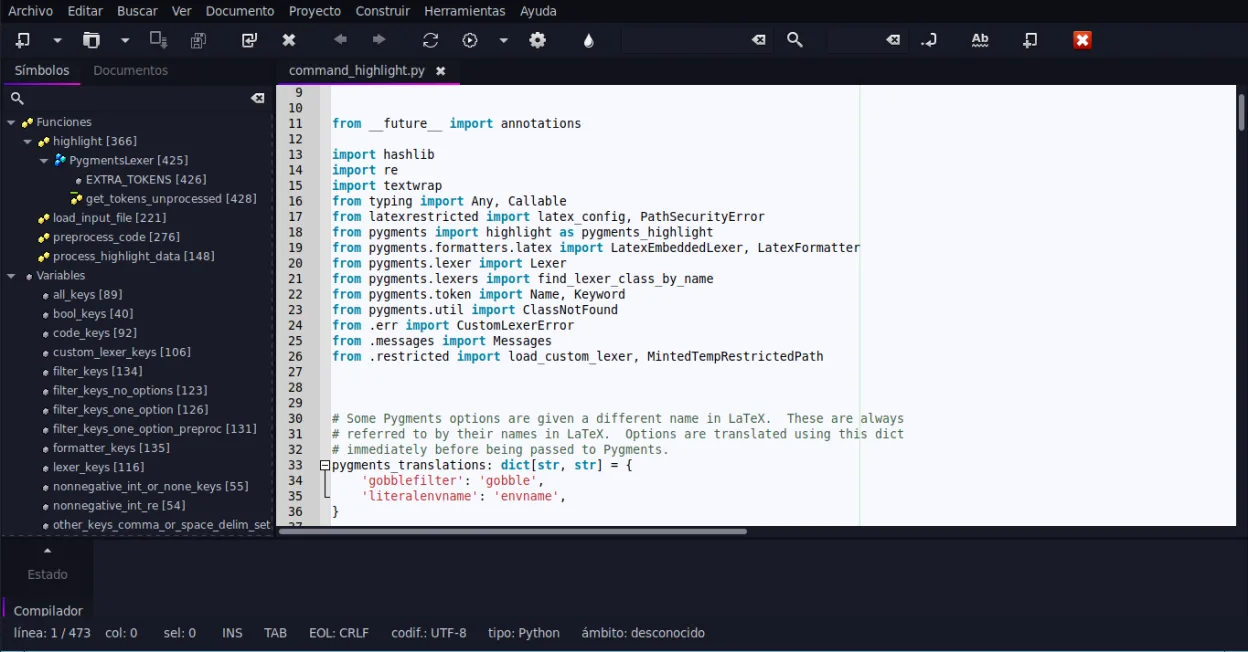
Geany is a solid replacement for Notepad++ if you want a lightweight, fast editor with IDE-like features on Linux. It handles syntax highlighting, code folding, and plugin extensibility well, and starts quickly with low resource use. Programmers who rely on macros or heavy plugin customization may find it lacking, but most Notepad++ users doing general coding, scripting, or config editing will adapt easily. It’s especially suited for those who value simplicity and speed over deep customization.
- Licença
- GPL-2.0+
- Preço
- Grátis
- Versão mais recente
- 2.1.0 (6 de julho de 2025)
- Avaliação
- —
O que funciona igual
- Syntax highlighting for over 30 languages including C, Python, HTML, PHP
- Fast startup and low memory usage
- Plugin system with built-in plugin manager
- Search and replace with regex support (via built-in find dialog)
- Full Unicode and UTF-8 support
O que muda
- Geany lacks full macro recording and playback, a core Notepad++ feature
- Plugin ecosystem is smaller and less varied than Notepad++
- No native project-wide file search (like Notepad++ 'Find in Files') without external tools
- Interface is more IDE-like with symbol lists and code completion, less minimal than Notepad++
- No split-view or tab-docking system
Abrindo seus arquivos do Notepad++
Geany opens and saves files in standard formats, so any text, source code, or config file created in Notepad++ works without issue. It handles UTF-8, BOM, and line endings (Windows/Unix) correctly. Project files or user-defined language schemes from Notepad++ cannot be imported directly, but the text content itself transfers seamlessly.
Trocando o Notepad++ pelo Geany, passo a passo
- Install Geany via your distro's package manager or Flatpak
- Open your existing text and code files directly in Geany
- Use the Plugin Manager to enable features like code navigation or terminal
- Configure keyboard shortcuts under Preferences if migrating from Notepad++ bindings
- Set up file type associations for frequently used extensions
Principais recursos do Geany
- Destaque de sintaxe para mais de 30 linguagens
- Autocompletar de código e conclusão automática de estruturas comuns
- Emulador de terminal integrado
- Gerenciador de plugins com plugins pré-instalados
- Dobra de código e listas de símbolos
- Suporte a preenchimento automático de tags XML/HTML
Como instalar o Geany no Linux
flatpak install flathub org.geany.Geanysudo apt install geanysudo apt install geanysudo dnf install geanysudo pacman -S geanysudo zypper install geanyPerguntas frequentes
Can Geany record and replay macros like Notepad++?
No, Geany does not support macro recording or playback. You’ll need to use external tools or scripts for repetitive editing tasks.
Does Geany support user-defined languages like Notepad++?
Not directly. Geany uses built-in filetype definitions; custom syntax highlighting requires modifying config files or using external tools.
Is Geany available in all major Linux distributions?
Yes, Geany is packaged in Debian, Ubuntu, Fedora, Arch, openSUSE, and available via Flathub.
Outras 6 alternativas ao Notepad++
 geditgedit é o editor de texto leve e de uso geral do GNOME, adequado para anotações, documentos e edição básica…Código abertoGrátisFlatpakgedit vs Notepad++
 KateKate é um editor de texto rico em recursos, focado em programadores, da KDE, com suporte a mais de 300…Código abertoGrátisFlatpakKate vs Notepad++PlumaPluma é um editor de texto leve, baseado em GTK, para o desktop GNOME, projetado como uma alternativa simples…Código abertoGrátisPluma vs Notepad++
 KDevelopKDevelop é um IDE gratuito, baseado em plugins, para KDE que suporta C++, Python, PHP e outras linguagens…Código abertoGrátisFlatpakKDevelop vs Notepad++
 NotepadNotepad Next é um editor de texto leve e multiplataforma para Linux, que reimplementa os recursos do…Código abertoGrátisFlatpakNotepad vs Notepad++
 MousepadMousepad é um editor de texto leve, baseado em GTK, para o desktop Xfce.Código abertoGrátisFlatpakMousepad vs Notepad++