
 PiTiViLinux
vs
iMovieWindows
PiTiViLinux
vs
iMovieWindows
PiTiVi como alternativa Linux ao iMovie
Atualizado em
Nossa avaliação
PiTiVi is a solid, free replacement for iMovie if you are moving from Mac to Linux and want a native, non-linear editor. It covers the core needs: drag-and-drop timeline, transitions, and basic effects. However, it lacks iMovie's polished, template-driven simplicity and built-in music library. It is best for users willing to learn a slightly more technical interface in exchange for open-source freedom and low resource usage. If you need one-click social media exports or extensive built-in assets, you may find it less intuitive than iMovie, but for basic editing, it works well.
- Licença
- LGPL-2.0+
- Preço
- Grátis
- Versão mais recente
- 2023.03 (26 de março de 2023)
- Avaliação
- —
O que funciona igual
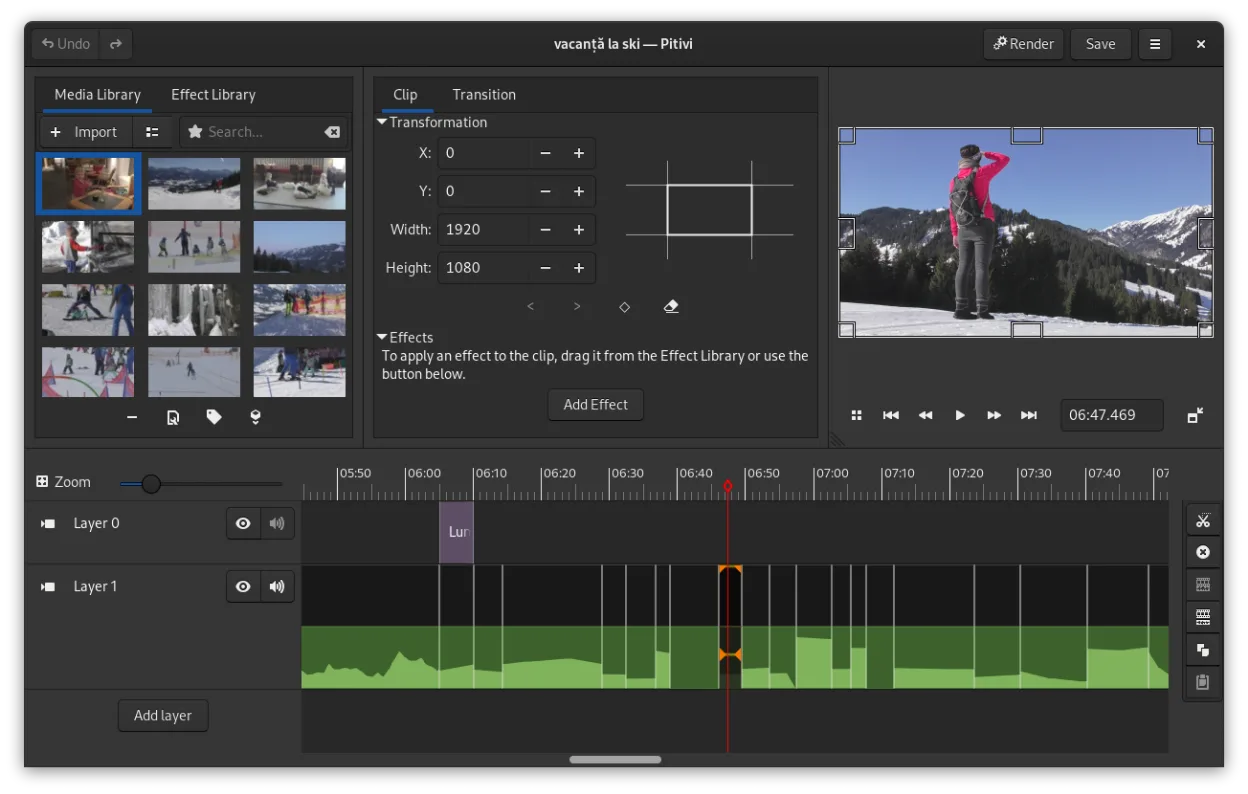
- Non-linear timeline editing with drag-and-drop clips
- Support for common video formats like MP4 and MOV via GStreamer
- Built-in transitions and crossfades
- Basic color correction and filters
- Low resource usage suitable for older hardware
O que muda
- No built-in library of background music or sound effects
- Lacks iMovie's highly simplified, template-based workflow for absolute beginners
- No specific one-click presets for social media platforms
- Interface is GNOME-integrated and functional, but less polished visually than iMovie
- Stabilization features may require manual keyframing or external tools rather than being a simple toggle
Abrindo seus arquivos do iMovie
PiTiVi does not open iMovie project files (.imovied) directly. You will need to export your finished videos from iMovie as standard formats like MP4 or MOV before importing them into PiTiVi. Since PiTiVi relies on GStreamer, it supports a wide range of codecs, so standard H.264/H.265 MP4 files will work without issue. There is no direct project file conversion tool available.
Trocando o iMovie pelo PiTiVi, passo a passo
- Export all your iMovie projects as MP4 files before switching to Linux
- Install PiTiVi via your package manager or Flathub
- Import your MP4 clips into PiTiVi's media library
- Recreate your timeline by dragging clips into the tracks
- Apply transitions and effects manually using the filters panel
- Render your final video using a custom or default preset
Principais recursos do PiTiVi
- Edição não linear com linha do tempo independente da taxa de quadros
- Suporta qualquer formato processado pelo GStreamer
- Animação de keyframes para efeitos e filtros
- Edição ripple e roll para ajustes eficientes na linha do tempo
- Proporções de tela, taxas de quadros e presets de renderização personalizados
- Crossfades e transições padrão SMPTE
- Painéis de interface destacáveis para configurações com múltiplos monitores
- Fluxo de trabalho de edição não modal com design centrado no playhead
Como instalar o PiTiVi no Linux
flatpak install flathub org.pitivi.Pitivisudo apt install pitivisudo apt install pitivisudo dnf install pitivisudo pacman -S pitivisudo zypper install pitiviPerguntas frequentes
Does PiTiVi have a built-in music library?
No, PiTiVi does not come with a pre-loaded library of songs or sound effects. You need to import your own audio files, such as MP3 or WAV, into the project.
Is PiTiVi suitable for absolute beginners?
It is easier than professional editors like Kdenlive or DaVinci Resolve, but it is not as simplified as iMovie. You will need to learn where to find filters and transitions, which are not always one-click templates.
Can I edit 4K video in PiTiVi?
Yes, PiTiVi can handle 4K video, but performance depends heavily on your hardware. It uses GStreamer, so efficient hardware acceleration is key for smooth playback of high-resolution footage.
Outras 5 alternativas ao iMovie
 KdenliveO Kdenlive é um editor de vídeo não linear gratuito e repleto de recursos, construído sobre o framework MLT.Código abertoGrátisFlatpakKdenlive vs iMovie
 ShotcutShotcut é um editor de vídeo gratuito e de código aberto para Linux, com suporte a uma ampla variedade de…Código abertoGrátisFlatpakShotcut vs iMovie
 OpenShotOpenShot é um editor de vídeo não linear gratuito, de código aberto, para Linux e outras plataformas…Código abertoGrátisFlatpakOpenShot vs iMovie
 BlenderBlender é uma suíte 3D gratuita e de código aberto para modelagem, animação, renderização e edição de vídeo.Código abertoGrátisFlatpakBlender vs iMovie
 NatronNatron é uma ferramenta gratuita e de código aberto de composição de vídeo baseada em nós para criação de VFX…Código abertoGrátisFlatpakNatron vs iMovie