
 ThunderbirdLinux
vs
Windows Live MailWindows
ThunderbirdLinux
vs
Windows Live MailWindows
Thunderbird como alternativa Linux ao Windows Live Mail
Atualizado em
Nossa avaliação
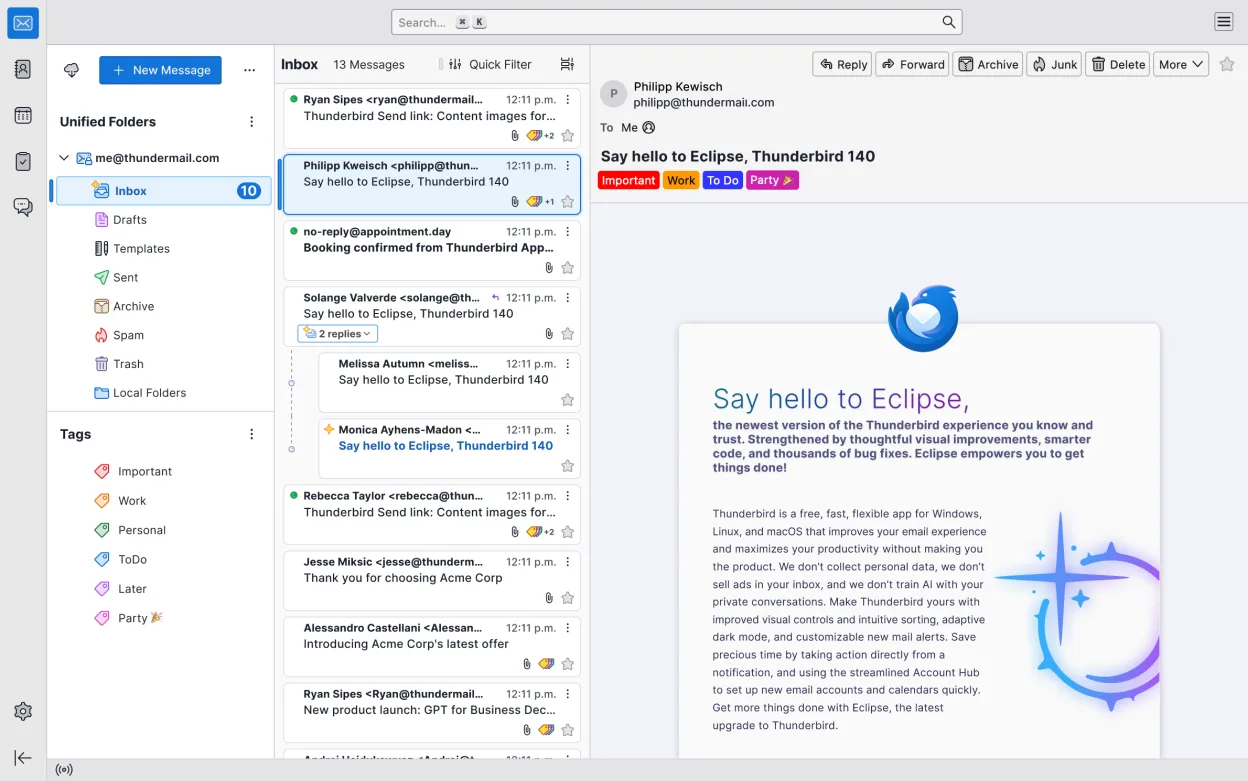
Thunderbird is a solid replacement for Windows Live Mail for users who need a free, open‑source client that handles email, calendar, contacts, RSS feeds and news reading. It covers most everyday tasks and offers a keyboard‑driven workflow that many power users appreciate. Those who rely on the tight Windows integration of Live Mail or on its legacy data format may need extra steps, but overall Thunderbird meets the core needs of typical users.
- Licença
- MPL-2.0
- Preço
- Grátis
- Versão mais recente
- 158.0.1 (20 de outubro de 2026)
- Avaliação
- —
O que funciona igual
- Supports IMAP/POP3 for email access
- Includes a built‑in calendar with scheduling and reminders
- Provides an address book for contact management
- Offers RSS/Atom feed reading
- Allows multiple email accounts in one interface
O que muda
- No native import of Windows Live Mail .pst/.ost files – requires third‑party tools
- Exchange support is via extensions, not built‑in
- No built‑in newsreader for Usenet (requires add‑on)
- Chat/IRC integration is optional and may feel less polished
- No automatic migration of Windows Live Mail settings
- Requires manual configuration of some protocols
Abrindo seus arquivos do Windows Live Mail
Thunderbird does not directly open Windows Live Mail data files (.pst or .ost). Users must export their mail from Windows Live Mail to a standard format such as MBOX or use a third‑party converter before importing into Thunderbird. The import process is not automated within Thunderbird.
Trocando o Windows Live Mail pelo Thunderbird, passo a passo
- Export all mail from Windows Live Mail to MBOX or EML format via the export feature or a converter tool.
- Install Thunderbird from your distribution’s package manager or Flathub.
- Open Thunderbird, go to File → Import, and choose the exported MBOX files to import messages.
- Set up your email accounts in Thunderbird using the same server settings (IMAP/POP3) you used in Windows Live Mail.
- Import your contacts by selecting File → Import → Address Book and choosing the appropriate format.
- Verify that calendar events and RSS feeds have been recreated; reconfigure any missing feeds manually.
Principais recursos do Thunderbird
- Suporta IMAP, POP3, SMTP e Exchange via extensões
- Calendário integrado com agendamento e lembretes
- Cliente de chat e IRC integrado
- Leitor de feeds RSS/Atom
- Filtros avançados de mensagens e marcação
- Criptografia completa com OpenPGP
- Extensível por meio de complementos
- Fluxo de trabalho com foco em atalhos de teclado
Como instalar o Thunderbird no Linux
flatpak install flathub org.mozilla.thunderbirdsudo apt install thunderbirdsudo apt install thunderbirdsudo dnf install thunderbirdsudo pacman -S thunderbird-i18n-frsudo zypper install MozillaThunderbirdPerguntas frequentes
Can I migrate my Windows Live Mail settings automatically?
No, Thunderbird does not support automatic migration of Windows Live Mail settings. You must manually reconfigure account settings, filters, and other preferences.
Is there a way to keep my old Windows Live Mail data in Thunderbird?
You can import your old mail by exporting it from Windows Live Mail to MBOX or EML files and then importing those into Thunderbird. Contacts and calendar items need to be exported separately and imported into Thunderbird’s address book and calendar.
Does Thunderbird support Exchange servers?
Yes, but it requires the “Exchange Support” add‑on. Without the add‑on, Thunderbird will not connect to Exchange servers directly.
Outras 5 alternativas ao Windows Live Mail
 EvolutionO Evolution é um gerenciador de informações pessoais completo que combina e-mail, calendário, contatos e…Código abertoGrátisFlatpakEvolution vs Windows Live Mail
 MailspringUm cliente de e‑mail desktop rápido e cheio de recursos para Linux com um motor de sincronização em C++ e…Código abertoGrátisFlatpakMailspring vs Windows Live Mail
 Claws MailClaws Mail é um cliente de e‑mail leve e rápido baseado em GTK para Linux.Código abertoGrátisFlatpakClaws Mail vs Windows Live Mail
 KMailO KMail é o cliente de e-mail completo do KDE, parte da suíte Kontact, com suporte a IMAP, POP3 e caixas…Código abertoGrátisKMail vs Windows Live Mail
 GearyO Geary é um cliente de e-mail baseado no GNOME para Linux que permite enviar, receber e organizar e-mails em…Código abertoGrátisFlatpakGeary vs Windows Live Mail