
 Qalculate! (GTK UI)Linux
vs
Microsoft CalculatorWindows
Qalculate! (GTK UI) as a Linux alternative to Microsoft Calculator
Updated
Our verdict
Qalculate! (GTK UI) is a strong replacement for Microsoft Calculator, especially for users who go beyond basic arithmetic. It covers all core modes: scientific, programmer, date calculation, and graphing — often with more depth. The interface is keyboard-friendly and highly functional. While Microsoft Calculator is simpler for casual use, Qalculate! excels for students, engineers, and technical users who need symbolic math, unit conversions, or precision control. It’s overkill only for those who strictly use standard mode with no extra features.
- License
- GPL-2.0+
- Price
- Free
- Latest version
- 5.13.0 (October 5, 2026)
- Rating
- —
What works the same
- Both support standard and scientific calculator modes with exponents and trigonometry
- Programmer mode includes hex, binary, and octal arithmetic
- Date difference calculations are built-in and easy to access
- Graphing capabilities allow plotting functions visually
- Unit conversion is available and extensive
What is different
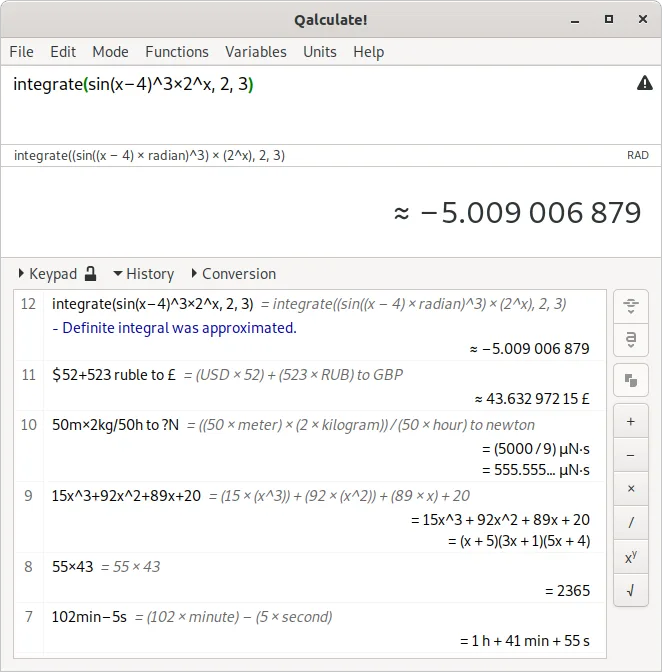
- Qalculate! has symbolic math (e.g. solving equations, integrals), which Microsoft Calculator lacks
- Arbitrary precision and interval arithmetic go far beyond Microsoft Calculator’s capabilities
- Physical constants database is built-in and searchable
- Customizable functions and scripting support are unique to Qalculate!
- Microsoft Calculator has a simpler, more minimal interface for casual users
Opening your Microsoft Calculator files
Microsoft Calculator does not save or export calculations in a file format, and Qalculate! does not import any such session data. Both allow copying expressions and results to the clipboard. Qalculate! can save calculation history and expressions in its own format, but there is no direct file compatibility or conversion tool between the two apps.
Switching from Microsoft Calculator to Qalculate! (GTK UI), step by step
- Install Qalculate! via Flathub or your distro’s package manager
- Open it and explore the main interface — expression entry is keyboard-first
- Switch modes using the menu: use 'Mode > Calculator Mode' for scientific, programmer, or algebraic
- Use 'Plot > Add Function' for graphing, or 'Functions > Date Calculation'
- Configure unit conversion shortcuts under 'Preferences > Units'
- Browse 'Functions' menu to access physical constants and equation solver
Key features of Qalculate! (GTK UI)
- Symbolic calculations including integrals and equations
- Extensive unit calculations and conversion library
- Arbitrary precision and uncertainty propagation
- Interval arithmetic support
- Built-in plotting capabilities
- Large library of customizable functions
- Physical constants database
- Cross-platform compatibility
How to install Qalculate! (GTK UI) on Linux
flatpak install flathub io.github.QalculateFrequently asked questions
Can Qalculate! handle hex and binary calculations like Microsoft Calculator?
Yes, Qalculate! supports programmer mode with hex, binary, octal, and decimal arithmetic, including bitwise operations. It displays results in all bases simultaneously if needed.
Is Qalculate! as easy to use as Microsoft Calculator for quick math?
Yes, basic arithmetic is immediate. The interface is intuitive, and keyboard input works well, though the extra features mean more options are visible by default.
Does Qalculate! require internet to work?
No, Qalculate! is fully offline. Currency conversion rates need manual updates, but all math, unit conversion, and plotting functions work without internet.
4 other alternatives to Microsoft Calculator
 KCalcKCalc is KDE's scientific calculator with trigonometric functions, logic operations, and a results stack.Open sourceFreeFlatpakKCalc vs Microsoft Calculator
 SpeedCrunchA fast, keyboard-driven scientific calculator with real-time evaluation and high precision.Open sourceFreeFlatpakSpeedCrunch vs Microsoft CalculatorGalculatorGalculator is a lightweight, GTK‑based calculator for Linux that supports basic, scientific, and programming…Open sourceFreeGalculator vs Microsoft Calculator