
 VeuszLinux
vs
Tableau DesktopWindows
Veusz as a Linux alternative to Tableau Desktop
Updated
Our verdict
Veusz is not a direct replacement for Tableau Desktop for business users focused on dashboards and interactive data exploration. It excels at creating precise, publication-quality scientific plots and supports scripting, but lacks Tableau’s intuitive drag-and-drop dashboarding, real-time collaboration, and broad database connectors. If your work centers on static, high-quality 2D/3D scientific visualizations with tight control over styling and LaTeX support, Veusz is a strong Linux alternative. For business intelligence, dashboarding, or non-technical users, it falls short.
- License
- GPL-2.0+
- Price
- Free
- Latest version
- 4.2.1 (April 4, 2026)
- Rating
- —
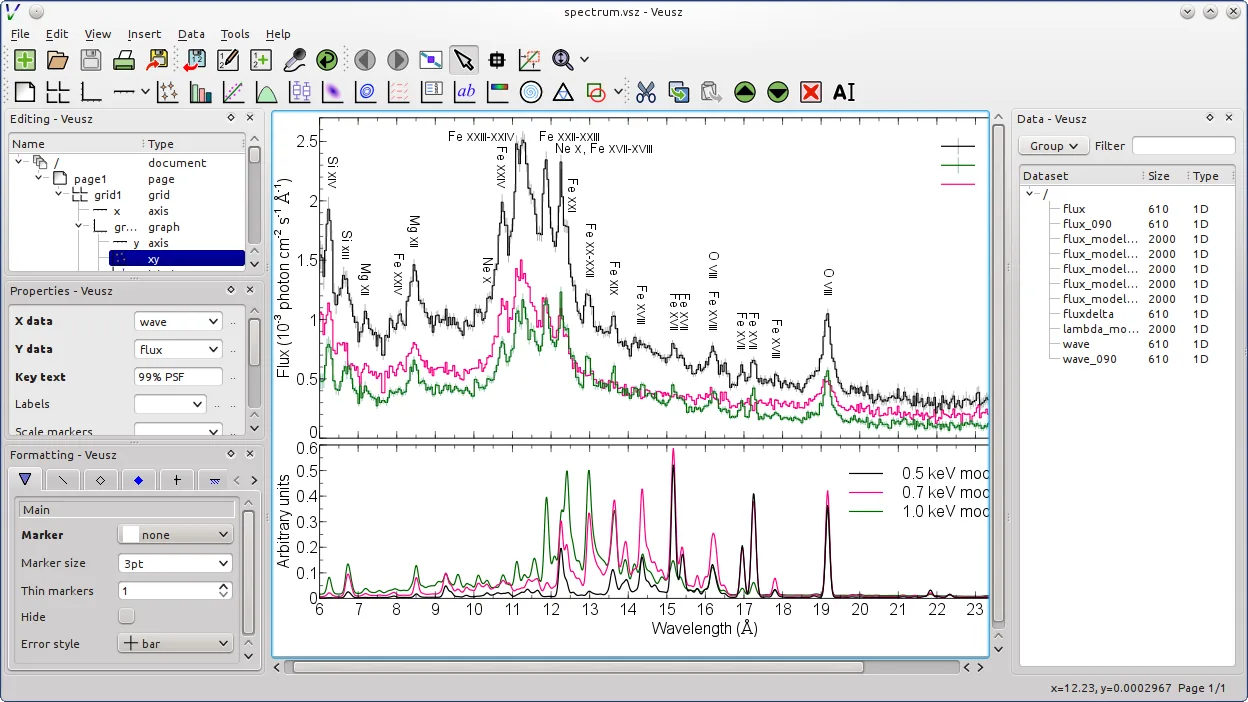
What works the same
- Both support CSV and text data import
- Both allow creation of 2D and 3D plots including contour and image types
- Both offer export to PDF, SVG, and bitmap formats
- Both support scripting for automation (Veusz via Python, Tableau via TabPy or REST)
- Both provide real-time data manipulation within the app
What is different
- Veusz lacks native database connectors (e.g., SQL Server, Oracle) that Tableau supports
- Tableau offers intuitive drag-and-drop dashboard building; Veusz uses a nested widget system better suited to technical users
- Tableau supports real-time data preview from live sources; Veusz is more static and file-based
- Veusz has no built-in sharing or collaboration features like Tableau Server
- Tableau handles large datasets more efficiently with in-memory processing
Opening your Tableau Desktop files
Veusz cannot open Tableau Desktop (.twb, .twbx) files. There is no import support for Tableau’s project or data source formats. You must export data from Tableau to CSV or another intermediate format before using it in Veusz. Conversely, Veusz exports to PDF, SVG, EMF, and image formats, which can be imported into other tools, but it does not produce Tableau-compatible outputs.
Switching from Tableau Desktop to Veusz, step by step
- Export your Tableau data sources to CSV or text format
- Install Veusz via your distribution’s package manager or Flathub
- Import data into Veusz using CSV or text import
- Recreate plots using Veusz’s widget-based interface
- Use Python scripts to automate repetitive plotting tasks if needed
- Export final figures in PDF or SVG for publication
Key features of Veusz
- Publication-quality PDF, SVG, EMF, and bitmap export
- Supports x-y, contour, image, polar, ternary, and 3D plots
- Data import from CSV, text, HDF5, and FITS files
- Python scripting and command-line interface
- Object-based plotting interface with nested widgets
- Multiple axes, custom labels, and LaTeX support
- Real-time data manipulation and formula entry
- Cross-platform with native Linux integration
How to install Veusz on Linux
flatpak install flathub io.github.veusz.Veuszsudo apt install veuszsudo apt install veuszsudo dnf install veuszsudo zypper install python-veuszFrequently asked questions
Can Veusz connect directly to SQL databases like Tableau?
No, Veusz does not support direct database connections. You must export data to CSV or another supported format first.
Is Veusz suitable for creating interactive dashboards?
No, Veusz is designed for static, publication-quality figures. It does not support interactive dashboards with filters or drill-downs.
Can I automate plots in Veusz like in Tableau with scripts?
Yes, Veusz supports Python scripting and a command-line interface, allowing automation of plot generation.
3 other alternatives to Tableau Desktop
 KstKst is a KDE application for visualizing and analyzing scientific data sets, offering a lightweight…Open sourceFreeFlatpakKst vs Tableau DesktopGnuplotGnuplot is a command-line driven graphing tool for generating 2D and 3D plots from data and mathematical…Open sourceFreeGnuplot vs Tableau Desktop