
 ZenmapLinux
vs
NmapWindows
Zenmap as a Linux alternative to Nmap
Updated
Our verdict
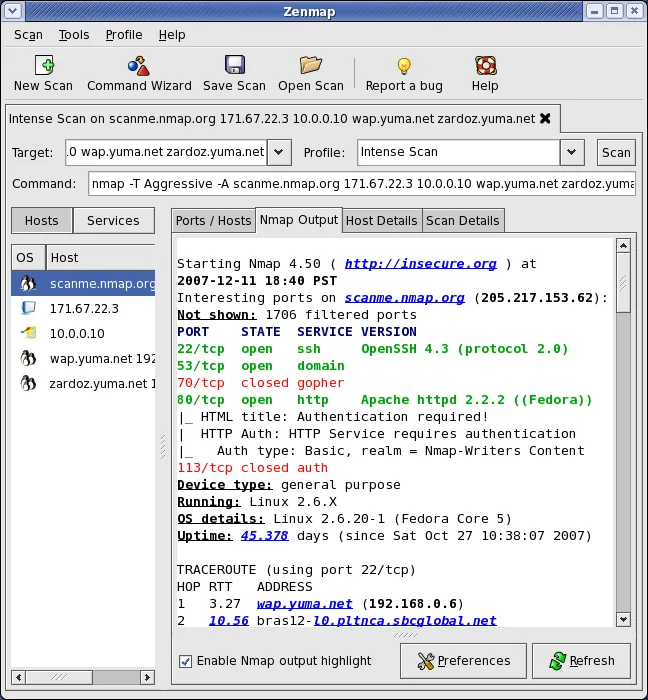
Zenmap is the official GUI for Nmap, so it is not a separate replacement but a front-end for the same engine. It is ideal for users who prefer visual host mapping and saved profiles over raw command-line syntax. However, it requires Nmap to be installed separately and runs with user-level permissions on Linux, which may limit some advanced scanning capabilities compared to running Nmap as root. For most standard network discovery and port scanning tasks, it covers the needs effectively, but power users relying on complex scripting or root-only probes should stick to the CLI.
- License
- GPL-2.0-only
- Price
- Free
- Latest version
- 7.94 (May 20, 2023)
- Rating
- —
What works the same
- Uses the same Nmap engine for host discovery, port scanning, and service detection
- Supports OS fingerprinting and version detection
- Allows saving and reusing scan profiles
- Generates output in multiple formats including XML and JSON
What is different
- Zenmap is a GUI wrapper; Nmap is a command-line tool
- Zenmap adds visual host mapping and side-by-side scan comparison
- Zenmap on Linux/Flatpak cannot run as root, limiting some privileged scans
- Nmap CLI offers more direct control over complex scripting and automation
Opening your Nmap files
Zenmap saves results in its own internal database format for easy searching and comparison. It also supports exporting standard Nmap output formats like XML, JSON, and grepable formats. You can import Nmap-generated XML files into Zenmap to view them in the GUI, though direct support for importing raw CLI logs may vary. Since Zenmap drives Nmap, any file Nmap can produce, Zenmap can typically display or export.
Switching from Nmap to Zenmap, step by step
- Install Nmap via your package manager or Flatpak
- Install Zenmap via your package manager or Flatpak
- Run Zenmap and verify it detects the Nmap binary
- Create a scan profile for your common tasks
- Export your first scan to XML to verify output formats
- Test a host discovery scan to ensure permissions are sufficient
Key features of Zenmap
- Visual network discovery and host mapping
- Interactive command line creator for Nmap
- Save and reuse scan profiles
- Searchable database of past scan results
- Side-by-side comparison of different scans
- Detailed host details including ports and services
- Export results to various formats
How to install Zenmap on Linux
flatpak install flathub org.nmap.ZenmapFrequently asked questions
Do I need to install Nmap separately?
Yes, Zenmap is a GUI interface. It requires the Nmap binary to be installed on your system to perform scans.
Can Zenmap run as root on Linux?
The Flatpak version cannot run as root due to sandboxing. For root-level scans, use the native package manager version or run Nmap CLI directly.
Is Zenmap suitable for automated scanning?
No, Zenmap is designed for interactive use. For automation, use the Nmap command-line tool directly.