
 ZulipLinux
vs
Microsoft Teams (2026 standalone version)Windows
Zulip as a Linux alternative to Microsoft Teams (2026 standalone version)
Updated
Our verdict
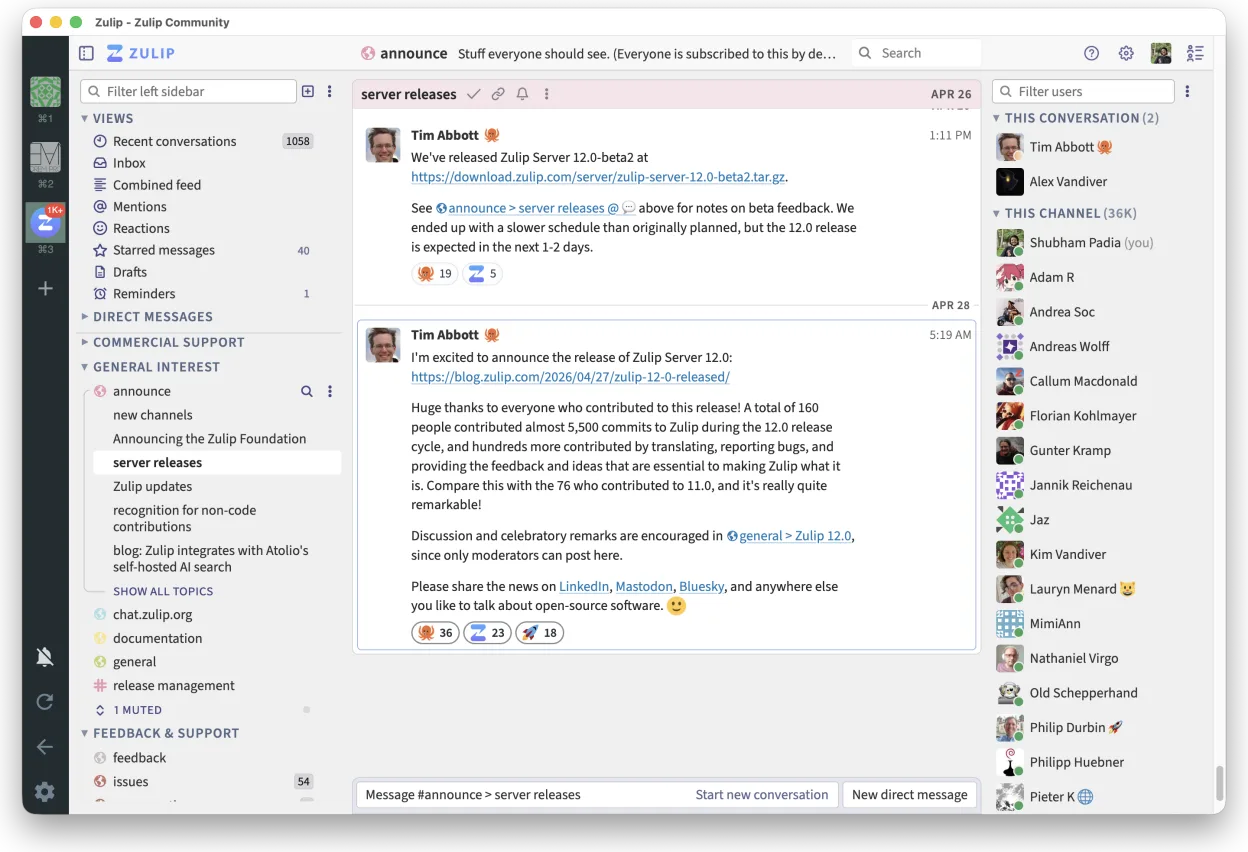
Zulip is a solid replacement for Microsoft Teams (2026 standalone version) for teams that prioritize organized, high-volume communication over video-first workflows. Its threaded conversations make it easier to follow multiple discussions, which benefits technical and asynchronous teams. While it supports audio and video calls through integrations like Jitsi, these features are not as tightly integrated or polished as in Teams. If your team values clear, searchable text communication and doesn’t rely heavily on built-in conferencing, Zulip works well on Linux and scales reliably.
- License
- Apache-2.0
- Price
- Free
- Latest version
- 5.14.2 (October 30, 2026)
- Rating
- —
What works the same
- Real-time text chat with support for channels and group discussions
- Cross-platform access including native Linux desktop client
- File sharing and persistent message history
- Searchable chat history across all messages
- Desktop notifications and presence indicators
What is different
- Zulip uses threaded conversations by default, unlike Teams' linear chat
- Built-in video and audio calling are not native; relies on external services
- No direct integration with Microsoft 365 calendars or Outlook contacts
- Self-hosting is possible with Zulip, unlike Microsoft Teams
- Less enterprise management tooling compared to Teams in large deployments
Opening your Microsoft Teams (2026 standalone version) files
Zulip does not directly open or import Microsoft Teams chat archives or exported data. File sharing works independently: documents sent in Teams can be manually re-uploaded to Zulip, but there’s no automated migration path for chat history or file metadata. Calendar invites or contact lists from Teams won’t sync automatically. If migrating, export files manually and re-share them in Zulip topics. Some organizations use scripts to migrate historical data, but this requires custom development.
Switching from Microsoft Teams (2026 standalone version) to Zulip, step by step
- Install the Zulip desktop client from Flathub or download from zulip.com
- Set up a self-hosted Zulip server or create an organization on zulipchat.com
- Invite team members and organize workflows using streams and topics
- Configure integrations for calendar and video calls (e.g., Jitsi, Google Calendar)
- Train team members on using topic threads instead of linear chat
- Migrate important files manually and archive old Teams data
Key features of Zulip
- Threaded conversations for organized discussions
- Open-source and self-hostable
- Available as a native Linux desktop client
- Supports large groups and high message volumes
- Cross-platform compatibility
- Strong search functionality across history
How to install Zulip on Linux
flatpak install flathub org.zulip.ZulipFrequently asked questions
Can Zulip do video meetings like Microsoft Teams?
Not natively. Zulip supports video calls through integrations with Jitsi, Zoom, or Google Meet, but doesn’t have built-in conferencing. You’ll need to start calls via a link in a message, which works but isn’t as seamless as Teams.
Is Zulip secure for enterprise use?
Yes. Being open-source and self-hostable, Zulip allows full control over data. It supports SSO, LDAP, and audit logs. Many organizations use it in regulated environments, though it lacks some compliance certifications that Teams offers out of the box.
Does Zulip work offline?
The Zulip desktop client caches messages and allows composing offline, syncing once reconnected. It doesn’t support offline file access or editing, but text drafts are preserved.
4 other alternatives to Microsoft Teams (2026 standalone version)
 SlackSlack is a proprietary team communication app for Linux that centralizes conversations, tools, and workflows…FlatpakSlack vs Microsoft Teams (2026 standalone version)
 MattermostMattermost is an open-source, self-hosted collaboration platform for developer teams, offering a secure…Open sourceFreeFlatpakMattermost vs Microsoft Teams (2026 standalone version)
 Rocket.ChatOpen-source team communication platform for chat, video, and collaboration, often used to replace Slack or…Open sourceFreeFlatpakRocket.Chat vs Microsoft Teams (2026 standalone version)
 ElementElement is an open‑source, matrix‑based chat and video‑conference client for Linux.Open sourceFreeFlatpakElement vs Microsoft Teams (2026 standalone version)
All alternatives to Microsoft Teams (2026 standalone version)