
Windows · System Tools
Best Linux alternatives to AOMEI Partition Assistant
AOMEI Partition Assistant is a Windows utility for resizing, moving, and cloning disk partitions, often used for system migrations.
Updated
Quick answer
The best Linux alternative to AOMEI Partition Assistant is GParted. Other strong options: parted.
2 Linux alternatives to AOMEI Partition Assistant
-
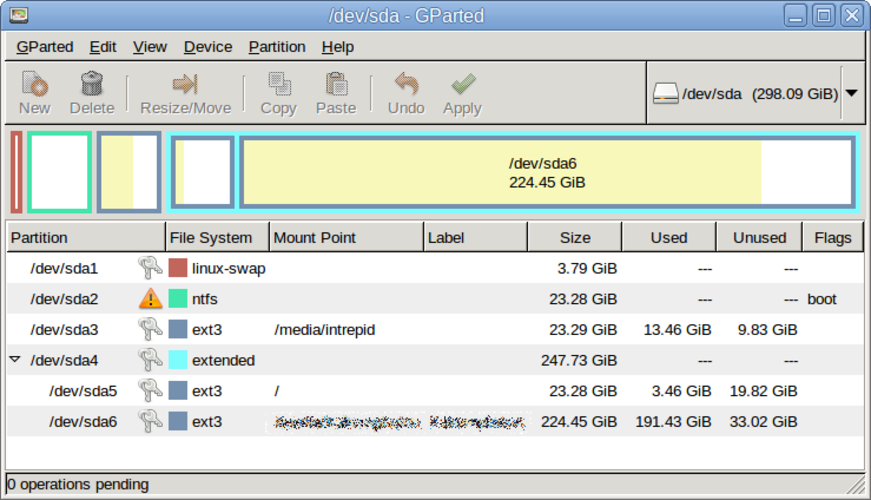
GParted is a free, open‑source graphical partition editor for creating, resizing, moving, and copying disk partitions and file systems.
GParted is a strong, native Linux replacement for AOMEI Partition Assistant. It handles the core tasks of resizing, moving, cloning, and creating partitions with equal reliability. It is ideal for users who need to prepare drives for Linux installation or manage disk layouts on existing systems…
Feature parity85% -
Parted is a command‑line tool for creating, resizing, and managing disk partitions on Linux.
Parted can replace AOMEI Partition Assistant for most core tasks such as resizing, moving, creating, deleting, and cloning partitions, and converting file systems. It is suitable for users comfortable with command‑line or scripting, including system administrators and advanced home users. For…
Feature parity80%

What is AOMEI Partition Assistant?
AOMEI Partition Assistant is a disk management tool primarily used by system administrators and enthusiasts to manipulate hard drive layouts. It handles tasks like resizing partitions, converting file systems, and cloning entire drives. Users typically employ it when upgrading hardware or reorganizing storage without losing data.
The software operates on a freemium model. The standard version is free for personal use but includes advertisements. A paid Professional edition removes ads and unlocks advanced features such as virtual disk management and specific cloning options. Licensing is per device, typical for commercial Windows utilities.
Linux users seek alternatives because AOMEI is not natively available on Linux distributions. While Wine can sometimes run it, GUI-based disk tools often fail due to missing dependencies or kernel interface issues. Native Linux tools offer better integration with the ext4 and other native file systems, providing more reliable partition management.
What a replacement for AOMEI Partition Assistant must do
- Resize and move partitions
- Clone entire disks or partitions
- Convert file systems (e.g., NTFS to ext4)
- Create and delete partitions
- Manage disk layouts for OS installation
- Bootable media creation for offline use
Can you run AOMEI Partition Assistant on Linux?
There is no native Linux version of AOMEI Partition Assistant. Running it via Wine is unreliable for disk management tasks because the application interacts directly with hardware and kernel drivers, which Wine does not fully emulate. Do not attempt to use it on a running Linux system for critical operations; it is safer to use native tools.
Which alternative should you choose?
GParted is the best choice for most users, offering a graphical interface that is intuitive for resizing, moving, and creating partitions. It is widely available in package managers and works well for standard disk management. parted is a command-line tool suited for scripting or users comfortable with the terminal. It is less forgiving than GParted but offers precise control for automated tasks or complex partitioning schemes.
Moving your AOMEI Partition Assistant files and habits
Partition data is stored on the disk, not in a proprietary file format, so no data export is needed. If you are cloning a drive, ensure the destination disk is large enough. When converting file systems, back up your data first, as format operations are destructive. Linux tools handle ext4, Btrfs, and XFS natively, while NTFS support is read/write capable but less robust than native Windows drivers.
Side-by-side comparison
AOMEI Partition Assistant: frequently asked questions
Can I use GParted to clone a Windows drive?
GParted does not have a built-in one-click clone feature like AOMEI. To clone, you would typically use dd or Clonezilla in conjunction with GParted for layout adjustments. It is more manual but effective.
Is parted safer than GParted?
Neither is inherently safer; safety depends on user input. parted is a low-level tool where a typo can wipe a disk. GParted provides visual previews and confirmation dialogs, making it less error-prone for casual users.
Do I need to boot from a USB to resize partitions?
Yes, if you are resizing the partition that contains the currently running operating system. You must boot from a live USB stick to modify the active filesystem safely.
Can these tools convert NTFS to ext4?
Yes, both GParted and parted can format partitions as ext4. However, this erases all data on that partition. You must back up the data before converting.
How important is AOMEI Partition Assistant to you?
Know a better alternative? Suggest an alternative