
Windows · System Tools
Best Linux alternatives to CrystalDiskInfo
CrystalDiskInfo displays SMART data and health status for hard drives and SSDs, helping users monitor storage device reliability.
Updated
Quick answer
The best Linux alternative to CrystalDiskInfo is GSmartControl. Other strong options: nvme-cli, KDiskMark.
3 Linux alternatives to CrystalDiskInfo
-
GSmartControl is a GUI front-end for smartctl that monitors hard drive health and SMART data on Linux.
GSmartControl is a solid replacement for CrystalDiskInfo on Linux. It reads SMART attributes, reports overall health, shows temperature and power‑on hours, and supports NVMe, SATA, SCSI, and USB drives. Users who need a GUI similar to CrystalDiskInfo and who also want advanced options like…
Feature parity85% -
nvme-cli is a command‑line utility for managing NVMe SSDs on Linux.
nvme-cli is a capable tool for reading SMART data and health status on NVMe drives, making it a solid replacement for CrystalDiskInfo if you only use NVMe SSDs and are comfortable with the command line. It reports temperature, power-on hours, and overall health. However, it does not support SATA or…
Feature parity60% -
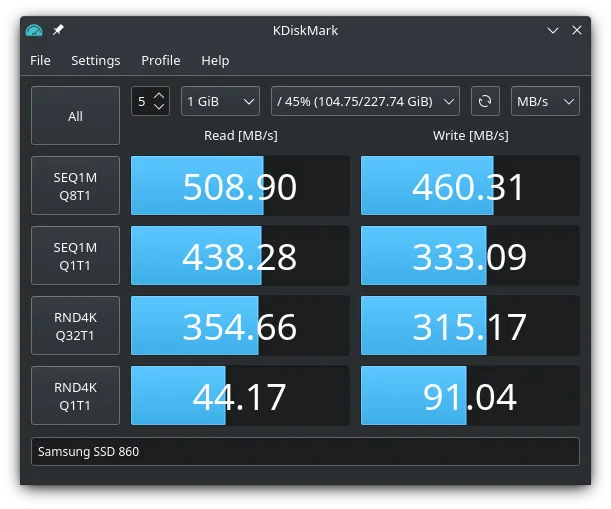
KDiskMark is a lightweight open‑source disk benchmark tool for Linux.
KDiskMark is not a replacement for CrystalDiskInfo. It benchmarks read/write speeds but does not read SMART data, show health status, temperature, or power‑on hours. Users who only need performance testing can use it, but those monitoring drive health should stick with CrystalDiskInfo or a Linux…
Feature parity10%

What is CrystalDiskInfo?
CrystalDiskInfo is a lightweight utility used by system administrators and enthusiasts to monitor the physical health of storage devices. It reads SMART (Self-Monitoring, Analysis and Reporting Technology) data from hard drives and SSDs, presenting critical metrics like temperature, power-on hours, and error counts. This helps users anticipate hardware failures before data loss occurs.
The software is available in a free version and a paid version that adds extra features and removes ads. It is widely distributed as a portable executable, meaning it does not require a traditional installation process. The free version is sufficient for most users who only need basic health monitoring and notification alerts.
Users seek Linux alternatives because they want to maintain the same level of hardware visibility without relying on Windows-specific tools. While Linux has built-in SMART support, a dedicated GUI or CLI tool simplifies the process of checking drive health. This is especially useful for users running mixed operating systems or those who prefer a consistent monitoring workflow across platforms.
What a replacement for CrystalDiskInfo must do
- Read SMART attributes from HDDs and SSDs
- Display overall health status (Good, Caution, Bad)
- Show temperature and power-on hours
- Monitor NVMe drives if supported
- Provide notifications for critical issues
- Support multiple drive types simultaneously
Can you run CrystalDiskInfo on Linux?
There is no native Linux version of CrystalDiskInfo. It does not run reliably under Wine or Proton because it relies on specific Windows driver interactions for SMART access. You should not expect it to work in a Linux environment. Instead, Linux has native tools that access SMART data directly through the kernel, which is more efficient and stable than trying to emulate the Windows application.
Which alternative should you choose?
For a graphical interface similar to CrystalDiskInfo, GSmartControl is the closest match, offering a clear view of SMART data and health status. If you prefer command-line tools or need to script checks, nvme-cli is excellent for NVMe drives, though it is less comprehensive for traditional SATA drives. KDiskMark is a benchmarking tool, not a health monitor, so it does not replace CrystalDiskInfo’s primary function. Use GSmartControl for monitoring and KDiskMark only if you also need performance testing.
Moving your CrystalDiskInfo files and habits
There is no data to export or migrate because CrystalDiskInfo does not store historical logs in a user-accessible format by default. It reads live SMART data from the drives. When switching to a Linux alternative, you simply install the new tool and read the same SMART attributes directly from the hardware. No configuration files or log transfers are necessary. The data source remains the same; only the interface changes.
Side-by-side comparison
| App | License | Flatpak | Latest version | Feature parity | Rating |
|---|---|---|---|---|---|
| GSmartControl | GPL-2.0 | — | 2.0.2 | 85% | — |
| nvme-cli | GPL-2.0 | — | 3.1 | 60% | — |
| KDiskMark | GPL-3.0-only | ✓ | 3.3.0 | 10% | — |
CrystalDiskInfo: frequently asked questions
Can I use CrystalDiskInfo with Wine?
It is not recommended. SMART access in Wine is often unreliable or unsupported, leading to incorrect readings or failures. Native Linux tools are safer and more accurate.
Does GSmartControl support NVMe drives?
Yes, GSmartControl supports NVMe drives, but for detailed NVMe log pages, nvme-cli is often more thorough. GSmartControl is sufficient for basic health checks.
Is KDiskMark a replacement for CrystalDiskInfo?
No. KDiskMark is a benchmarking tool for measuring read/write speeds. It does not display SMART health data. You need GSmartControl or similar for health monitoring.
Do I need root access to read SMART data on Linux?
Yes, reading SMART data typically requires root privileges or membership in the disk group. Most GUI tools will prompt for authentication if you do not have sufficient permissions.
How important is CrystalDiskInfo to you?
Know a better alternative? Suggest an alternative