

Linux · System Tools
KDiskMark
KDiskMark is a lightweight open‑source disk benchmark tool for Linux.
- License
- GPL-3.0-only
- Latest version
- 3.3.0 (June 12, 2026)
- Developer
- Dmitry Sidorov (JonMagon)
- Installs
- 4,656 (Flathub, 30 days)
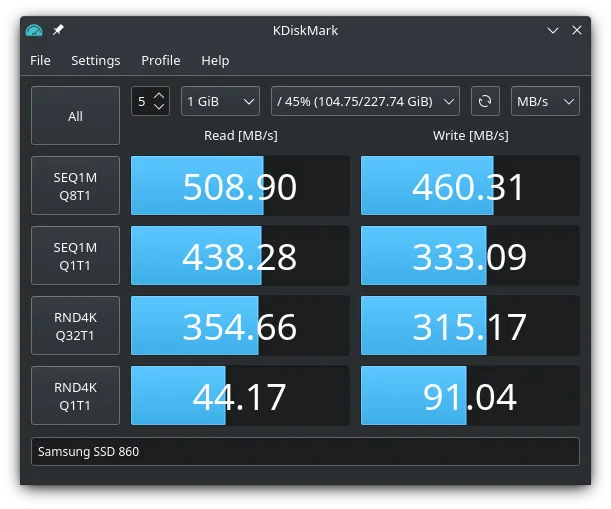
What is KDiskMark?
KDiskMark is a simple, command‑line friendly tool that measures read and write performance on block devices. It was created by Dmitry Sidorov (JonMagon) and first released in the early 2010s, steadily gaining a reputation for reliability and ease of use. The project is actively maintained, with the latest release 3.3.0 coming out in June 2026.
The tool is aimed at system administrators, power users, and anyone who needs quick, repeatable disk performance numbers. It supports configurable block sizes, queue depths, and thread counts, allowing users to mimic real‑world workloads.
Compared to Windows tools like CrystalDiskInfo, KDiskMark is more focused on raw performance testing rather than health monitoring. It feels more utilitarian but provides comparable data in a format that can be exported and shared across systems.
Best for: Users who need quick, repeatable disk performance tests on Linux systems.
Key features of KDiskMark
- Configurable block size, queue depth, and thread count
- Multi‑language support
- Plain‑text report generation
- Cross‑platform packaging (deb, rpm, arch)
- Command‑line interface for scripting
- No GUI required, runs in terminal
- Open‑source under GPL‑3.0-only
Pros
- Fast, low‑overhead benchmarking
- Highly configurable for different workloads
- Free and open‑source
- Available in major distro repositories
- Easy to integrate into automated scripts
Cons
- No graphical interface for beginners
- Limited to block device testing, no health diagnostics
- Requires terminal knowledge
- Report format is basic, no charting
Windows programs KDiskMark replaces
How to install KDiskMark on Linux
flatpak install flathub io.github.jonmagon.kdiskmarksudo apt install kdiskmarksudo apt install kdiskmarksudo dnf install kdiskmarksudo pacman -S kdiskmarksudo zypper install kdiskmarkTips for Windows users
If you’re coming from CrystalDiskInfo, note that KDiskMark only measures performance, not SMART health. Use tools like smartctl for health checks. The command syntax is simple: kdiskmark -b 64k -q 4 -t 2 /dev/sda. Results are plain text; you can pipe them to a file or use kdiskmark -o report.txt. Shortcuts are minimal—just the standard terminal shortcuts. Workflow is script‑friendly, so you can automate tests in cron or CI pipelines.
Recent releases
- 3.3.0 —
Changelog: - Implemented interactive terminal interface (TUI) - New configuration option to enable/disable --refill_buffers - Added Korean (ko_KR) localization - Fixed halved results with multiple jobs, now using fio --group_reporting
- 3.2.0 —
Changelog: - Removed country flags from language selector - Used clat instead of lat for latency measurements - Improved translations in .desktop file - Added Spanish (es_ES) localization - Added Finnish (fi_FI) localization - Added Traditional Chinese…
- 3.1.4 —
Changelog: - Fixed config directory name to ~/.config/kdiskmark - Hungarian localization correction. - Fixed window icon. - Dutch localization.
- 3.1.3 —
Changelog: - Benchmark file name is randomly generated. - Fixed the device list template when changing the locale. - Added Japanese localization.
KDiskMark: frequently asked questions
Is KDiskMark safe to run on my production server?
Yes, it only performs read/write tests on the specified device; it does not modify data. However, avoid running it on a live filesystem during critical operations to prevent I/O contention.
Can I use KDiskMark to test SSDs and HDDs alike?
Absolutely. The tool treats all block devices the same; you just point it at the device you want to benchmark.
Does it support NVMe drives?
Yes, as long as the NVMe device appears as a block device (e.g., /dev/nvme0n1), KDiskMark can benchmark it.
How do I install KDiskMark on Ubuntu?
On Ubuntu 24.04, run sudo apt install kdiskmark. For older releases, you may need to add a PPA or install from a .deb package available on the project's GitHub releases.
Updated