
 MyPaintLinux
vs
PaintTool SAIWindows
MyPaint als Linux-Alternative zu PaintTool SAI
Aktualisiert am
Unser Fazit
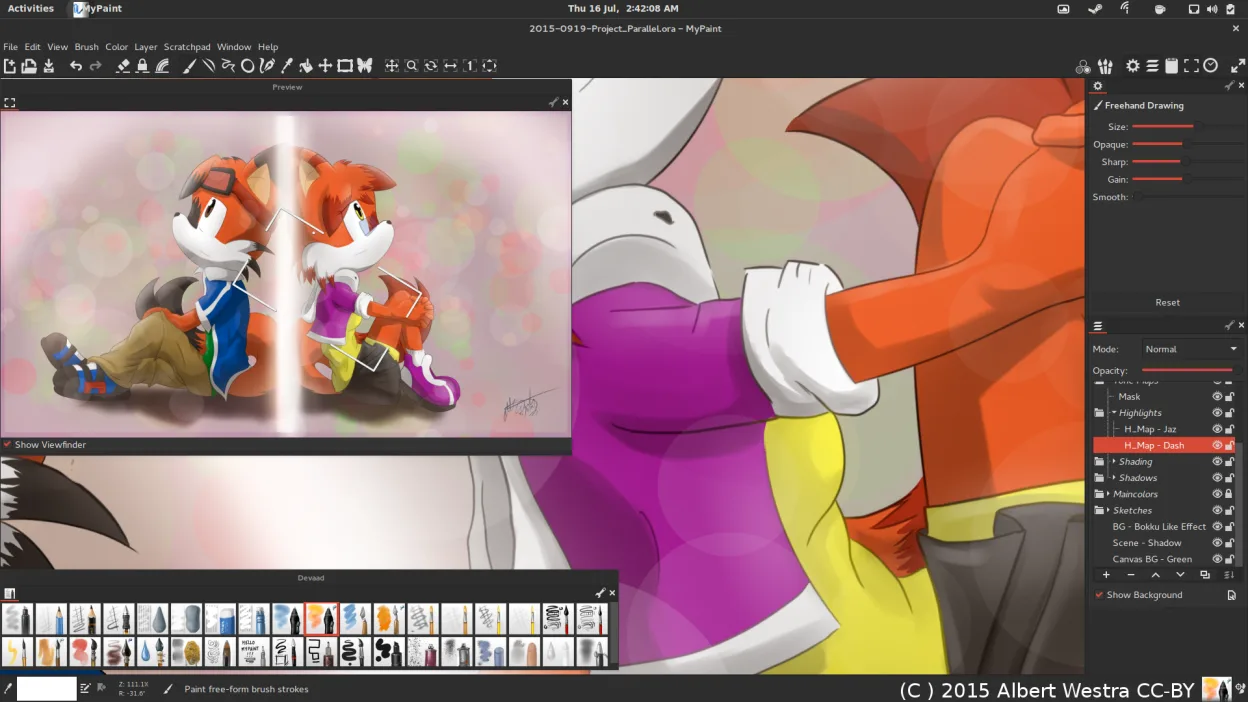
MyPaint is a strong replacement for artists who prioritize brush feel and tablet interaction over complex editing tools. It excels at line art and coloring with a highly configurable brush engine and low resource usage, matching SAI's lightweight nature. However, it lacks SAI's dedicated stabilization tools and advanced selection/masking features. If your workflow relies heavily on precise vector-like smoothing or intricate layer management, you may find MyPaint limiting. For pure painting and sketching, it is an excellent, free alternative.
- Lizenz
- GPL-2.0+
- Preis
- Kostenlos
- Aktuelle Version
- 2.0.1 (29. Mai 2020)
- Bewertung
- —
Was gleich funktioniert
- Lightweight raster editor focused on painting rather than complex photo editing
- Strong support for pressure-sensitive graphics tablets
- Low resource usage suitable for older hardware
- Layer support with blending modes
- Export to standard formats like PNG and JPEG
Was anders ist
- Lacks dedicated line art stabilization tools found in SAI
- Selection and masking tools are more basic than SAI's
- Interface is canvas-only and distraction-free, hiding tools until needed
- Brush engine is more complex and configurable but lacks SAI's specific preset stability
- No native support for SAI's proprietary file format
Ihre PaintTool SAI-Dateien öffnen
MyPaint does not natively open PaintTool SAI's .psa files. You will need to export your work from SAI as a layered format like OpenRaster (.ora) or PSD (if you have a converter) before importing into MyPaint. MyPaint exports to PNG, JPEG, OpenRaster, and other common formats, ensuring compatibility with other tools.
Von PaintTool SAI zu MyPaint wechseln – Schritt für Schritt
- Install MyPaint via your distribution's package manager or Flathub
- Connect your graphics tablet and configure pressure sensitivity in system settings
- Export existing SAI projects as OpenRaster (.ora) files
- Open the .ora files in MyPaint to verify layers and brushes
- Configure your preferred brushes using the built-in editor or pre-installed packs
- Test line art and coloring to adjust brush dynamics for your style
Wichtige Funktionen von MyPaint
- Pinsel-Engine mit hunderten konfigurierbaren Parametern
- Unterstützung für Drucksensorik und Neigung auf Grafiktabletts
- Einfache, ablenkungsfreie Oberfläche nur mit Leinwand
- Ebenenunterstützung mit grundlegenden Mischmodi
- Export in PNG, JPEG, OpenRaster und andere gängige Formate
- Erweiterbar über Python-Plugins
- Vorinstallierte Pinselpakete von professionellen Künstlern
- Rückgängig/Wiederherstellen-Verlauf mit unbegrenzten Schritten
MyPaint unter Linux installieren
flatpak install flathub org.mypaint.MyPaintsudo apt install mypaintsudo apt install mypaintsudo dnf install mypaintsudo pacman -S mypaintsudo zypper install mypaintHäufige Fragen
Does MyPaint have a stabilization tool like SAI?
MyPaint does not have a dedicated 'stabilization' slider like SAI. However, you can achieve similar smoothness by adjusting the brush's lag, smoothing, and pressure response parameters in the brush editor.
Can I use MyPaint without a tablet?
Yes, but it is designed primarily for tablet use. Mouse input works, but you lose pressure sensitivity and tilt features, which are central to the brush engine's capabilities.
Is MyPaint actively maintained?
The project is active, but the latest stable release mentioned is 2.0.1 from 2020. Check the official website or Flathub for the most current builds, as development may have continued in newer versions.
3 weitere Alternativen zu PaintTool SAI
 KritaKrita ist ein vollwertiges Open‑Source-Programm für digitales Malen und Illustration.Open SourceKostenlosFlatpakKrita vs. PaintTool SAI
 GIMPGIMP ist ein kostenloser, quelloffener Rastergrafik‑Editor für Fotobearbeitung, digitale Malerei und…Open SourceKostenlosFlatpakGIMP vs. PaintTool SAI
 Pencil2DPencil2D ist ein Open-Source-Tool für 2D-Animationen mit handgezeichneten Vektor- und Bitmap-Grafiken.Open SourceKostenlosFlatpakPencil2D vs. PaintTool SAI