
 ShotwellLinux
vs
Microsoft PhotosWindows
Shotwell als Linux-Alternative zu Microsoft Photos
Aktualisiert am
Unser Fazit
Shotwell is a solid replacement for Microsoft Photos if you're on a GNOME-based Linux system and want simple photo management with basic editing. It handles common formats like JPEG and PNG well, browses quickly, and organizes by date or tags without bloat. The non-destructive editing is reliable for crops, rotation, and lighting tweaks. However, it lacks HEIC support unless you install additional codecs, and web service integrations like Google Photos may be less reliable now. It’s ideal for users who value simplicity and Linux integration over cloud syncing.
- Lizenz
- LGPL-2.1+
- Preis
- Kostenlos
- Aktuelle Version
- 33.2 (5. November 2026)
- Bewertung
- —
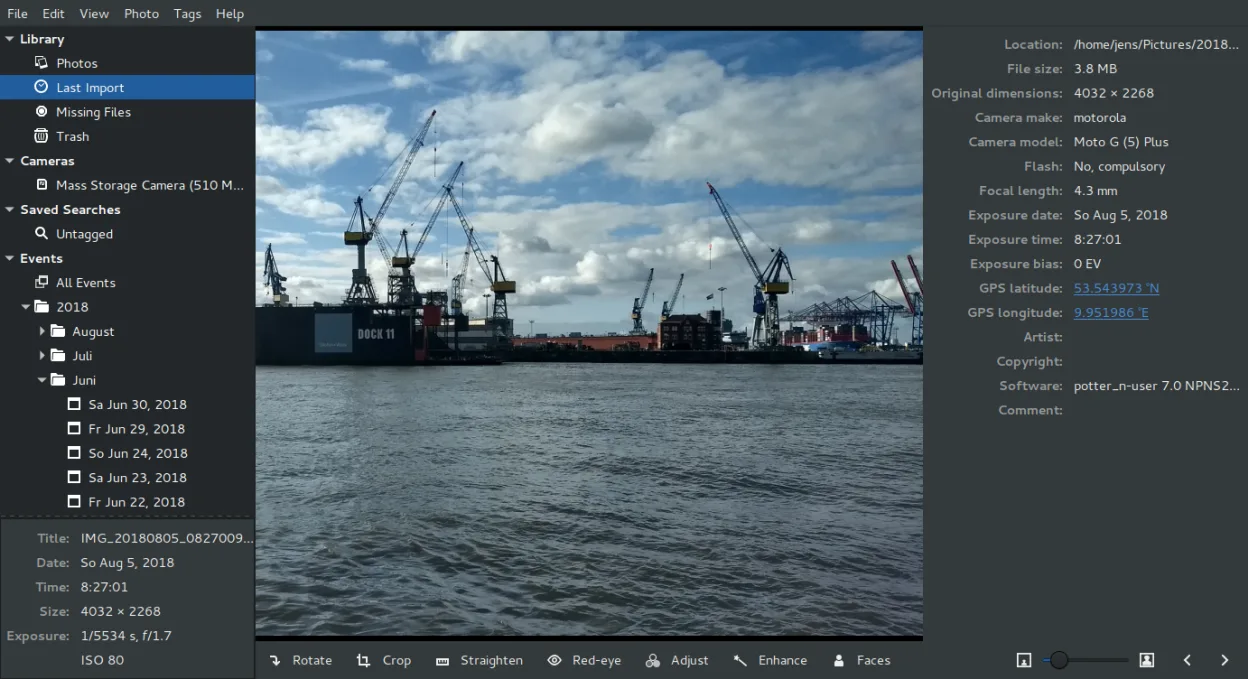
Was gleich funktioniert
- View JPEG, PNG, and TIFF images directly
- Organize photos by date automatically
- Basic editing tools: crop, rotate, straighten, color adjustment
- Fast thumbnail browsing with lightweight resource use
- Supports file tagging and ratings for personal organization
Was anders ist
- No native HEIC support without extra system codecs
- No built-in video playback or editing
- Missing advanced AI-based enhancements (e.g., auto-fix, object recognition)
- Upload services like Flickr are deprecated or unreliable
- Interface is minimalist but less polished than modern Microsoft Photos
Ihre Microsoft Photos-Dateien öffnen
Shotwell opens JPEG, PNG, and TIFF files without issue, matching Microsoft Photos. RAW support is broader than Microsoft Photos, but HEIC files — commonly created on iPhones — require additional system-level codecs (like libheif) to be installed and may not work out of the box. If your photos are in standard formats, Shotwell will handle them fine. Exporting edits is non-destructive by default, meaning originals stay intact, but saved adjustments are stored in sidecar files or the library, not embedded into the original image.
Von Microsoft Photos zu Shotwell wechseln – Schritt für Schritt
- Install Shotwell via your distro’s package manager or Flatpak
- Copy your photo folders from Windows to your Linux home directory
- Launch Shotwell and set the photo library location to your copied folder
- Use 'Import from Folder' to add existing photos to the library
- Enable 'Copy files to Pictures folder' in preferences if you want automatic organization
Wichtige Funktionen von Shotwell
- Fotos von Kamera oder Festplatte importieren
- Nach Datum, Tags und Bewertungen organisieren
- Nicht destruktives Zuschneiden, Rote-Augen-Korrektur, Farbe, Ausrichten
- Unterstützung für RAW, JPEG, PNG, TIFF
- Hochladen zu Flickr, Google Photos usw.
- Schnelle, leichte Benutzeroberfläche
- Integration in den GNOME-Dateimanager
Shotwell unter Linux installieren
flatpak install flathub org.gnome.Shotwellsudo apt install shotwellsudo apt install shotwellsudo dnf install shotwellsudo pacman -S shotwellsudo zypper install shotwellHäufige Fragen
Can Shotwell edit photos non-destructively?
Yes. Edits like crop, rotate, and exposure are stored separately and don’t alter the original file unless you explicitly export a modified version.
Does Shotwell work well on non-GNOME desktops?
It runs on other desktops like KDE or XFCE, but integration with the file manager and system settings is best on GNOME.
Is Google Photos upload still supported?
The option exists, but Google ended support for the underlying API. Uploading may fail or require third-party tools.
4 weitere Alternativen zu Microsoft Photos
 nomacs - Image LoungeNomacs ist ein kostenloser, quelloffener Bildbetrachter, der Miniaturansichten, Metadaten, Histogramme und…Open SourceKostenlosFlatpaknomacs - Image Lounge vs. Microsoft Photos
 GwenViewGwenView ist der schnelle Bildbetrachter von KDE mit grundlegenden Bearbeitungs- und Anmerkungswerkzeugen…Open SourceKostenlosFlatpakGwenView vs. Microsoft Photosfehfeh ist ein leichter, kommandozeilenbasierter Bildbetrachter für Linux, der häufig zum Festlegen von…Open SourceKostenlosfeh vs. Microsoft Photos
 darktabledarktable ist ein kostenloser, quelloffener Bildbearbeitungsprogrammier, der Rohdateien verwaltet und einen…Open SourceKostenlosFlatpakdarktable vs. Microsoft Photos