
 ShotwellLinux
vs
PhotoScapeWindows
Shotwell als Linux-Alternative zu PhotoScape
Aktualisiert am
Unser Fazit
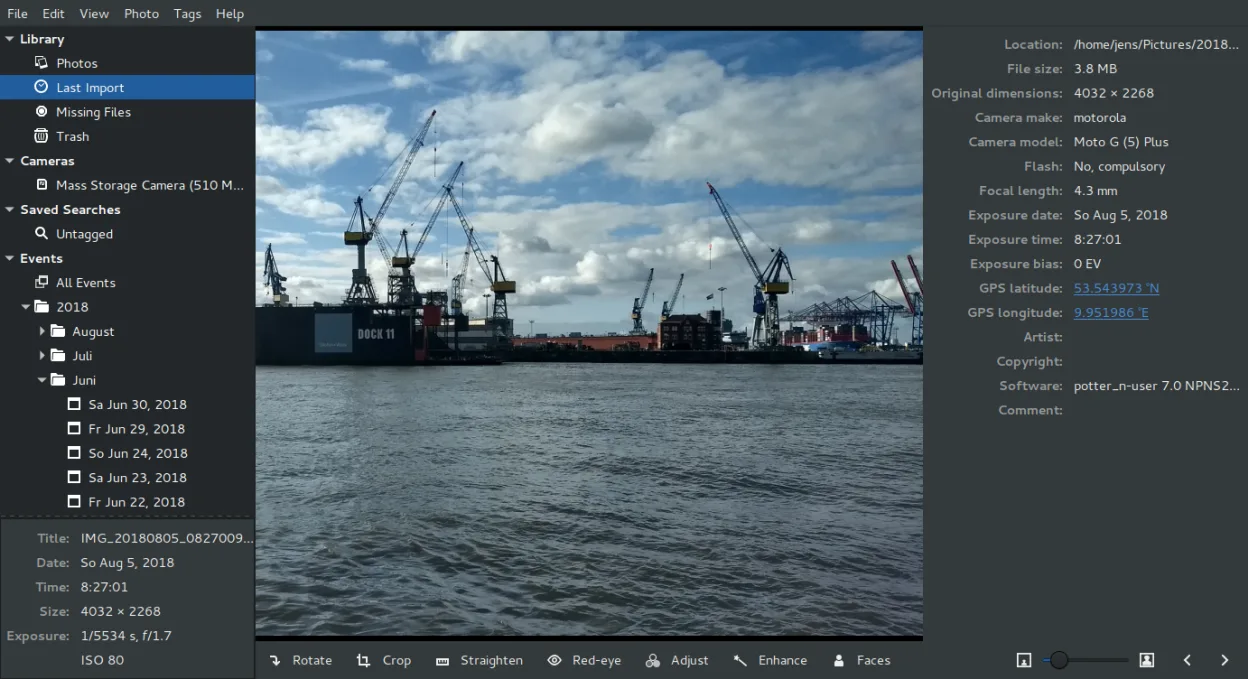
Shotwell can replace PhotoScape for users who mainly need a quick way to view, organise and perform light edits such as cropping, red‑eye removal, colour tweaks and straightening. It excels at managing large libraries and works well in GNOME environments. However, it does not provide the same batch‑rename/resize tools, collage or contact‑sheet generators, nor GIF‑animation creation that many PhotoScape fans rely on. If your workflow is centred on simple edits and library management, Shotwell is a solid alternative; if you need the richer batch and creative features, you will miss them.
- Lizenz
- LGPL-2.1+
- Preis
- Kostenlos
- Aktuelle Version
- 33.2 (5. November 2026)
- Bewertung
- —
Was gleich funktioniert
- Basic editing (crop, red‑eye, colour/brightness adjustments)
- Support for common formats (JPEG, PNG, TIFF, RAW)
- Free and open‑source licensing
- Simple, lightweight UI
Was anders ist
- Shotwell lacks built‑in batch rename/resize functionality
- No collage, contact‑sheet or GIF‑animation creation tools
- PhotoScape offers a dedicated batch processing panel, Shotwell does not
- Shotwell focuses on photo organisation; PhotoScape is more of an all‑in‑one editor
Ihre PhotoScape-Dateien öffnen
PhotoScape saves edited images as standard formats (JPEG, PNG, BMP). Shotwell can open and export those without issue. PhotoScape does not use a proprietary project file, so there is no special compatibility concern; any images created in PhotoScape can be imported into Shotwell directly.
Von PhotoScape zu Shotwell wechseln – Schritt für Schritt
- Install Shotwell from your distribution’s repository or Flathub.
- Copy your photo folders to a location accessible to Shotwell.
- Open Shotwell and use the Import function to bring in existing images.
- If you used PhotoScape batch scripts, recreate needed batch actions with a command‑line tool like mogrify or imbatch.
- Set up tags or events in Shotwell to mirror any organisational scheme you had in PhotoScape.
Wichtige Funktionen von Shotwell
- Fotos von Kamera oder Festplatte importieren
- Nach Datum, Tags und Bewertungen organisieren
- Nicht destruktives Zuschneiden, Rote-Augen-Korrektur, Farbe, Ausrichten
- Unterstützung für RAW, JPEG, PNG, TIFF
- Hochladen zu Flickr, Google Photos usw.
- Schnelle, leichte Benutzeroberfläche
- Integration in den GNOME-Dateimanager
Shotwell unter Linux installieren
flatpak install flathub org.gnome.Shotwellsudo apt install shotwellsudo apt install shotwellsudo dnf install shotwellsudo pacman -S shotwellsudo zypper install shotwellHäufige Fragen
Can Shotwell create collages like PhotoScape?
No, Shotwell does not have a collage generator; you would need a separate tool such as ImageMagick or a dedicated collage app.
Is there a way to batch‑resize images in Shotwell?
Shotwell does not provide batch resize; use a command‑line utility (e.g., mogrify) or a batch‑oriented GUI like XnConvert.
Does Shotwell support GIF animation creation?
Shotwell cannot assemble GIF animations; you would have to use a tool like gifsicle or an online service after exporting the frames.
5 weitere Alternativen zu PhotoScape
 GIMPGIMP ist ein kostenloser, quelloffener Rastergrafik‑Editor für Fotobearbeitung, digitale Malerei und…Open SourceKostenlosFlatpakGIMP vs. PhotoScape
 darktabledarktable ist ein kostenloser, quelloffener Bildbearbeitungsprogrammier, der Rohdateien verwaltet und einen…Open SourceKostenlosFlatpakdarktable vs. PhotoScape
 KritaKrita ist ein vollwertiges Open‑Source-Programm für digitales Malen und Illustration.Open SourceKostenlosFlatpakKrita vs. PhotoScape
 gThumb Image ViewergThumb is a GNOME‑integrated image viewer, editor and organizer for Linux.Open SourceKostenlosFlatpakgThumb Image Viewer vs. PhotoScape
 nomacs - Image LoungeNomacs ist ein kostenloser, quelloffener Bildbetrachter, der Miniaturansichten, Metadaten, Histogramme und…Open SourceKostenlosFlatpaknomacs - Image Lounge vs. PhotoScape