
Windows · Sound & Video
Best Linux alternatives to Final Cut Pro
Professional non-linear video editor for macOS, requiring native Linux replacements for timeline-based workflows.
Updated
Quick answer
The best Linux alternative to Final Cut Pro is Kdenlive. Other strong options: Shotcut, Flowblade, OpenShot.
5 Linux alternatives to Final Cut Pro
-

Kdenlive is a free, feature‑rich non‑linear video editor built on the MLT framework.
Kdenlive is a solid, free alternative for users who need a non‑linear editor on Linux. It covers most of the core tasks that Final Cut Pro offers—multi‑track editing, color grading, audio mixing, and high‑resolution export—making it suitable for hobbyists, small‑studio producers, and educators…
Feature parity70% -

Shotcut is a free, open-source video editor for Linux with support for a wide range of formats via FFmpeg.
Shotcut is a capable non-linear editor for Linux and can replace Final Cut Pro for hobbyists, educators, and independent creators doing basic to intermediate editing. It handles multi-track timelines, color grading, filters, and high-resolution exports. However, it lacks professional-grade tools…
Feature parity65% -

Flowblade is a fast, stable, multitrack non-linear video editor for Linux, suitable for beginners to professionals.
Flowblade is a solid, native Linux alternative for those who need a stable, non-linear editor without the complexity of NLEs like Kdenlive or DaVinci Resolve. It handles standard multitrack video and audio editing well, making it suitable for vloggers, documentary makers, and professionals who…
Feature parity70% -

OpenShot is a free, open-source, non-linear video editor for Linux and other platforms, built with Python and MLT.
OpenShot is a capable free alternative for casual to intermediate video editing, but it is not a direct professional replacement for Final Cut Pro. It handles standard timeline editing, multi-track audio, and basic color grading well. However, it lacks the advanced multi-cam synchronization…
Feature parity55% -
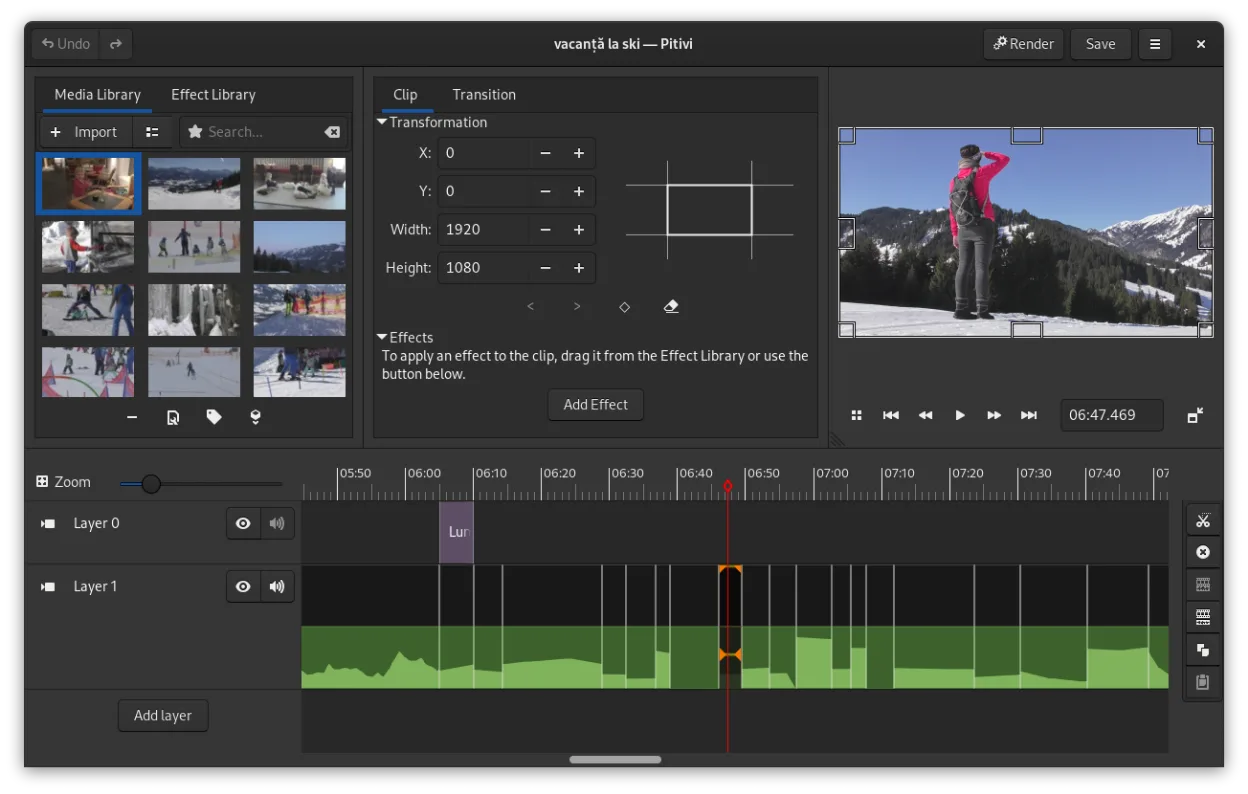
PiTiVi is a free, open-source, non-linear video editor for Linux built on GStreamer with a clean GNOME-integrated interface.
PiTiVi is a solid, native Linux replacement for Final Cut Pro if you prioritize open-source tools and GNOME integration. It handles core non-linear editing, multi-track timelines, and GStreamer-supported codecs well. However, it lacks Final Cut Pro’s polished color grading suite, dedicated…
Feature parity65%





What is Final Cut Pro?
Final Cut Pro is a professional, non-linear video editing application used by filmmakers, content creators, and studios to import, cut, and color-grade footage. It serves as the high-end counterpart to iMovie, offering advanced tools for multi-cam editing, audio mixing, and visual effects. The software is designed for users who need precise control over the editing timeline and high-quality output for professional distribution.
The software is proprietary and developed by Apple, available as part of its Creator Studio collection for macOS and iPadOS. It is not a free tool; users must purchase a license or subscribe to Apple's creative suite. Because it is tightly integrated with Apple's ecosystem, including hardware optimization and specific file formats, it is strictly limited to Apple devices and does not run on Windows or Linux natively.
Linux users seek alternatives because they want to avoid the cost of Apple hardware or because they prefer open-source ecosystems for their creative workflows. While Final Cut Pro is highly regarded, its exclusivity forces Linux users to find native applications that offer comparable timeline-based editing, codec support, and export options without the vendor lock-in associated with macOS.
What a replacement for Final Cut Pro must do
- Non-linear timeline editing
- Multi-track audio and video
- Wide range of codec import/export
- Color grading and effects
- Multi-cam editing support
- High-resolution output capabilities
Can you run Final Cut Pro on Linux?
There is no native Linux version of Final Cut Pro. It does not run via Wine or Proton because it relies heavily on macOS-specific frameworks and hardware acceleration that are not fully compatible with Linux. You cannot use a web version either, as it is a desktop application. The only way to use Final Cut Pro is on a Mac, which means Linux users must switch to a different software entirely.
Which alternative should you choose?
Kdenlive is the closest match for professional workflows, offering a multi-track timeline and extensive plugin support, making it suitable for complex projects. Shotcut is a strong alternative for users who want a balance of power and ease of use, with good codec support. Flowblade is designed for simplicity and speed, ideal for linear editing tasks. OpenShot is beginner-friendly and good for basic cuts, while PiTiVi is a lightweight option for simple editing needs. Choose Kdenlive or Shotcut if you need professional features.
Moving your Final Cut Pro files and habits
You cannot directly import Final Cut Pro projects into Linux editors. You must export your project from Final Cut Pro as a sequence of clips or a flattened video file, then re-import the raw media into your Linux editor. This process is manual and requires you to rebuild your timeline, apply effects, and adjust audio. Keep your original media files organized, as you will need to relink them in the new software. Exporting to a common format like ProRes or DNxHR can help maintain quality during the transfer.
Side-by-side comparison
Final Cut Pro: frequently asked questions
Can I open a Final Cut Pro project file in Kdenlive?
No, project files are not compatible. You must export your media and re-edit the timeline in the Linux application.
Is Kdenlive as powerful as Final Cut Pro?
It covers most professional needs, including multi-cam and color grading, but some specific Apple-exclusive effects may not have direct equivalents.
Do these Linux editors support 4K or 8K video?
Yes, Kdenlive, Shotcut, and others support high-resolution video, provided your hardware has sufficient RAM and GPU power.
Which Linux editor is best for audio editing?
All listed editors have multi-track audio, but Kdenlive and Shotcut offer more detailed audio mixing and effect controls than the simpler options.
How important is Final Cut Pro to you?
Know a better alternative? Suggest an alternative