
 GNOME System MonitorLinux
vs
Process HackerWindows
GNOME System Monitor, alternative Linux à Process Hacker
Mis à jour le
Notre avis
GNOME System Monitor is a solid, lightweight replacement for basic Process Hacker needs, especially if you prefer a clean, integrated desktop experience. It handles standard process listing, CPU/memory monitoring, and killing tasks effectively. However, it lacks the deep forensic capabilities of Process Hacker, such as detailed thread inspection, open file handles, and advanced network connection mapping. If you only need to check resource usage and end unresponsive apps, this is sufficient. If you rely on Process Hacker for debugging, security analysis, or detailed system introspection, you will find GNOME System Monitor too limited and should look at heavier tools like htop or specialized system utilities instead.
- Licence
- GPL-2.0
- Prix
- Gratuit
- Dernière version
- 51.1
- Note
- 5/5 (1)
Ce qui fonctionne pareil
- Lists running processes with real-time CPU and memory usage
- Allows users to sort processes by resource consumption or name
- Provides functionality to kill or end running processes
- Displays system-wide performance metrics like load average and uptime
Ce qui change
- Lacks detailed thread-level inspection and per-thread CPU usage
- Does not show open file handles or detailed network connection mappings
- Missing advanced process management features like priority adjustment or suspension
- Interface is simpler and less customizable than Process Hacker's multi-pane layout
Ouvrir vos fichiers Process Hacker
GNOME System Monitor does not import or export Process Hacker configuration files or saved process lists. It uses standard GNOME settings for its own configuration. If you have saved Process Hacker views or scripts, they will not transfer directly; you will need to manually recreate any custom monitoring setups within the Linux tool.
Passer de Process Hacker à GNOME System Monitor, étape par étape
- Install GNOME System Monitor via your package manager (e.g., apt, dnf, pacman)
- Open the application to verify it launches correctly
- Familiarize yourself with the process list and sorting options
- Test the 'End Process' function on a non-critical task
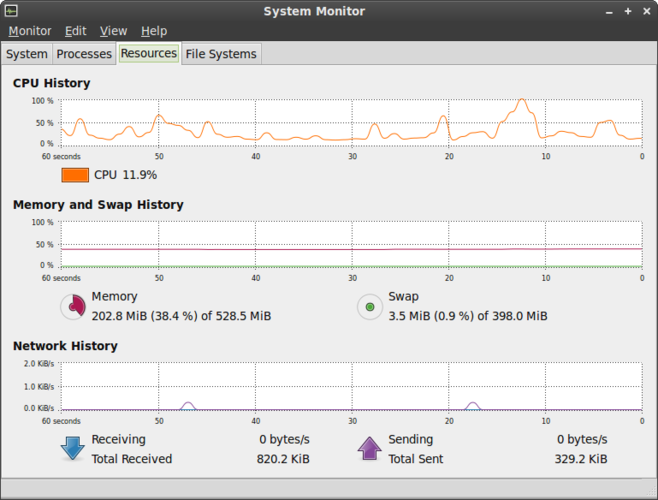
- Check the 'Resources' tab for CPU and memory graphs
- Note that advanced features like file handles are not available
Fonctionnalités clés de GNOME System Monitor
- Lister tous les processus en cours avec leur utilisation du processeur et de la mémoire
- Trier les processus par nom, PID, utilisateur ou consommation de ressources
- Afficher des informations détaillées pour un processus spécifique
- Arrêter ou tuer des processus en cours
- Surveiller la charge globale du processeur et de la mémoire
- Afficher la durée de fonctionnement du système et la charge moyenne
- Afficher un aperçu de l'activité réseau
- S'intégrer à l'environnement de bureau GNOME
Installer GNOME System Monitor sous Linux
sudo apt install gnome-system-monitorsudo apt install gnome-system-monitorsudo dnf install gnome-system-monitorsudo pacman -S gnome-system-monitorsudo zypper install gnome-system-monitorQuestions fréquentes
Can I see which files a process has open?
No, GNOME System Monitor does not display open file handles. For that, you need to use command-line tools like lsof or specialized system utilities.
Is it as feature-rich as Process Hacker?
No, it is much simpler. It covers basic monitoring and process management but lacks the deep system introspection and advanced debugging features found in Process Hacker.
Does it work on all Linux distributions?
Yes, it is available in major repositories including Debian, Ubuntu, Fedora, Arch, and openSUSE, making it a standard choice for GNOME-based systems.
4 autres alternatives à Process Hacker
 System Monitoring CenterSystem Monitoring Center est un moniteur à faible consommation, multi‑fonctionnalités pour le CPU, la RAM, le…Open sourceGratuitFlatpakSystem Monitoring Center ou Process Hackerhtophtop est un visualiseur de processus interactif pour les systèmes de type Unix, remplaçant l'ancienne…Open sourceGratuithtop ou Process Hackerbtopbtop est un moniteur système en mode terminal qui visualise l’utilisation du CPU, de la mémoire, du disque et…Open sourceGratuitbtop ou Process HackerlsofUn utilitaire en ligne de commande qui liste les fichiers ouverts et les processus associés, offrant une…Open sourceGratuitlsof ou Process Hacker