
 jamoviLinux
vs
StataWindows
jamovi as a Linux alternative to Stata
Updated
Our verdict
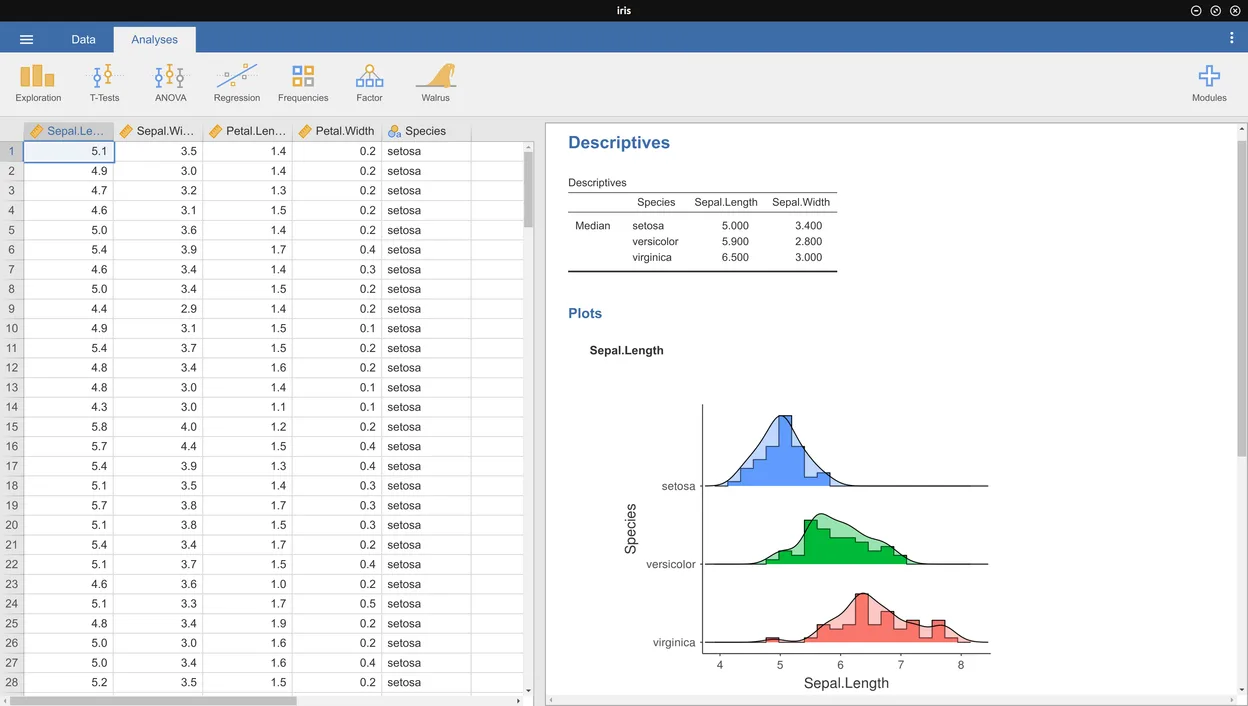
Jamovi can replace Stata for users who need standard descriptive statistics, basic t‑tests, ANOVAs, correlations, and factor analysis. It is suitable for students, researchers, and small‑scale projects that do not rely on Stata’s advanced econometric or custom scripting features. For advanced regression, panel data, or large‑scale reproducible workflows, Stata remains superior.
Feature parity
- License
- AGPL-3.0-or-later
- Price
- Free
- Latest version
- 28.7 (October 3, 2026)
- Rating
- —
What works the same
- Both support import of CSV, Excel, SPSS, SAS, and Stata .dta files
- Both provide graphical output that can be exported to PDF, HTML, or LaTeX
- Both allow interactive data exploration and real‑time results
- Both have cross‑platform availability
What is different
- Jamovi lacks advanced econometric procedures (e.g., GARCH, panel models) that Stata offers
- Jamovi’s scripting is limited to the jamovi syntax and R extensions, not a full programming language like Stata’s Do files
- Batch processing and automation are not as mature in jamovi
- Stata’s command‑line interface and integration with other statistical tools is more extensive
- Jamovi’s library is growing but still smaller than Stata’s built‑in procedures
Opening your Stata files
Jamovi can open Stata .dta files directly, but it does not support exporting back to .dta format. For export, users can save datasets as CSV or SPSS (.sav) and then convert to .dta using other tools if needed.
Switching from Stata to jamovi, step by step
- Export your Stata dataset to CSV or Excel from Stata.
- Open the CSV/Excel file in jamovi and verify variable names and types.
- Recreate any custom analyses using jamovi’s built‑in tests or install relevant modules from the jamovi library.
- Export results to PDF or LaTeX for reporting.
- If you need advanced regressions, consider running them in R via jamovi’s R module or keep Stata for those parts.
- Document the workflow in a reproducible script using jamovi’s syntax or R.”
- faq
Key features of jamovi
- Real‑time output updates
- Built‑in t‑tests, ANOVAs, correlations, and factor analysis
- Extensible via jamovi library
- Export to PDF, HTML, LaTeX, Markdown
- Cross‑platform (Linux, Windows, macOS)
- Supports .csv, .sav, .dta, .xlsx
- Keyboard shortcuts for common actions
- Integrated help and tutorials
How to install jamovi on Linux
Flatpak (Flathub)
flatpak install flathub org.jamovi.jamovi3 other alternatives to Stata
RR is a free, open-source programming language and environment for statistical computing and graphics with a…Open sourceFreeR vs Stata JASPJASP is a free, cross‑platform GUI for classical and Bayesian statistics.Open sourceFreeFlatpakJASP vs Stata
 PSPPPSPP is a free, open-source statistical analysis tool designed as a replacement for SPSS, offering similar…Open sourceFreeFlatpakPSPP vs Stata
JASPJASP is a free, cross‑platform GUI for classical and Bayesian statistics.Open sourceFreeFlatpakJASP vs StataPSPPPSPP is a free, open-source statistical analysis tool designed as a replacement for SPSS, offering similar…Open sourceFreeFlatpakPSPP vs StataRate jamovi
Be the first to rate
Is it a good replacement for Stata?
8