

Linux · Science & Education
JASP
JASP is a free, cross‑platform GUI for classical and Bayesian statistics.
- License
- AGPL-3.0+
- Latest version
- 0.98.1 (July 6, 2026)
- Developer
- University of Amsterdam
- Installs
- 3,085 (Flathub, 30 days)
What is JASP?
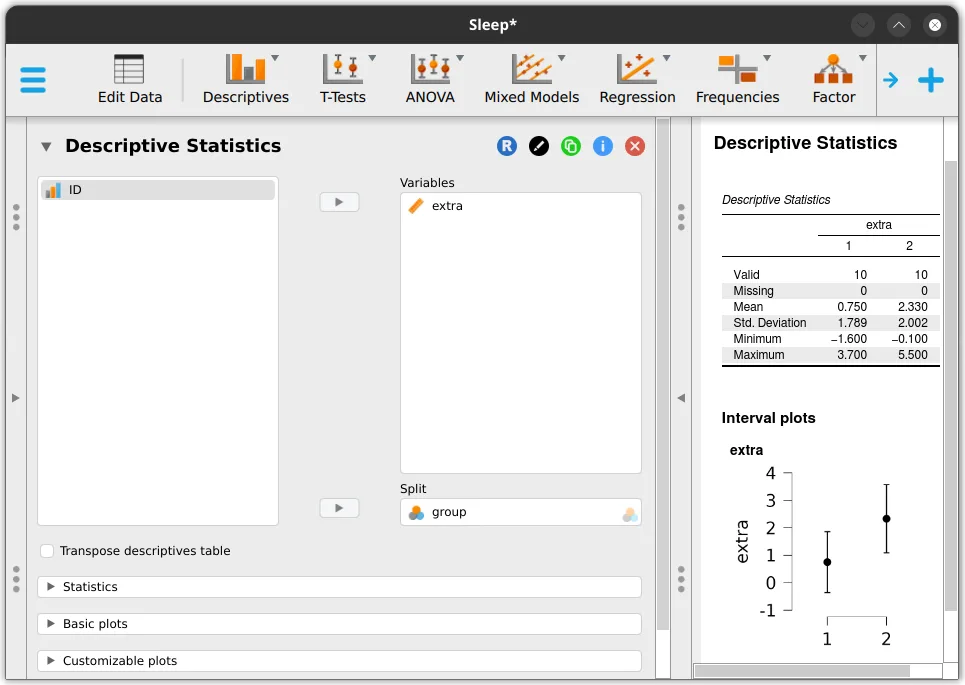
JASP started as a research project at the University of Amsterdam and has grown into a mature statistical package with regular releases. The latest version, 0.98.1, ships as a Flatpak on Linux, making installation straightforward. It is designed to be intuitive for users who prefer a point‑and‑click interface over command‑line syntax.
The tool targets students, researchers, and educators who need to run frequentist or Bayesian analyses without learning R or Python. It supports common data formats like CSV, SPSS, and Excel, and its APA‑style tables can be copied straight into Word or LaTeX.
Compared to Windows staples such as Stata, JASP offers a more visual workflow: you drag and drop variables, see the output update instantly, and can annotate results directly. The learning curve is shallow, but advanced users may find the lack of scripting a limitation.
Best for: Researchers and students who prefer a GUI for both frequentist and Bayesian statistics.
Key features of JASP
- Graphical interface with real‑time output updates
- Built‑in APA‑style tables
- Support for CSV, SPSS, Excel, and other common formats
- Frequentist and Bayesian analysis options
- Export to PDF, HTML, and RTF
- Extensible via add‑ons
- Cross‑platform (Windows, macOS, Linux)
- Open‑source code on GitHub
Pros
- Easy installation via Flatpak
- No licensing cost
- Transparent, open‑source code
- Good documentation and tutorials
- Frequent updates
- Clear visual workflow
Cons
- Limited scripting capabilities
- Some advanced tests missing compared to Stata
- Requires a recent Linux distro for Flatpak
- Learning curve for Bayesian terminology
Windows programs JASP replaces
How to install JASP on Linux
flatpak install flathub org.jaspstats.JASPTips for Windows users
If you come from Stata, expect a shift from command syntax to point‑and‑click. JASP reads Stata .dta files, but you’ll need to export any custom scripts or do‑files as CSV or RTF. The GUI updates results instantly, so you can experiment with model options without re‑running the whole analysis. Use the "Copy to clipboard" feature to paste tables into your word processor, and remember that JASP’s shortcuts differ from Stata’s; check the Help menu for a list of key bindings.
Recent releases
- 0.98.1 —
See 0.98.0 Release notes on our Github Page
- 0.98.0 —
See 0.98.0 Release notes on our Github Page
- 0.97.1 —
See 0.97.1 Release notes on our Github Page
- 0.97.0 —
See 0.97.0 Release notes on our Github Page
JASP: frequently asked questions
Can I use JASP on a 32‑bit Linux system?
JASP is distributed as a 64‑bit Flatpak; 32‑bit systems are not supported.
Does JASP support Bayesian hierarchical models?
Yes, JASP includes several hierarchical Bayesian models, but complex custom models may require R or Stan.
How do I export results to LaTeX?
Use the "Export" button and choose LaTeX; the tables will be ready for inclusion in a .tex file.
Is there a command‑line version of JASP?
No, JASP is purely a GUI application; for scripted analysis you would use R or Python.
Updated