
 KDiff3Linux
vs
Beyond CompareWindows
KDiff3Linux
vs
Beyond CompareWindows
KDiff3 as a Linux alternative to Beyond Compare
Updated
Our verdict
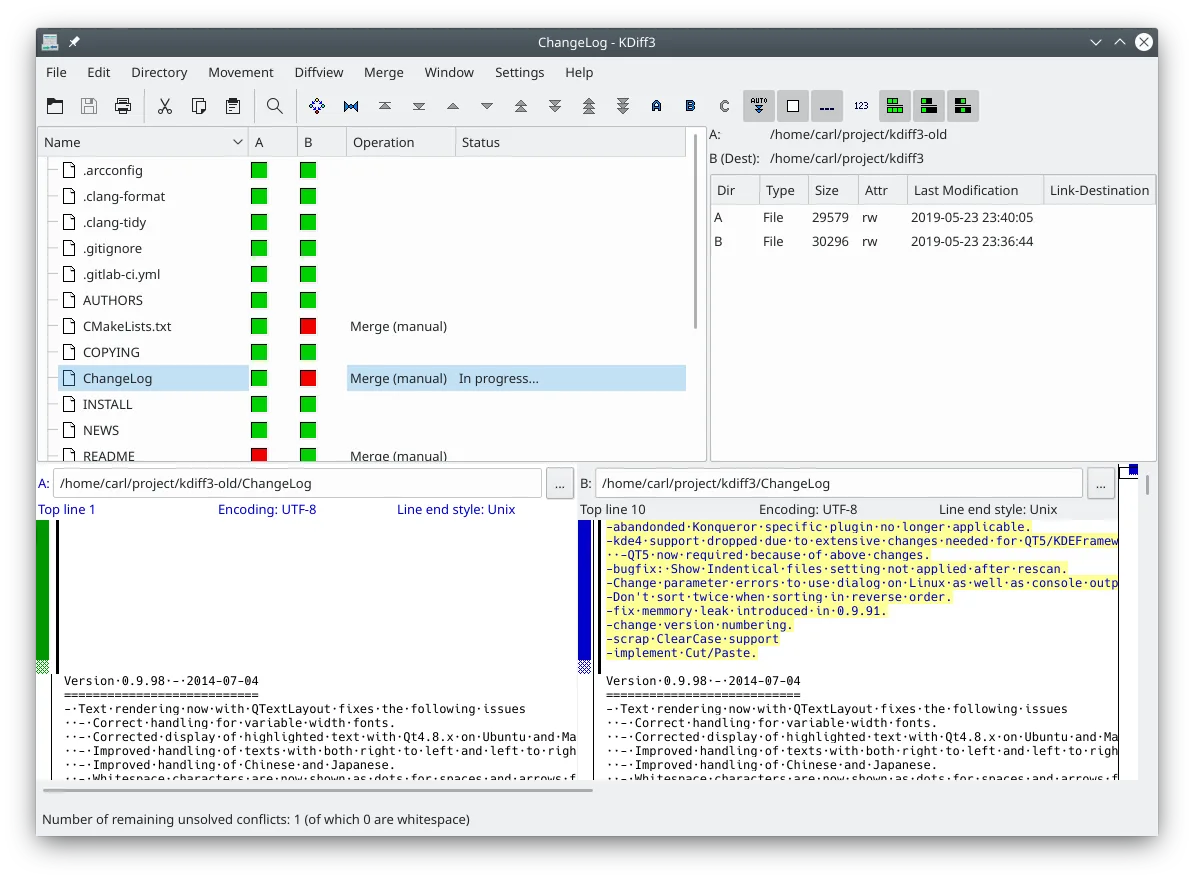
KDiff3 can replace Beyond Compare for basic text and folder comparison, especially for users who need a free, open‑source solution. It handles line‑by‑line diffs, three‑way merges, and Unicode files, making it suitable for developers and power users who work with Git. However, it lacks binary diffing, archive comparison, and the advanced visual highlighting and batch processing that Beyond Compare offers, so it may not satisfy users who rely on those features.
- License
- GPL-2.0-or-later
- Price
- Free
- Latest version
- 1.12.5 (July 20, 2026)
- Rating
- —
What works the same
- Both compare files and directories side‑by‑side
- Support three‑way merges
- Highlight differences line by line
- Integrate with Git for diff views
- Provide an editor for resolving merge conflicts
What is different
- KDiff3 does not compare binary files
- No support for comparing archive contents (zip, tar, etc.)
- No visual syntax highlighting for code
- No batch processing of large datasets
- Missing advanced UI features like side‑by‑side diff with color coding and context menus
Opening your Beyond Compare files
Beyond Compare uses proprietary .bcmp files for project settings and .bcs for session data. KDiff3 does not read these formats; you must recreate comparisons manually. Text and folder comparisons can be performed by opening the same files or directories directly in KDiff3.
Switching from Beyond Compare to KDiff3, step by step
- Export any custom settings from Beyond Compare (if needed).
- Open the target files or folders in KDiff3 by selecting File → Open or dragging them into the window.
- Use the three‑way merge feature if you need conflict resolution.
- Save any frequently used comparison as a script or batch file if KDiff3 supports it.
- Close Beyond Compare and rely on KDiff3 for future diffs.
Key features of KDiff3
- Compares two or three files or folders side-by-side
- Line-by-line and character-by-character difference display
- Automatic merge facility for conflict resolution
- Integrated editor for solving merge conflicts
- Supports Unicode, UTF-8, and various other encodings
- Options to highlight or ignore whitespace and comments
- Network transparency via KIO for remote files
- Version control keyword and history merging support
How to install KDiff3 on Linux
flatpak install flathub org.kde.kdiff3sudo apt install kdiff3sudo apt install kdiff3sudo dnf install kdiff3sudo pacman -S kdiff3sudo zypper install kdiff3Frequently asked questions
Can I use KDiff3 to compare zip archives?
No, KDiff3 cannot open or compare archive contents directly. You need to extract the archives first or use another tool that supports archive comparison.
Does KDiff3 support binary file comparison?
No, KDiff3 only handles text files. Binary comparison is not available.
Will KDiff3 show syntax highlighting for code?
KDiff3 shows line and character differences but does not provide language‑specific syntax highlighting like Beyond Compare. It uses plain text highlighting of changed lines.
2 other alternatives to Beyond Compare
 MeldMeld is a free visual diff and merge tool for comparing files, directories, and version-controlled projects.Open sourceFreeFlatpakMeld vs Beyond Compare
 DiffuseDiffuse is a free, open‑source graphical diff and merge tool for text files, supporting many VCS sources.Open sourceFreeFlatpakDiffuse vs Beyond Compare