

Linux · Programming
Bruno
A fast, offline-first API client that stores collections as plain text files in your filesystem for easy Git version control.
- License
- LicenseRef-proprietary
- Latest version
- v4.3.0 (October 22, 2026)
- Developer
- Bruno
- Installs
- 4,976 (Flathub, 30 days)
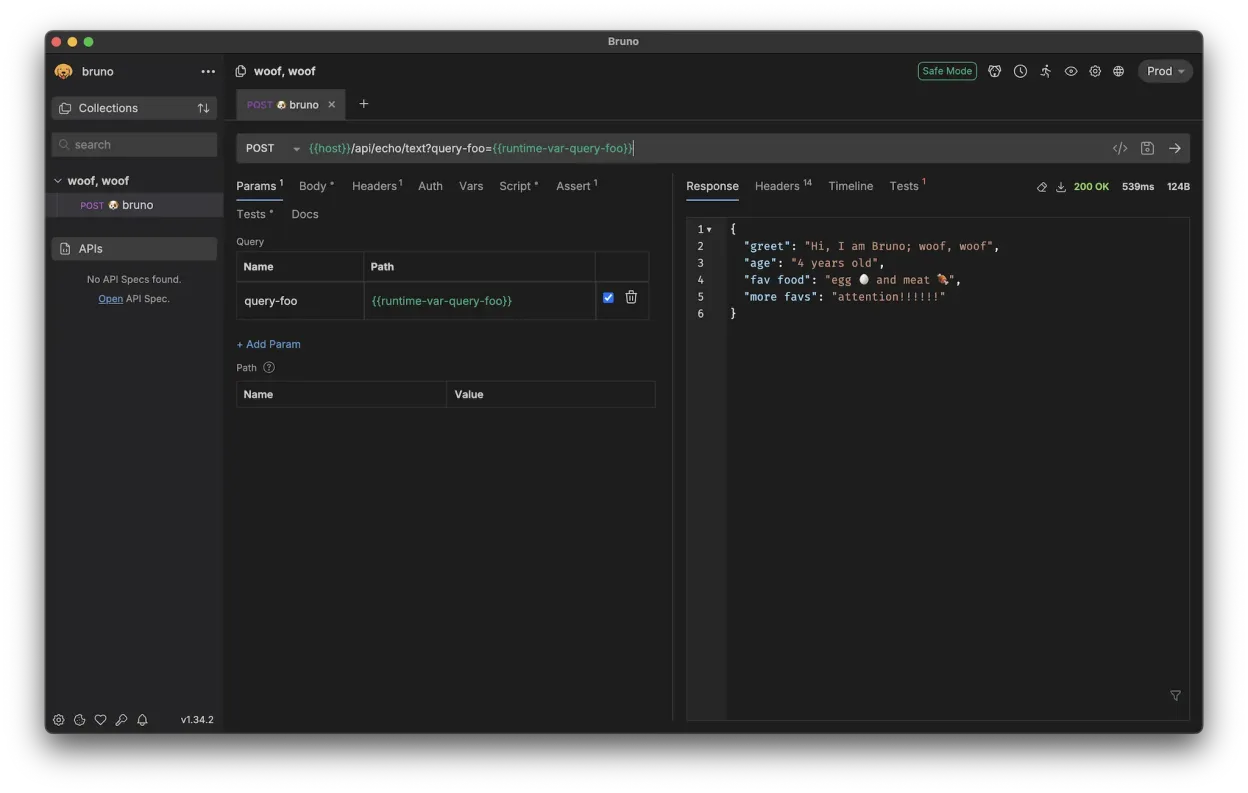
What is Bruno?
Bruno is a desktop application designed for testing and developing APIs. It differentiates itself by storing request collections directly on your local filesystem using a plain text markup language called Bru. This approach allows you to use standard Git workflows for collaboration and version control, avoiding the need for proprietary cloud sync services. The project has grown steadily as an alternative to cloud-heavy competitors, focusing on speed and local data ownership.
It targets backend developers, API testers, and teams who prefer managing their API documentation and requests via code repositories. If your team already uses Git for code, Bruno fits naturally into that workflow. It is suitable for individuals and teams who want to avoid vendor lock-in or subscription fees associated with cloud-based API clients. The interface is clean and focused on rapid request execution.
Compared to Insomnia, Bruno feels lighter and more responsive because it does not rely on a heavy backend database for every interaction. The experience is closer to using a code editor than a traditional GUI client. While Insomnia offers a polished, cloud-synced experience, Bruno prioritizes offline capability and transparency. You get a tool that respects your local environment and integrates seamlessly with your existing Git-based development practices.
Best for: Developers who want to manage API requests via Git and prefer a fast, offline-first tool over cloud-synced alternatives.
Key features of Bruno
- Stores collections as plain text files on the filesystem
- Uses Bru, a custom plain text markup language for requests
- Native Git integration for version control and collaboration
- Fully offline operation with no cloud sync requirements
- Fast startup and low resource usage
- Supports standard HTTP methods and headers
- Environment management for different API stages
- Available via Flathub for easy Linux installation
Pros
- No vendor lock-in; your data stays on your machine
- Git-friendly storage enables easy code review and history
- Fast performance due to local file-based architecture
- Core features are free and open-source under MIT license
Cons
- Requires learning the Bru text format for complex requests
- Lacks some advanced visualization features found in cloud clients
- Collaboration relies on Git, which may be a barrier for non-technical stakeholders
- Smaller community and ecosystem compared to Insomnia
Windows programs Bruno replaces
How to install Bruno on Linux
flatpak install flathub com.usebruno.BrunoTips for Windows users
If you are coming from Insomnia, expect to export your collections and then convert them into Bruno's Bru format. There is no direct one-click importer from Insomnia JSON files, so you may need to manually recreate collections or use community scripts to convert JSON to Bru. Your workflow will shift from a cloud-synced interface to a local folder-based one; ensure your team is comfortable with Git for sharing changes. Shortcuts and UI layout differ, so take time to familiarize yourself with Bruno's command palette and request organization structure.
Recent releases
- v4.3.0 —
- v4.2.1 —
- v4.2.0 —
- v4.1.0 —
Bruno: frequently asked questions
Is Bruno completely free?
The majority of features are free and open-source under the MIT license. Some advanced or team-oriented features may be part of a paid tier, but core API testing is free.
Can I import my Insomnia collections into Bruno?
There is no official direct importer from Insomnia JSON. You will need to manually recreate requests or use community-developed scripts to convert JSON files to Bruno's Bru format.
Does Bruno work offline?
Yes, Bruno is fully offline. It stores all data locally on your filesystem and does not require an internet connection to function or sync.
How do I share collections with my team?
You share collections by committing the Bru files to a Git repository. Teammates can clone the repository to access the same API requests and environments.
Updated