

Linux · Office
Jitsi Meet
Jitsi Meet is an open‑source video‑conferencing app that runs in the browser and as a native Linux client.
- License
- Apache-2.0
- Latest version
- 2026.10.0 (October 21, 2026)
- Developer
- Jitsi Team
- Installs
- 1,515 (Flathub, 30 days)
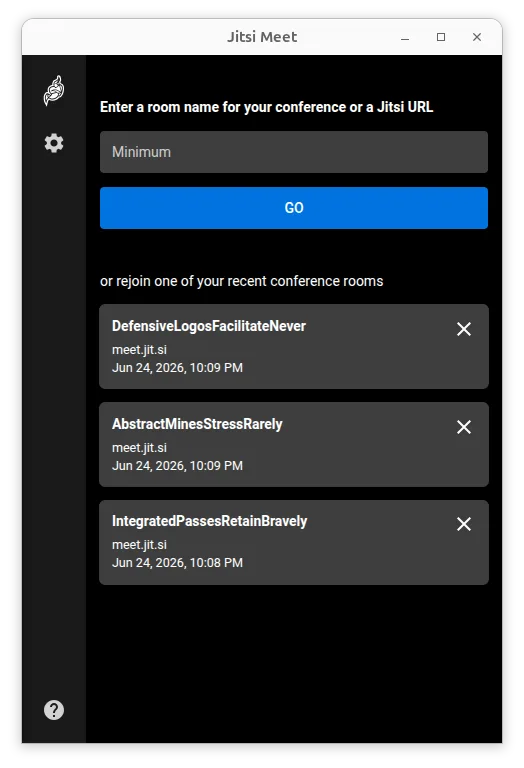
What is Jitsi Meet?
Jitsi Meet grew out of the Jitsi open‑source project and has been maintained for many years, with regular releases and a large community. It supports any Jitsi deployment, works without accounts, and offers optional end‑to‑end encryption. The latest stable release (2026.10.0) shows the project is still actively developed.
The tool is aimed at teams, families, and anyone needing quick video meetings without corporate licensing. It fits well for small‑to‑medium groups that value privacy and want to avoid the Microsoft ecosystem. Because it runs in a web browser and also ships as a native Flatpak, it feels lightweight compared to Microsoft Teams, which requires a heavyweight client and a Microsoft 365 subscription.
Compared with Teams, Jitsi Meet feels more informal: you join by sharing a URL, there is no forced sign‑in, and the interface is minimal. Audio‑video quality is solid, but you miss deep integration with Office apps and the large enterprise admin console that Teams provides.
Best for: Teams that need a quick, privacy‑focused video conference without Microsoft licensing.
Key features of Jitsi Meet
- No account required – join via URL
- Unlimited participants (limited only by server resources)
- Password‑protected rooms
- Default encryption, optional end‑to‑end encryption
- High‑quality Opus audio and VP8/VP9/AV1 video
- Browser‑based access, plus native Flatpak client
- Support for custom Jitsi deployments
- Pretty URLs for easy sharing
Pros
- Fully free and open source
- Works on any modern browser, no client install needed
- Strong privacy stance with encryption
- Scales to large meetings if you host your own server
Cons
- Lacks deep Office 365 integration
- Enterprise admin features are limited compared to Teams
- End‑to‑end encryption is still experimental
Windows programs Jitsi Meet replaces
How to install Jitsi Meet on Linux
flatpak install flathub org.jitsi.jitsi-meetTips for Windows users
Instead of opening Teams and signing into a Microsoft account, launch Jitsi Meet from the Flatpak or go to meet.jit.si in your browser, create a room name, and share the link. There are no .pst files or Teams chat histories to import; you’ll use regular file‑sharing services (e.g., Nextcloud) for documents. Keyboard shortcuts are similar – Ctrl + D toggles mute, Ctrl + E toggles video – but you’ll need to get used to the simpler UI and the lack of built‑in calendar integration.
Recent releases
- 2026.10.0 —
- 2026.8.0 —
- 2026.7.0 —
- 2026.6.0 —
Jitsi Meet: frequently asked questions
Can I use Jitsi Meet with my existing Microsoft Teams calendar?
Not directly; you can copy a Jitsi Meet link into a Teams meeting invite, but there is no automatic sync.
Is end‑to‑end encryption ready for production?
It is marked experimental; most users rely on the default TLS encryption.
Do I need a Jitsi server to use the Linux client?
No, the public meet.jit.si instance works out of the box; you can also point the client at a self‑hosted server if you prefer.
How do I record a meeting on Linux?
Jitsi Meet itself doesn’t record; you can use external tools like OBS or the built‑in recording feature of a self‑hosted Jitsi server.
Updated